
| 授 课 班 级 | 20级人工智能1 、2班 | 授 课 日 期 | |
| 教 学 课 题 | 几何变换 | ||
| 教学目的及要求 | 掌握几何变换中的缩放、翻转、仿射变换、透视、重映射 | ||
| 教 学 重 点 | 缩放、翻转 | ||
| 教 学 难 点 | 仿射变换、透视、重映射 | ||
| 教 学 方 法 | 讲授法、项目化教学法 | ||
| 教 具 | 计算机、Anaconda软件 | ||
| 作 业 | |||
| 教学过程及内容 | 见下 | ||
5.1缩放
在OpenCv中使用函数cv2.resize()实现对图像的缩放,该函数的具体形式为:
dst=cv2.resize(src,dsize [ , fx [ ,fy [ ,interpolation ] ] ] )
●dst代表输出的目标图像,该图像的类型与src相同,其大小为dsize(当该值非0时),或者可以通过src.size()、fx、fy计算得到。
●src代表需要缩放的原始图像。
●dsize代表输出图像大小。
●fx代表水平方向的缩放比例
●fy代表垂直方向的缩放比例
●interpolation代表插值方式。
表5-1插值方式
类型 | 说明 |
cv2.INTER_NEAREST | 最临近插值 |
cv2.INTER_LINEAR | 双线性插值(默认方式) |
cv2.INTER_CUBIC | 三次样条插值。首先对源图像附近的4×4近邻区域进行三次样条拟合,然后将目标像素对应的三次样条值作为目标图像对应像素点的值。 |
cv2.INTER_AREA | 区域插值,根据当前像素点周边区域的像素实现当前像素点的采样。该方法类似最临近插值方式 |
cv2.INTER_LANCZOS4 | 一种使用8×8近临的Lanczos插值方式 |
cv2.INTER_LINEAR_EXACT | 位精确双线性插值 |
cv2.INTER_MAX | 差值编码掩码 |
cv2.WARP_FILL_OUTLIERS | 标志,填补目标图像中的所有像素。如果它们中的一些对应源图像中的奇异点(离群值),则将它们设置为零。 |
cv2.WARP_INVERSE_MAP | 标志,逆变换 例如,极坐标变换: ●如果flag未被设置,则进行转换:dst(Φ,ρ)=src(x,y) ●如果flag被设置,则进行转换:dst(x,y)=src(Φ,ρ) |
情况一:通过参数dsize指定
如果指定参数dsize的值,则无论是否指定参数fx和fy的值,都由参数dsize来决定目标图像的大小
情况二:通过参数fx和fy指定
如果参数dsize的值是None,那么目标图像的大小通过参数fx和fy来决定。
#5.1使用函数cv2.resize()对一个数组进行简单缩放
import cv2
import numpy as np
img=np.ones([2,4,3],dtype=np.uint8)
size=img.shape[:2]
rst=cv2.resize(img,size)
print("img.shape=\n",img.shape)
print("img=\n",img)
print(size)
print("rst.shape=\n",rst.shape)
print("rst=\n",rst)

#在shape属性中,第1个值对应的是行数,第2个值对应的是列数
#在dsize属性中,第1个值对应的是列数,第2个值对应的是行数
运行结果:
img.shape=
(2, 4, 3)
img=
[[[1 1 1]
[1 1 1]
[1 1 1]
[1 1 1]]
[[1 1 1]
[1 1 1]
[1 1 1]
[1 1 1]]]
(2, 4)
rst.shape=
(4, 2, 3)
rst=
[[[1 1 1]
[1 1 1]]
[[1 1 1]
[1 1 1]]
[[1 1 1]
[1 1 1]]
[[1 1 1]
[1 1 1]]]
#5.2 设计程序,使用函数cv2.resize()完成一个简单的图像缩放
import cv2
img=cv2.imread("test.bmp")
rows,cols=img.shape[:2]#取img的行(rows)和列(cols)
size=(int(cols*0.9),int(rows*0.5))#size的行和列与shape的行和列刚好对调
rst=cv2.resize(img,size)
print("img.shape=",img.shape)
print("rst.shape=",rst.shape)#行数缩放到原来的0.5,列数缩放到原来的0.9
运行结果:
img.shape= (512, 51, 3)
rst.shape= (256, 45, 3)
#5.3控制函数cv2.resize()的fx参数、fy参数,完成图像的缩放
import cv2
img=cv2.imread("test.bmp")
rst=cv2.resize(img,None,fx=2,fy=0.5)#fx控制的是水平方向的列  fy控制的是垂直方向的行
print("img.shape=",img.shape)
print("rst.shape=",rst.shape)
运行结果:
img.shape= (512, 51, 3)
rst.shape= (256, 102, 3)
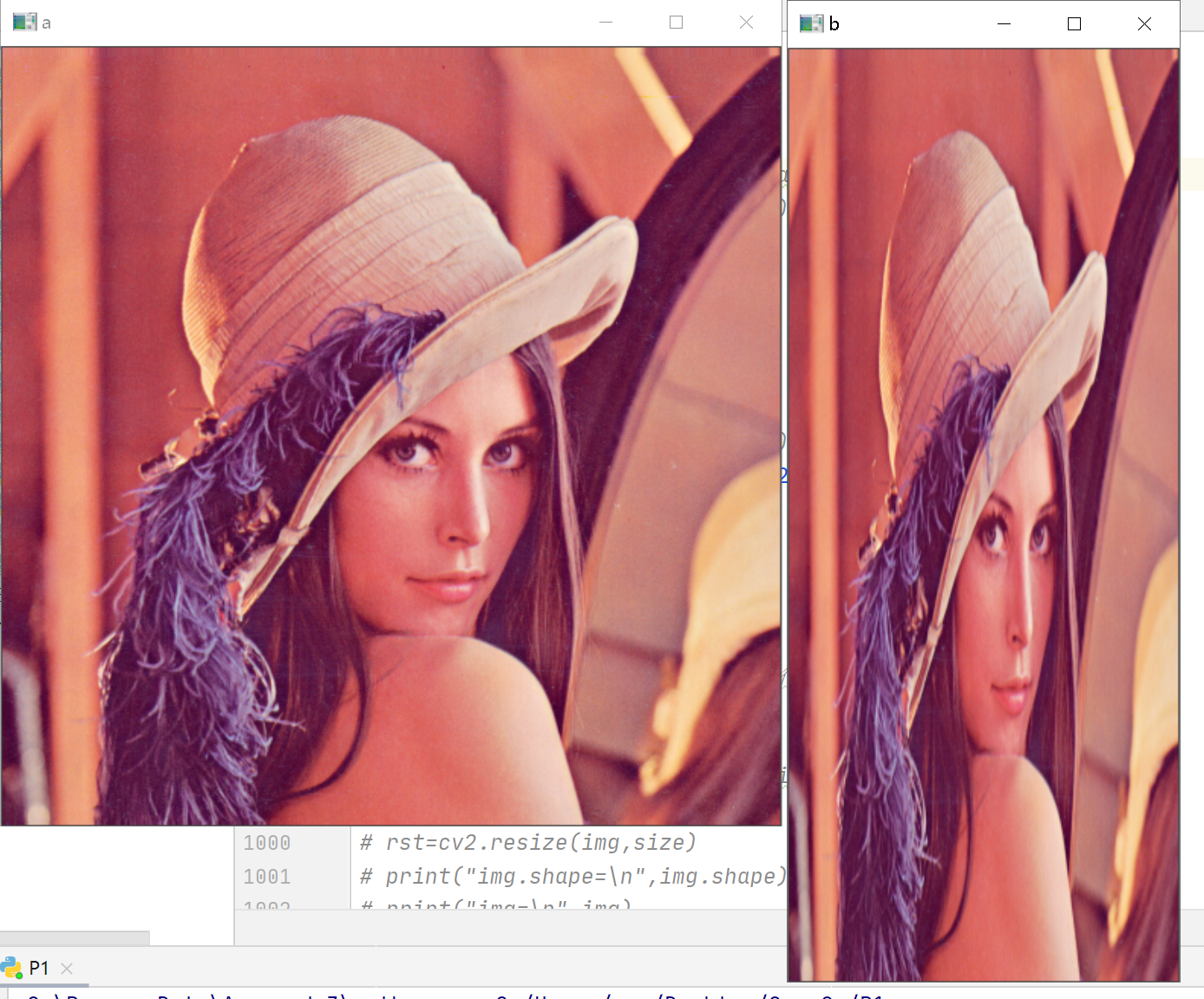
#图像缩放
import cv2
a=cv2.imread("lenacolor.png",-1)
rows,cols,chn=a.shape
# b=cv2.resize(a,(200,100))
# b=cv2.resize(a,(round(cols*0.5),round(rows*1.5)))
b=cv2.resize(a,None,fx=0.5,fy=1.2)
cv2.imshow("a",a)
cv2.imshow("b",b)
cv2.waitKey()
cv2.destroyAllWindows()
运行结果:
5.2 翻转
图像的翻转采用函数cv2.flip()实现,该函数能够实现图像在水平方向的翻转、垂直方向翻转、两个方向同时翻转,其语法结构为:
Dst=cv2.flip(src,flipCode)
●dst代表和原始图像具有同样大小、类型的目标图像
●src代表要处理的原始图像
●flipCode代表旋转类型
flipCode参数的意义
| 参数值 | 说明 | 意义 |
| 0 | 只能是0 | 绕着X轴翻转 |
| 正数 | 1,2,3等任意正数 | 绕着Y轴翻转 |
| 负数 | -1,-2,-3等任意负数 | 绕着X轴、绕着Y轴同时翻转 |
#5.4使用函数cv2.flip函数完成图像的翻转
import cv2
img=cv2.imread("lena.bmp")
x=cv2.flip(img,0)#绕X轴翻转
y=cv2.flip(img,1)#绕Y轴翻转
xy=cv2.flip(img,-1)#绕X轴和Y轴同时翻转
cv2.imshow("img",img)
cv2.imshow("x",x)
cv2.imshow("y",y)
cv2.imshow("xy",xy)
cv2.waitKey()
cv2.destroyAllWindows()
运行结果:
绕X轴旋转
绕Y轴旋转
绕X和Y轴同时旋转
5.3仿射
仿射变换是指图像可以通过一系列的几何变换来实现平移、旋转等多种操作。该变换能够保持图像的平直性和平行性。平直性是指图像经过仿射变换后,直线仍然是直线;平行性是指图像在完成仿射变换后,平行线仍然是平行线。
仿射函数为:cv2.warpAffine(),其通过一个变换矩阵M实现变换
具体为:
Dst(x,y)=src(M11x+M12y+M13,M21x+M22y+M23)
Dst=cv2.warpAffine(src,M,dsize)
●Src:原图
●M:变换矩阵
●Dsize:变换后的尺寸
例如:
将原始图像src向右移动100个像素,向下移动200个像素,则其对应关系为:
Dst(x,y)=src(x+100,y+200)
Dst(x,y)=src(1·x+0·y+100,0·x+1·y+200)
Dst(x,y)=src(M11x+M12y+M13,M21x+M22y+M23)
●M11=1
●M12=0
●M21=0
●M22=1
●M23=200
将上述值代入转换矩阵M:
M=
| 1 | 0 | 100 |
| 0 | 1 | 200 |
#5.5利用自定义转换矩阵完成图像平移
import cv2
import numpy as np
img=cv2.imread("lena.bmp")
height,width=img.shape[:2]
x=100
y=200
M = np.float32([[1, 0, x], [0, 1, y]])
move=cv2.warpAffine(img,M,(width,height))
cv2.imshow("original",img)
cv2.imshow("move",move)
cv2.waitKey()
cv2.destroyAllWindows()
运行结果:

旋转:
在使用函数cv2.warpAffine()对图像进行旋转时,可以通过函数cv2.getRotationMatrix2D()获取转换矩阵,该函数的语法格式为:
Retval = cv2.getRotationMatrix2D(center,angle,scale)
●Center 为旋转的中心点
●angle为旋转角度,正数表示逆时针旋转,负数表示顺时针旋转
●scale为变换尺寸(缩放大小)
例如:
要想以图像中心为圆点,逆时针旋转45°,并将目标图像缩小为原始图像的0.6倍,则使用语句 M= cv2.getRotationMatrix2D((height/2,width/2),45,0.6)
#5.6完成图像旋转
import cv2
img=cv2.imread("lena.bmp")
height,width=img.shape[:2]
M=cv2.getRotationMatrix2D((width/2,height/2),45,0.6)
rotate=cv2.warpAffine(img,M,(width,height))
cv2.imshow("original",img)
cv2.imshow("rotation",rotate)
cv2.waitKey()
cv2.destroyAllWindows()
运行结果:
更为复杂的仿射变换
cv2.getAffineTransform()来生产仿射函数cv2.warpAffine()所使用的转换矩阵M。
语法格式:
Retval=cv2.getAffineTransform(src,dst)
式中:
●src代表输入图像的三个点坐标
●dst代表输出图像的三个点坐标
该函数中,其参数值src和dst是包含三个二维数组(x,y)点的数组,上述参数通过函数cv2.getAffineTransform(src,dst)定义了两个平行四边形。src和dst中的三个点分别对应平行四边形的左上角、右上角、左下角三个点。
#5.7设计程序,完成图像的仿射。
import cv2
import numpy as np
img=cv2.imread('lena.bmp')
rows,cols,ch=img.shape
p1=np.float32([[0,0],[cols-1,0],[0,rows-1]])
p2=np.float32([[0,rows*0.33],[cols*0.85,rows*0.25],[cols*0.15,rows*0.7]])
M=cv2.getAffineTransform(p1,p2)
dst=cv2.warpAffine(img,M,(cols,rows))
cv2.imshow("origianl",img)
cv2.imshow("result",dst)
cv2.waitKey()
cv2.destroyAllWindows()
运行结果:
5.4透视
仿射变换可以将矩形映射为任意平行四边形,透视变换则可以将矩形映射为任意四边形。
透视变换通过函数cv2.warpPerspective()实现,该函数的语法是:
Dst=cv2.warpPerspective(src,M,dsize[,flags[,borderMode[,borderValue]]])
●dst代表透视处理后的输出图像,该图像和原始图像具有相同的类型。dsize决定输出图像的实际大小。
●src代表要透视的图像
●M代表一个3*3的变换矩阵
●dsize代表输出图像的尺寸大小
●可以使用cv2.getPerspectiveTransform()来生产cv2.warpPerspective()所使用的转换矩阵
Retval=cv2.getPerspectiveTransform(src,dst)
Src:代表输入图像的四个顶点的坐标
Dst:代表输出图像的四个顶点的坐标
src参数和dst参数是包含四个点的数组,与放射变换函数cv2.getAffineTransform(src,dst)中的三个点是不同的,实际使用中,我们可以根据需要控制src中的四个点映射到dst中的四个点。
#5.8设计程序,完成图像透视
import cv2
import numpy as np
img=cv2.imread('demo.bmp')
rows,cols=img.shape[:2]
print(rows,cols)
pts1 = np.float32([[150,50],[400,50],[60,450],[310,450]])
pts2 = np.float32([[50,50],[rows-50,50],[50,cols-50],[rows-50,cols-50]])
M=cv2.getPerspectiveTransform(pts1,pts2)
dst=cv2.warpPerspective(img,M,(cols,rows))
cv2.imshow("img",img)
cv2.imshow("dst",dst)
cv2.waitKey()
cv2.destroyAllWindows()
运行结果:
5.5重映射
把一幅图像内的像素点放置到另外一幅图像内的指定位置,这个过程称为重映射
Dts=cv2.remap(src,map1,map2)
●dst代表目标图像,它和src具有相同的大小和类型
●src代表原始图像
●Map1参数有两种可能的值:
●表示(x,y)点的一个映射
●表示CV_16SC2,CV_32FC1,CV_32FC2类型(x,y)点的X值。
●map2参数同样有两种可能的值:
●当map1表示(x,y)时,该值为空
●当map1表示(x,y)点的X值时,该值是CV_16UC1,CV_32FC1类型(x,y)点的y值。
●Interpolation代表插值方式,这里不支持INTER_AREA方法
类型 | 说明 |
cv2.INTER_NEAREST | 最临近插值 |
cv2.INTER_LINEAR | 双线性插值(默认方式) |
cv2.INTER_CUBIC | 三次样条插值。首先对源图像附近的4×4近邻区域进行三次样条拟合,然后将目标像素对应的三次样条值作为目标图像对应像素点的值。 |
cv2.INTER_AREA | 区域插值,根据当前像素点周边区域的像素实现当前像素点的采样。该方法类似最临近插值方式 |
cv2.INTER_LANCZOS4 | 一种使用8×8近临的Lanczos插值方式 |
cv2.INTER_LINEAR_EXACT | 位精确双线性插值 |
cv2.INTER_MAX | 差值编码掩码 |
cv2.WARP_FILL_OUTLIERS | 标志,填补目标图像中的所有像素。如果它们中的一些对应源图像中的奇异点(离群值),则将它们设置为零。 |
cv2.WARP_INVERSE_MAP | 标志,逆变换 例如,极坐标变换: ●如果flag未被设置,则进行转换:dst(Φ,ρ)=src(x,y) ●如果flag被设置,则进行转换:dst(x,y)=src(Φ,ρ) |
#5.9设计程序,使用cv2.remap()完成数组映射,将目标数组内的所有像素点都映射为
#原始图像内第0行第3列上的像素点,以此来了解函数cv2.remap()内参数map1和map2的使用情况
#根据题目要求,可以确定:
#用来指定列的参数map1(mapx)内的值均为3.
#用来指定行的参数map2(mapy)内的值均为0
import cv2
import numpy as np
img=np.random.randint(0,256,size=[4,5],dtype=np.uint8)
rows,cols=img.shape
mapx = np.ones(img.shape,np.float32)*3
mapy = np.ones(img.shape,np.float32)*0
rst=cv2.remap(img,mapx,mapy,cv2.INTER_LINEAR)
print("img=\n",img)
print("mapx=\n",mapx)
print("mapy=\n",mapy)
print("rst=\n",rst)
运行结果:
img=
[[ 33 202 224 138 231]
[186 105 98 165 217]
[136 234 241 130 77]
[ 49 254 79 127 130]]
mapx=
[[3. 3. 3. 3. 3.]
[3. 3. 3. 3. 3.]
[3. 3. 3. 3. 3.]
[3. 3. 3. 3. 3.]]
mapy=
[[0. 0. 0. 0. 0.]
[0. 0. 0. 0. 0.]
[0. 0. 0. 0. 0.]
[0. 0. 0. 0. 0.]]
rst=
[[138 138 138 138 138]
[138 138 138 138 138]
[138 138 138 138 138]
[138 138 138 138 138]]
5.5.2复制
将map1的值设定为对应位置上的X轴坐标值。
将map2的值设定为对应位置上的Y轴坐标值。
#5.10设计程序,使用函数cv2.remap()完成数组复制,了解函数cv2.remap()内参数map1和map2的使用情况
import cv2
import numpy as np
img=np.random.randint(0,256,size=[4,5],dtype=np.uint8)
rows,cols=img.shape
mapx = np.zeros(img.shape,np.float32)
mapy = np.zeros(img.shape,np.float32)
for i in range(rows):
    for j in range(cols):
        mapx.itemset((i,j),j)
        mapy.itemset((i,j),i)
rst=cv2.remap(img,mapx,mapy,cv2.INTER_LINEAR)
print("img=\n",img)
print("mapx=\n",mapx)
print("mapy=\n",mapy)
print("rst=\n",rst)
运行结果:
img=
[[ 37 153 164 120 252]
[133 30 102 118 199]
[ 13 30 44 47 169]
[ 87 36 192 123 74]]
mapx=
[[0. 1. 2. 3. 4.]
[0. 1. 2. 3. 4.]
[0. 1. 2. 3. 4.]
[0. 1. 2. 3. 4.]]
mapy=
[[0. 0. 0. 0. 0.]
[1. 1. 1. 1. 1.]
[2. 2. 2. 2. 2.]
[3. 3. 3. 3. 3.]]
rst=
[[ 37 153 164 120 252]
[133 30 102 118 199]
[ 13 30 44 47 169]
[ 87 36 192 123 74]]
#5.11设计程序,使用函数cv2.remap()完成图像复制
import cv2
import numpy as np
img=cv2.imread("lena.bmp")
rows,cols=img.shape[:2]
mapx = np.zeros(img.shape[:2],np.float32)
mapy = np.zeros(img.shape[:2],np.float32)
for i in range(rows):
    for j in range(cols):
        mapx.itemset((i,j),j)
        mapy.itemset((i,j),i)
rst=cv2.remap(img,mapx,mapy,cv2.INTER_LINEAR)
cv2.imshow("original",img)
cv2.imshow("result",rst)
cv2.waitKey()
cv2.destroyAllWindows()
5.5.3绕X轴翻转
X坐标轴的值保持不变
Y坐标轴的值以X轴为对称轴进行交换
反映在map1和map2上:
Map1的值保持不变
Map2的值调整为“总行数-1-当前行号”
OpenCV中行号的下标是从0开始的,所以在对称关系中存在“当前行号+对称行号=总行数-1”的关系
#5.12设计程序,使用函数cv2.remap()实现数组绕X轴翻转
import cv2
import numpy as np
img=np.random.randint(0,256,size=[4,5],dtype=np.uint8)
rows,cols=img.shape
mapx = np.zeros(img.shape,np.float32)
mapy = np.zeros(img.shape,np.float32)
for i in range(rows):
    for j in range(cols):
        mapx.itemset((i,j),j)
        mapy.itemset((i,j),rows-1-i)
rst=cv2.remap(img,mapx,mapy,cv2.INTER_LINEAR)
print("img=\n",img)
print("mapx=\n",mapx)
print("mapy=\n",mapy)
print("rst=\n",rst)
运行结果:
img=
[[137 27 77 138 69]
[201 100 134 143 174]
[ 64 134 32 34 207]
[213 38 67 135 41]]
mapx=
[[0. 1. 2. 3. 4.]
[0. 1. 2. 3. 4.]
[0. 1. 2. 3. 4.]
[0. 1. 2. 3. 4.]]
mapy=
[[3. 3. 3. 3. 3.]
[2. 2. 2. 2. 2.]
[1. 1. 1. 1. 1.]
[0. 0. 0. 0. 0.]]
rst=
[[213 38 67 135 41]
[ 64 134 32 34 207]
[201 100 134 143 174]
[137 27 77 138 69]]
#5.13 设计程序,使用函数cv2.remap()实现图像绕X轴的翻转
import cv2
import numpy as np
img=cv2.imread("lena.bmp")
rows,cols=img.shape[:2]
mapx = np.zeros(img.shape[:2],np.float32)
mapy = np.zeros(img.shape[:2],np.float32)
for i in range(rows):
    for j in range(cols):
        mapx.itemset((i,j),j)
        mapy.itemset((i,j),rows-1-i)
rst=cv2.remap(img,mapx,mapy,cv2.INTER_LINEAR)
cv2.imshow("original",img)
cv2.imshow("result",rst)
cv2.waitKey()
cv2.destroyAllWindows()
运行结果:
5.5.4绕Y轴翻转
Y坐标轴的值保持不变
X坐标轴的值以Y轴为对称轴进行交换
反映在map1和map2上:
Map2的值保持不变。
Map1的值调整为“总列数-1-当前列号”
#5.14设计程序,使用函数cv2.remap()实现数组绕Y轴翻转
import cv2
import numpy as np
img=np.random.randint(0,256,size=[4,5],dtype=np.uint8)
rows,cols=img.shape
mapx = np.zeros(img.shape,np.float32)
mapy = np.zeros(img.shape,np.float32)
for i in range(rows):
    for j in range(cols):
            mapx.itemset((i,j),cols-1-j)
            mapy.itemset((i,j),i)
rst=cv2.remap(img,mapx,mapy,cv2.INTER_LINEAR)
print("img=\n",img)
print("mapx=\n",mapx)
print("mapy=\n",mapy)
print("rst=\n",rst)
运行结果:
img=
[[ 41 60 207 28 123]
[233 93 128 65 93]
[ 29 243 139 231 157]
[ 31 187 215 207 253]]
mapx=
[[4. 3. 2. 1. 0.]
[4. 3. 2. 1. 0.]
[4. 3. 2. 1. 0.]
[4. 3. 2. 1. 0.]]
mapy=
[[0. 0. 0. 0. 0.]
[1. 1. 1. 1. 1.]
[2. 2. 2. 2. 2.]
[3. 3. 3. 3. 3.]]
rst=
[[123 28 207 60 41]
[ 93 65 128 93 233]
[157 231 139 243 29]
[253 207 215 187 31]]
#5.15设计程序,使用函数cv2.remap()实现图像绕Y轴的翻转。
import cv2
import numpy as np
img=cv2.imread("lena.bmp")
rows,cols=img.shape[:2]
mapx = np.zeros(img.shape[:2],np.float32)
mapy = np.zeros(img.shape[:2],np.float32)
for i in range(rows):
    for j in range(cols):
            mapx.itemset((i,j),cols-1-j)
            mapy.itemset((i,j),i)
rst=cv2.remap(img,mapx,mapy,cv2.INTER_LINEAR)
cv2.imshow("original",img)
cv2.imshow("result",rst)
cv2.waitKey()
cv2.destroyAllWindows()
运行结果:
5.5.5绕X轴、Y轴翻转
x坐标轴的值以y轴为对称轴进行交换
y坐标轴的值以x轴为对称轴进行交换
反映在map1和map2上:
Map1的值调整为“总列数-1-当前列号”
Map2的值调整为“总行数-1-当前行号”
#5.16设计程序,使用函数cv2.remap()实现x轴、y轴翻转
import cv2
import numpy as np
img=np.random.randint(0,256,size=[4,5],dtype=np.uint8)
rows,cols=img.shape
mapx = np.zeros(img.shape,np.float32)
mapy = np.zeros(img.shape,np.float32)
for i in range(rows):
    for j in range(cols):
            mapx.itemset((i,j),cols-1-j)
            mapy.itemset((i,j),rows-1-i)
rst=cv2.remap(img,mapx,mapy,cv2.INTER_LINEAR)
print("img=\n",img)
print("mapx=\n",mapx)
print("mapy=\n",mapy)
print("rst=\n",rst)
运行结果:
img=
[[150 165 13 124 120]
[ 82 219 63 238 175]
[187 133 144 202 107]
[ 31 220 120 141 26]]
mapx=
[[4. 3. 2. 1. 0.]
[4. 3. 2. 1. 0.]
[4. 3. 2. 1. 0.]
[4. 3. 2. 1. 0.]]
mapy=
[[3. 3. 3. 3. 3.]
[2. 2. 2. 2. 2.]
[1. 1. 1. 1. 1.]
[0. 0. 0. 0. 0.]]
rst=
[[ 26 141 120 220 31]
[107 202 144 133 187]
[175 238 63 219 82]
[120 124 13 165 150]]
#5.17设计程序,使用函数cv2.remap()实现图像绕x轴、y轴翻转
import cv2
import numpy as np
img=cv2.imread("lena.bmp")
rows,cols=img.shape[:2]
mapx = np.zeros(img.shape[:2],np.float32)
mapy = np.zeros(img.shape[:2],np.float32)
for i in range(rows):
    for j in range(cols):
            mapx.itemset((i,j),cols-1-j)
            mapy.itemset((i,j),rows-1-i)
rst=cv2.remap(img,mapx,mapy,cv2.INTER_LINEAR)
cv2.imshow("original",img)
cv2.imshow("result",rst)
cv2.waitKey()
cv2.destroyAllWindows()
运行结果:
5.5.6 x轴、y轴互换
对于任意一点,都需要将其x轴、y轴坐标互换。
反映在mapx和mapy上:
mapx的值调整为所在行的行号
Mapy的值调整为所在列的列号
#5.18设计程序,使用函数cv2.remap()实现数组的x轴、y轴的互换
import cv2
import numpy as np
img=np.random.randint(0,256,size=[4,6],dtype=np.uint8)
rows,cols=img.shape
mapx = np.zeros(img.shape,np.float32)
mapy = np.zeros(img.shape,np.float32)
for i in range(rows):
    for j in range(cols):
            mapx.itemset((i,j),i)
            mapy.itemset((i,j),j)
rst=cv2.remap(img,mapx,mapy,cv2.INTER_LINEAR)
print("img=\n",img)
print("mapx=\n",mapx)
print("mapy=\n",mapy)
print("rst=\n",rst)
运行结果:
img=
[[ 74 250 6 75 45 59]
[ 95 22 166 76 13 159]
[111 170 108 236 174 171]
[106 38 102 143 223 49]]
mapx=
[[0. 0. 0. 0. 0. 0.]
[1. 1. 1. 1. 1. 1.]
[2. 2. 2. 2. 2. 2.]
[3. 3. 3. 3. 3. 3.]]
mapy=
[[0. 1. 2. 3. 4. 5.]
[0. 1. 2. 3. 4. 5.]
[0. 1. 2. 3. 4. 5.]
[0. 1. 2. 3. 4. 5.]]
rst=
[[ 74 95 111 106 0 0]
[250 22 170 38 0 0]
[ 6 166 108 102 0 0]
[ 75 76 236 143 0 0]]
#5.19设计程序,使用函数cv2.remap()实现图像的x轴、y轴互换
import cv2
import numpy as np
img=cv2.imread("lena.bmp")
rows,cols=img.shape[:2]
mapx = np.zeros(img.shape[:2],np.float32)
mapy = np.zeros(img.shape[:2],np.float32)
for i in range(rows):
    for j in range(cols):
            mapx.itemset((i,j),cols-1-j)
            mapy.itemset((i,j),rows-1-i)
rst=cv2.remap(img,mapx,mapy,cv2.INTER_LINEAR)
cv2.imshow("original",img)
cv2.imshow("result",rst)
cv2.waitKey()
cv2.destroyAllWindows()
运行结果:
5.5.7 图像缩放
在目标图像的X轴(0.25·x轴长度,0.75·x轴长度)区间内生产缩小图像;x轴其余区域的点取样自x轴上任意一点的值。
在目标图像的y轴(0.25·y轴长度,0.75·y轴长度)区间内生产缩小图像;y轴其余区域的点取样自y轴上任意一点的值。
#5.20图像缩放
import cv2
import numpy as np
img=cv2.imread("lena.bmp")
rows,cols=img.shape[:2]
mapx = np.zeros(img.shape[:2],np.float32)
mapy = np.zeros(img.shape[:2],np.float32)
for i in range(rows):
    for j in range(cols):
        if 0.25*cols< i <0.75*cols and 0.25*rows< j <0.75*rows:
                mapx.itemset((i,j),2*( j - cols*0.25 ) + 0.5)
                mapy.itemset((i,j),2*( i - rows*0.25 ) + 0.5)
        else:
                mapx.itemset((i,j),0)
                mapy.itemset((i,j),0)
rst=cv2.remap(img,mapx,mapy,cv2.INTER_LINEAR)
cv2.imshow("original",img)
cv2.imshow("result",rst)
cv2.waitKey()
cv2.destroyAllWindows()

