
-
1 如何查看快键键?
-
2 快捷键列表
-
3 快捷键大全
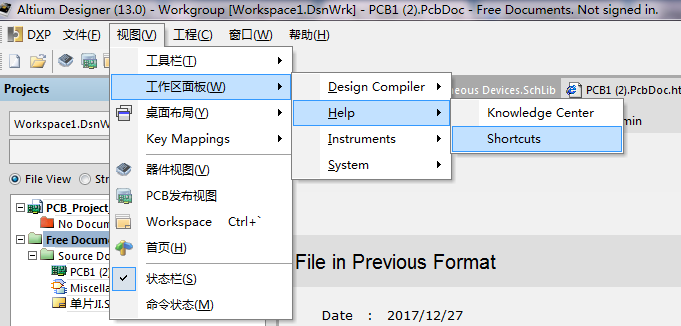
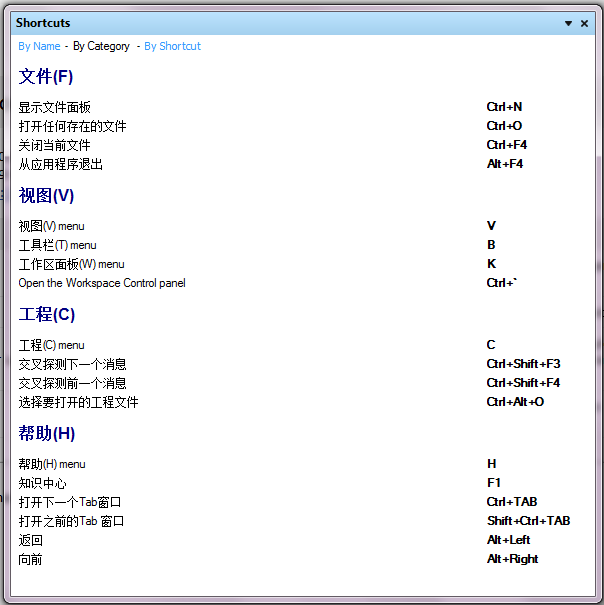
AD版本很多,不同版本的快捷键也不尽相同,可以快速查看各个版本的快捷键列表,SCH图编辑器和PCB图编辑器的快捷键查看方法:
view(视图)-----workspacepanels(工作区面板)-----help-----shortcuts。
Altium_Designer快捷键列表
1. 原理图编辑器与PCB通用的快捷键
| 快捷键 | 相关操作 |
| Shift | 当自动平移时,加速平移 |
| Y | 放置元件时,上下翻转 |
| X | 放置元件时,左右翻转 |
| Shift+↑(↓、←、→) | 在箭头方向以10个栅格为增量移动光标 |
| ↑、↓、←、→ | 在箭头方向以1个栅格为增量移动光标 |
| Esc | 退出当前命令 |
| End | 刷新屏幕 |
| Home | 以光标为中心刷新屏幕 |
| PageDown或Ctrl+鼠标滑轮 | 以光标为中心缩小画面 |
| PageUp或Ctrl+鼠标滑轮 | 以光标为中心放大画面 |
| 鼠标滑轮 | 上下移动画面 |
| Shift+鼠标滑轮 | 左右移动画面 |
| Ctrl+Z | 撤销上一次操作 |
| Ctrl+Y | 重复上一次操作 |
| Ctrl+A | 选择全部 |
| Ctrl+S | 存储当前文件 |
| Ctrl+C | 复制 |
| Ctrl+X | 剪切 |
| Ctrl+V | 粘贴 |
| Ctrl+R | 复制并重复粘贴选中的对象 |
| Delete | 删除 |
| V+D | 显示整个文档 |
| V+F | 显示所有选中 |
| Tab | 编辑正在放置的元件属性 |
| Shift+C | 取消过滤 |
| Shift+F | 查找相似对象 |
| Y | Filter选单 |
| F11 | 打开或关闭Inspector面板 |
| F12 | 打开或关闭Sch Filter面板 |
| H | 打开Help菜单 |
| F1 | 打开Knowledge center菜单 |
| W | 打开Window菜单 |
| R | 打开Report菜单 |
| T | 打开Tools菜单 |
| P | 打开Place菜单 |
| D | 打开Design菜单 |
| C | 打开Project菜单 |
| Shift+F4 | 将所有打开的窗口平均平铺在工作区内 |
| Ctrl+Alt+O | 选择需要打开的文件 |
| Alt+F5 | 全屏显示工作区 |
| Ctrl+Home | 跳转到绝对坐标原点 |
| Ctrl+End | 跳转到当前坐标原点 |
2. 原理图编辑器快捷键
| 快捷键 | 相关操作 |
| Alt | 在水平和垂直线上限制 |
| Spacebar | 将正在移动的物体旋转90。 |
| Shift+Spacebar | 在放置导线、总线和多边形填充时,设置放置模式 |
| Backspace | 在放置导线、总线和多边形填充时,移除最后一个顶点 |
| 鼠标左键单击对象的顶点不放,按“Delete”键不放 | 删除选中线的顶点 |
| 鼠标左键单击对象上任意点不放,按“Insert”键不放 | 在选中线处添加顶点 |
3. PCB编辑器快捷键
| 快捷键 | 相关操作 |
| Shift+R | 切换3种布线模式 |
| Shift+E | 打开或关闭捕获电气栅格功能 |
| Ctrl+G | 弹出捕获栅格对话框 |
| G | 弹出捕获栅格选单 |
| Backspace | 在放置导线时,删除最后一个拐角 |
| Shift+Spacebar | 旋转导线时设置拐角模式 |
| Shift+S | 打开或关闭单层模式 |
| O+D | 显示或隐藏Preference对话框 |
| L | 浏览Board Layers对话框 |
| Ctrl+H | 选择连接层 |
| Ctrl+Shift+Left_Click | 切断线 |
| + | 切换工作层面为下一层 |
| — | 切换工作层面为上一层 |
| Ctrl | 暂时不显示电气栅格 |
| Ctrl+M | 测量距离 |
| Shift+Spacebar | 旋转移动的物体(顺时针) |
| Spacebar | 旋转移动的物体(逆时针) |
| Q | 单位切换 |
| I | 打开Component placement菜单 |
| U | 打开Un-Route菜单 |
| L | 打开Board layer&Colors菜单 |
| F2 | 打开Insight菜单 |
| Ctrl+PgUp | 将工作区放大400% |
| Ctrl+PgDn | 将工作区缩小400% |
| Shift+PgUp | 以很小的增量放大整张图纸 |
| Shift+PgDn | 以很小的增量缩小整张图纸 |
概述
本文是在官方原有的快捷键说明,进行翻译和重新编译,同时适合AD6.3/AD6.0/DXP2004/DXP的版本适用,部分高版本快捷键在底版本不会有,而低版本的快捷键在高版本中全部有。
本文原文件是使用AD6.3的帮助文件进行翻译的,原文件位置:X:\Program Files\Altium Designer 6\Help\下的GU0104ShortcutKeys.pdf,
本文只翻译了原理图、PCB和CAM三个模块的快捷键说明,其它的模块并未作翻译,同时加入一些常用快捷键(官方原文没有的)。
环境快捷键
F1 访问文档库 (in context withobject under cursor)
Ctrl + O 访问选择的文档打开对话框
Ctrl + F4 关闭活动的文档
Ctrl + S 保存当前的文档
Ctrl + P 打印当前的文档
Alt + F4 关闭Altium Designer
Ctrl + Tab 切换打开的文档(右手习惯)
Shift + Ctrl + Tab 切换打开的文档 (左手习惯) 从Windows资源管理器打开文档作为自由文档拖放进 Altium Designer
F4 隐藏/显示所有浮动面板
Shift + F4 平铺打开文档
Shift + F5 在活动的面板和工作台之间巡回
Shift + F1 搜索访问本地语言(智能选择)
Hold Ctrl while moving a panelPrevent automatic docking, 分组或捕捉
工程快捷键
C, C 编辑当前设计工程
C, R 重新编译当前设计工程
C, D 编辑文档
C, O 工程对话为当前的工程打开选项
Ctrl + Alt + O 访问当前工程打开工程的文件对话框
C, L 关闭属于活动工程的全部文档
C, T, M 访问存储管理面板
C, T, L 为当前工程访问本地历史
C, V 访问当前存档相当
面板快捷键
共同面板快捷键1
Home 跳转到第一个登陆面板 End 跳转到后一个登陆面板上箭头移动动上一个登陆的面板下箭头移动到一下个登陆面板 左箭头折叠扩展到 高层的条目或子文件夹右箭头扩展折叠 高层的条目或子文件夹单击左键在光标下面选择条目 单击右键显示上下文区分的弹出式菜单
Left-Click on a column header Sortdata by that column
Left-Click & Drag columnheader Move data column
Left-Click and type Directfiltering based on typed character(s)
Esc Clear current filtering whenusing the direct filter feature
Backspace Clear previously entered filter characters when using thedirect filter feature
工程面板快捷键
双击左键编辑光标下的文档
Drag & Drop from one projectto another Move selected document
Ctrl + Drag & Drop from oneLink selected document into second project project to another
CAMtastic面板快捷键
选择层, Left Arrow Turn all layers OFF except selectedone
Select layer, Right Arrow Turn alllayers ON
在层上的双击左键使那层成为当前层 选择两层, C 访问比较层对话框选择层,删除层
1
Not all panels will support all of theseshortcuts. For detailed information with respect to each individual panel,press F1 with the cursor over the(focused) panel.
2These shortcuts are based on the Default keymapping. The key mapping used can be changed on the Text Editors – General page of the Preferences dialog (Tools »Editor Preferences).
3唯一的 F9 快捷键应用到TCL 脚本编辑
目录面板快捷键
↑ ↓ ← → 在箭头键的方向的下一单元的移动焦点
Left-Click & Drag 在鼠标移动的方向的重复选择
Ctrl + Click 重复选择 (不连续的)
Shift + Click 重复选择 (连续)
Spacebar (原理图) 编辑选择单元
Spacebar (PCB)为单元当前的条目当前正在被编辑
F2 编辑选择的单元
Enter (原理图)完成编辑当前单元
Enter (PCB)完成编辑当前单元并且为单元进入编辑模式下
Ctrl + C (或Ctrl +Insert) 复制
Ctrl + V (或Shift +Insert) 粘贴
PgUp 跳到选择到顶部可见列表区域 PgDn 跳到选择到底部可见列表区域鼠标滚轮向上或向下
编辑快捷键
共同的原理图和PCB编辑快捷键
以高速移动自动加载到焊盘
Y 翻转Y轴放置对象
X 翻转X轴放置对象
Shift+ ↑ ↓ ← → 移动光标以10格在箭头键的方向递增
↑ ↓ ← → 移动光标以1格在箭头键的方向递增
Esc 从当前步骤退出
End 刷新屏幕
Home 刷新屏幕到中心指针点
Ctrl + Home 跳转到绝对原点位置 (工作面的较低的左方角落)
Ctrl +鼠标滚轮向下(或 PgDn)为缩小
Ctrl +鼠标滚轮向上(或 PgUp)放大周围的指针(缩放周围指针,position the cursor first) 鼠标滚轮向上/向下
Shift +鼠标滚轮 向左/向右移动
A 显示排列子菜单
B 显示工具栏子菜单
C 显示工程下拉子菜单
D 显示设计下拉子菜单
E 显示编辑下拉子菜单
F 显示文件下拉子菜单
T 显示工具下拉子菜单
H 显示帮助下拉子菜单
P 显示放置下拉子菜单
R 显示报告下拉子菜单
J 显示跳转子菜单
K 显示工作面板子菜单
M 显示移动子菜单
O 弹出右键菜单
S 显示选择子菜单
V 显示查看下拉子菜单
X 显示取消选择子菜单
Z 弹出菜单缩放的命令
Ctrl + Z 撤消
Ctrl + Y 重做
Ctrl + A 选择所有
Ctrl + C (或 Ctrl +Insert) 复制
Ctrl + X (或 Shift+ Delete) 剪切
Ctrl + V (or Shift + Insert) 粘贴
Ctrl + R 复制或重新粘贴对象 (橡皮图章)
Ctrl + Q 访问当前选择存储对话
Alt 强制对象移动为水平或垂直
Delete 删除选择
V, D 查看文档
V, F 查看适合放置的对象
X, A 取消全部的选择
单击右键 &锁定显示滑臂&平滑查看
单击左键 选择/取消选择光标下的对象单击右键 从当前操作弹出浮动菜单或退出 单击右键上对象,选择在光标下查找相似的加载对象进查找相似对象的对话单击左键,锁定拖放选择区域内 单击左键&锁定移动对象/选择光标下
双击左键编辑对象
Shift +单击左键 增加/从选择设定移除对象
Tab 编辑放置的属性
Shift + C 清除当前过滤
Shift + F 单击在对象上显示查找相似对象的对话
Y 弹出快速查询菜单
F11 触发检查面板开/关
F12 触发过滤面板开/关
Shift + F12 触发列表面板开/关
Alt + F5 触发全屏模式
匹配对象上的目标文件单击左键十字探针,延缓主源文档
Ctrl +单击左键 十字探针和跳转到匹配对象上的目标,跳转到目标文档
Shift + Ctrl + T 排列选择对象顶部的edges
Shift + Ctrl + L 排列选择对象左边的edges
Shift + Ctrl + R 排列选择对象右边的edges
Shift + Ctrl + B 排列选择对象顶部的edges
Shift + Ctrl + H 分类选择的对象为相平行的水平面板
Shift + Ctrl + V 分类选择的对象为相平行的垂直面板
Shift + Ctrl + D 排列选择的对象到格点
Ctrl + n (n=1 to 8)存储当前选择的存储器位置 n
Alt + n (n=1 to 8)从存储器 n 召回选择
Shift + n (n=1 to 8)增加当前选择到选择已经存储在存储器位置 n
Shift + Alt + n(n=1 to 8)从存储器位置 n 和增加到当前选择的工作台召回选择 Shift + Ctrl + n (n=1 to 8)应用过滤基于选择设定的存储器位置 n.
原理图唯一的快捷键
G 切换捕捉格点设定
F2 编辑在放置的 Ctrl + PgDn 适合所有对象的查看
空格 移动对象时以90度逆时针方向旋转空格 当放置导线/总线/直线时拐角起始/停止模式
 , Spacebar Toggle pen color while usinghighlighting pens
Shift +空格 移动对象时以90度顺时针方向旋转
Shift +空格 放置导线/总线/直线时切换角度放置模式
Ctrl +空格 拖动对象时以90度逆时针方向旋转
Shift + Ctrl +空格 拖动对象时以90度顺时针方向旋转
, Ctrl + 单击左键 在端口或图纸入口高亮连接/网络上对象使用高亮绘笔
Shift + Ctrl + C 清除所有高亮应用到高亮的绘笔
Backspace 放置导线/总线/直线/多边形时移除 后 一个顶点单击左键, Hold + Delete 当一根导线被选择删除顶点单击左键, Hold + Insert 当一根导线被选择删除顶点
Ctrl +单击左键& 拖拉对象
对象上原理图文档单击左键导航面板十字探针
Alt +单击左键 在原理图文档和PCB导航面板十字探针到对象
Alt +在网络对象上单击左键图纸上网络关联的图元全部高亮
Ctrl +在图纸符号双击左键下降层次
Ctrl +在端口双击左键上升层次
+ (数字键盘)在放置或移动期间扩大IEEE符号尺寸
- (数字键盘)在放置或移动期间减小IEEE符号尺寸
Ctrl + F 查找下一个
Ctrl + H 查找和替换文本
F3 查找下一个要搜索的文本在光标下当放置相同类型对象时插入对象的复制属性
S 当移动时交换图纸入口边一个或更多选择的图纸入口
V 当移动两个或更多图纸入口时反选图纸入口顺序
T 当移动一个或更多选择的图纸入口时触发图纸入口I/O类型
T 当恢复图纸符号大小时触发所有图纸入口I/O类型
T, P 访问 Schematic – General 页面的参数选择对话框
PCB唯一快捷键
Shift + R 切换三种布线模式(忽略, 避开或推挤)
Shift + E 触发电气格点开/关
Shift + B 建立查询
Shift + PgUp 放大到 小的递增
Shift + PgDn 缩小到 小的递增
Ctrl + PgUp 放大到400%
Ctrl + PgDn 适合文档内的查看
Ctrl + End 工作台跳转到绝对的原点
Alt + End 刷新当前的层
Alt + Insert 粘贴在当前层
Ctrl + G 弹出捕捉格点对话框
G 弹出捕捉格点菜单
N 移动一个元件时隐藏元件中心点(编辑模式)
N 隐藏或显示网络子菜单(非编辑模式)
L 移动元件时翻转到板的另一边(就是镜像元件啦~)
Ctrl +单击左键 在光标下高亮布线的网络 (清除重复的自由空白)
Ctrl +空格 在交互布线时切换连接线模式
Backspace 在交互布线时移除 后的导线铜箔
Shift + S 触发信号层模式开/关
O, D, D, 进入在草图的模式将所有原始到显示
O, D, F, 进入在 终模式将所有的原始到显示
O, D (或 Ctrl +D) 访问 PCB – Show/Hide页面参数选择对话框
L 查看板层和颜色对话框(非编辑模式下)
U 取消布线下拉子菜单
Ctrl + H 选择连接的铜
Ctrl + Shift +单击左键&锁定暂停导线
Shift + Ctrl +单击左键 在光标高亮在布线的网络
+ (数字键盘)下一层
- (数字键盘)上一层
* (数字键盘)下一个布线层
M 显示移动子菜单
Alt 从避开障碍到忽略障碍锁定到临时的转换
Ctrl 当布线锁定到临时禁止电气格点
Ctrl + M 测量距离
空格 (在交互布线过程) 逆时针旋转对象 (定义旋转角度在 PCB – General页面参数选择对话框) 空格 (在交互布线期间)触发起始/停止模式
Shift +空格 (在交互布线过程)移动时逆时针旋转对象
Shift +空格(在交互布线期间)在交互布线期间改变拐角模式
[ 为永久过滤减小掩摸等级
] 为永久过滤增加掩摸等级
Ctrl +左箭头 在活动元件库文档查看上一个元件
Ctrl +右箭头 在活动元件库文档查看下一个元件
Q 快速切换单位 (公制/英制).
T, B 访问元件体管理对话框
T, P 访问PCB – General页面参数选择对话框
设备查看快捷键
F5 刷新全部
Esc 停止程序流程
Ctrl + F9 编译二进制文件
Ctrl + F10 重建二进制文件
F12 复位硬件
F9 编译二进制文件和下载
F10 重建二进制文件和下载
F11 下载二进制文件
Shift + Ctrl + F9 编译所有二进制文件
Shift + Ctrl + F10 重建所有二进制文件
Shift + F12 复位所有设备
Shift + F9 编译所有二进制文件和下载
Shift + F10 重建所有二进制文件和下载
Shift + F11 下载所有二进制文件
Alt + T, P 访问FPGA – Devices View页面参数选择对话框
PCB3D编辑快捷键
PgUp 放大
PgDn 缩小
Alt + B 适合整板
↑ ↓ ← → Pan in direction of thearrow key
Insert Pan In
Delete Pan Out
T, E 访问 IGES 导出选项对话框
T, P 访问 PCB – PCB 3D页面参数选择对话框
PCB3D库编辑快捷键
PgUp 放大
PgDn 缩小
Alt + M 适合模型
↑ ↓ ← → Pan in direction of thearrow key
Insert Pan In
Delete Pan Out
F2 重命名
Shift + Delete 删除模型
Ctrl + T 设定旋转和转换
T, I 导入3D模型
T, E 导出模型为IGES格式
T, P 访问PCB – PCB 3D页面参数选择对话框
输出工作编辑快捷键
Ctrl + X (或Shift +Delete) 剪切
Ctrl + C (或Ctrl +Insert) 复制
Ctrl + V (或Shift +Insert) 粘贴
Ctrl + D 副本
Delete 清除
Alt + Enter 配置
Ctrl + F9 运行聚焦输出生成
Shift + Ctrl + F9 运行选择输出生成
F9 运行所有批处理输出生成器
Shift + Ctrl + O 访问输出作业选项对话框
CAMtastic编辑快捷键
Ctrl + Z (或Alt +Backspace) 撤销
Ctrl + Y (或Ctrl +Backspace) 重做
Ctrl + X 剪切
Ctrl + C (或 Ctrl +Insert) 复制
Ctrl + V (或 Shift+ Insert) 粘贴
Ctrl + E 清除
Ctrl + M 镜像
Ctrl + R 旋转
Ctrl + L 排列选择
L 合并层
Alt + C 选择交叉窗口
Alt + P 选择上一次选择
Ctrl + F 触发快速选择模式开/关
Ctrl + T 触发导线选择模式开/关
Ctrl + A 排列对象
Ctrl + D 修改/更改对象
Ctrl + I 设定原点
Ctrl + U 测量对象
Home 查看全部
Shift + P 查看周围特殊点
Ctrl + 鼠标上滚(或PgUp) 放大
Ctrl + 鼠标下滚(或PgDn) 缩小
鼠标滚轮向上滚 鼠标滚轮向下滚
Shift + 鼠标上滚 摇镜头到左
Shift + 鼠标下滚 摇镜头到右
Shift + V 后缩放
End 刷新
D 动态摇镜头模式
Shift + B 查看菲林盒
Ctrl + Home 缩放菲林盒
Alt + Home 缩放当前D码
Shift + E 触发扩展盒开/关
Shift + F 触发菲林模式开/关
Shift + H 触发高亮当前对象使用当前D码
N 触发底片查看
Shift + T 触发半透明查看
Shift + G 访问CAMtastic – Drawing Modes页面参数选对话框
Q 查询对象
Shift + N 查询网络
Shift + M 测量点到到
Shift + A 访问光圈表
K 访问设定层关闭对话框
Alt + K 访问设定层打开对话框
Shift + S 触发对象捕捉模式
Esc 取消操作
Shift + Ctrl + R 重复 后操作
+ (数字键盘)显示下一层
- (数字键盘)显示上一层
* (数字键盘)显示下一信号/平面层
数码波形编辑快捷键
PgUp Zoom-in around active timecursor
PgDn Zoom-out around active timecursor
Ctrl + PgDn Fit document
Ctrl + A Select all waveforms
Ctrl + C (or Ctrl + Insert) Copywaveform
Ctrl + X (or Shift + Delete) Cutwaveform
Ctrl + V (or Shift + Insert) Pastewaveform
Left-Click & Drag Relocatefocused waveform
J Display Jump sub-menu
Shift + Ctrl + F Jump to firsttransition for focused waveform
Shift + Ctrl + N Jump to nexttransition for focused waveform
Shift + Ctrl + P Jump to previoustransition for focused waveform
Shift + Ctrl + L Jump to lasttransition for focused waveform
T, P Access Wave – General page of Preferencesdialog
仿真数据编辑快捷键
Ctrl + X (or Shift + Delete)Cut
Ctrl + C Copy
Ctrl + V (or Shift + Insert)Paste
Delete Clear
+ (numeric keypad) Next chart
- (numeric keypad) Previouschart
PgUp Zoom-in
PgDn Zoom-out
Ctrl + PgDn Fit Document
End Refresh
Esc (or Shift + C) Clearfilter
Up Arrow Scroll upwards throughchart, one wave plot at a time
Shift + Up Arrow Scroll upwardsthrough chart, one page at a time
Ctrl + Up Arrow (or Ctrl + Home)Jump to top of chart
Down Arrow Scroll downwardsthrough chart, one wave plot at a time
Shift + Down Arrow Scrolldownwards through chart, one page at a time
Ctrl + Down Arrow (or Ctrl + End)Jump to bottom of chart
Left Arrow Scroll left throughchart, one major division on X-axis at a time
Shift + Left Arrow Scroll leftthrough chart, one page at a time
Ctrl + Left Arrow Jump to start ofX-axis
Right Arrow Scroll right throughchart, one major division on X-axis at a time
Shift + Right Arrow Scroll rightthrough chart, one page at a time
Ctrl + Right Arrow Jump to end ofX-axis
Text-basedDocument Editors
Common Shortcuts2
Ctrl + Z Undo
Ctrl + X (or Shift + Delete)Cut
Ctrl + C (or Ctrl + Insert)Copy
Ctrl + V (or Shift + Insert)Paste
Enter Insert carriage return
Ctrl + N Insert new line
Tab Insert tab
Shift + Tab Tab backwards
Insert Toggle text insertion modebetween Insert and Overwrite
Shift + Ctrl + C Clear FilterMarks
Ctrl + F Find text
Ctrl + H (or Ctrl + R) Find andreplace text
F3 (or Ctrl + L) Find nextinstance of searched text
Shift + Ctrl + F Find nextselected instance of searched text
Ctrl + A Select All
PgUp Scroll one page up
PgDn Scroll one page down
Ctrl + Up Arrow Scroll one lineup
Ctrl + Down Arrow Scroll one linedown
Ctrl + PgUp Move cursor to top ofwindow
Ctrl + PgUp Move cursor to bottomof window
Home Move cursor to beginning ofcurrent line
End Move cursor to end of currentline
Ctrl + Home Move cursor toBeginning of File
Ctrl + End Move cursor to End ofFile
Up Arrow Move cursor one lineup
Down Arrow Move cursor one linedown
Left Arrow Move cursor onecharacter left
Right Arrow Move cursor onecharacter right
Ctrl + Left Arrow Move cursor oneword left
Ctrl + Right Arrow Move cursor oneword right
Shift + Ctrl + Home ExtendSelection to Beginning of File
Shift + Ctrl + End Extendselection to End of File
Shift + PgUp Extend selection onepage up
Shift + PgDn Extend selection onepage down
Shift + Ctrl + PgUp Extendselection to top of window
Shift + Ctrl + PgDn Extendselection to bottom of window
Shift + Home Extend selection tobeginning of current line
Shift + End Extend selection toend of current line
Shift + Left Arrow Extendselection left one character
Shift + Right Arrow Extendselection right one character
Shift + Up Arrow Extend selectionto same column in previous line
Shift + Down Arrow Extendselection to same column in next line
Shift + Ctrl + Left Arrow Extendselection one word left
Shift + Ctrl + Right Arrow Extendselection one word right
Alt + Shift + Ctrl + Home Extendselection column to Beginning of File
Alt + Shift + Ctrl + End Extendselection column to End of File
Alt + Shift + PgUp Extendselection column one page up
Alt + Shift + PgDn Extendselection column one page down
Alt + Shift + Ctrl + PgUp Extendselection column to top of window
Alt + Shift + Ctrl + PgDn Extendselection column to bottom of window
Alt + Shift + Home Extendselection column to beginning of current line
Alt + Shift + End Extend selectionto end of current line
Alt + Shift + Left Arrow Extendselection column to the left by one column
Alt + Shift + Right Arrow Extendselection column to the right by one column
Alt + Shift + Up Arrow Extendselection column up by one line
Alt + Shift + Down Arrow Extendselection column down by one line
Alt + Shift + Ctrl + Left ArrowExtend selection column one word left
Alt + Shift + Ctrl + Right ArrowExtend selection column one word right
Alt + Left-Click & Drag Defineselection column using mouse
Delete Delete character to theright of cursor position
Backspace Delete character to theleft of the cursor position
Ctrl + Backspace Delete tobeginning of previous word
Ctrl + T Delete to beginning ofnext word
Ctrl + Y Delete current line
Ctrl + Q + Y Delete to end ofcurrent line
Alt + T, P Access TextEditors – General page of Preferencesdialog
嵌入式软件编辑快捷键(.c, .asm)
F9 Run the program beingdebugged
Ctrl + F9 Run to cursor
F5 Toggle breakpoint for currentline
Left-Click in Gutter Togglebreakpoint for line
Ctrl + F5 Add Watch
F7 Step into the current sourceline
Ctrl + F7 Evaluate
F8 Step to the next sourceline
Shift + F7 Step into the currentinstruction
Shift + F8 Step to the nextinstruction
Ctrl + F2 Reset the current debugsession
Ctrl + F3 Finish the current debugsession
Left-Click on code outline +/-expand/contract segment of code
Ctrl + Double Left-Click on codeoutline +/- expand/contract all code segments
Ctrl + Left-Click on Jump textcursor to respective declaration point variable/function/procedure name
VHDL 编辑快捷键
Ctrl + F9 Compile source HDLdocuments
F9 Run Forever
Ctrl + F5 Run simulation for thelast time step
Ctrl + F8 Run simulation to aspecified time
Ctrl + F11 Run simulation to nextdebug point
Ctrl + F7 Run simulation for atime step
F6 Run simulation for a Deltastep
F7 Run simulation, stepping intoprocedures/functions
F8 Run simulation, stepping overprocedures/functions
Ctrl + F2 Reset current simulationsession
Ctrl + F3 End current simulationsession
Left-Click in Gutter Togglebreakpoint for line
Left-Click on code outline +/-expand/contract segment of code
Ctrl + Left-Click on code outline+/- expand/contract all code segments
脚本编辑快捷键3(.pas, .vbs, .js, .tcl, .bas)
F9 运行脚本
Ctrl + F9 在光标移动
F5 在当前行层叠断点
Left-Click in Gutter Togglebreakpoint for line
Ctrl + F7 Evaluate
F7 Step into the current sourceline
F8 Step to the next sourceline
Ctrl + F3 停止脚本执行
Ctrl + Left-Click on Jump textcursor to respective declaration point variable/function/procedure name

