相对布局
RelativeLayout 是一个以相对位置显示子视图的视图组。每个视图的位置可以指定为相对于同级元素的位置(例如,在另一个视图的左侧或下方)或相对于父级 RelativeLayout 区域的位置(例如在底部、左侧或中心对齐)。
注意:为获得更好的性能和工具支持,您应该改为使用 ConstraintLayout 构建布局。

RelativeLayout 是一个功能非常强大的界面设计实用工具,因为它可以消除嵌套视图组并使布局层次结构保持扁平化,从而提高性能。如果您发现自己使用了多个嵌套的 LinearLayout 组,只需用一个 RelativeLayout 就可以替换它们。
放置视图
RelativeLayout 可以指定子视图相对于父视图或彼此(通过 ID 指定)的位置。因此,您可以按照右边框对齐两个元素,或者使它们一上一下,屏幕居中,左侧居中,等等。默认情况下,所有子视图均绘制在布局的左上角,因此您必须使用 RelativeLayout.LayoutParams 中提供的各种布局属性定义每个视图的位置。
有很多布局属性可用于 RelativeLayout 中的视图,部分示例包括:
以上只是少数几个示例。所有布局属性都记录在 RelativeLayout.LayoutParams。
每个布局属性的值要么是一个布尔值,用于启用相对于父级 RelativeLayout 的布局位置,要么是一个 ID,用于引用布局中作为视图放置依据的另一个视图。
在 XML 布局中,可以按照任何顺序声明对布局中其他视图的依赖关系。例如,即使“view2”是在层次结构中声明的最后一个视图,也可以声明“view1”位于“view2”之下。以下示例演示了这种情况。
示例
控制每个视图相对位置的每个属性都已突出显示。
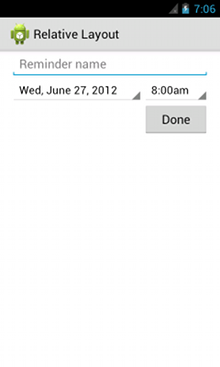
<?xml version="1.0" encoding="utf-8"?>
<RelativeLayout xmlns:android="http://schemas.android.com/apk/res/android"
    android:layout_width="match_parent"
    android:layout_height="match_parent"
    android:paddingLeft="16dp"
    android:paddingRight="16dp" >
    <EditText
        android:id="@+id/name"
        android:layout_width="match_parent"
        android:layout_height="wrap_content"
        android:hint="@string/reminder" />
    <Spinner
        android:id="@+id/dates"
        android:layout_width="0dp"
        android:layout_height="wrap_content"
        android:layout_below="@id/name"
        android:layout_alignParentLeft="true"
        android:layout_toLeftOf="@+id/times" />
    <Spinner
        android:id="@id/times"
        android:layout_width="96dp"
        android:layout_height="wrap_content"
        android:layout_below="@id/name"
        android:layout_alignParentRight="true" />
    <Button
        android:layout_width="96dp"
        android:layout_height="wrap_content"
        android:layout_below="@id/times"
        android:layout_alignParentRight="true"
        android:text="@string/done" />
</RelativeLayout>
如需详细了解可用于 RelativeLayout 的每个子视图的所有布局属性,请参阅 RelativeLayout.LayoutParams。
以上内容来源于互联网