什么是Vuex?
Vuex是一个专为Vue开发的状态管理库,它采用集中式存储的方式管理应用的所有组件的状态,解决了多组件数据通信的问题,使数据操作更加简洁。
如何理解Vue中的单向数据流机制?
在Vue中,组件的状态变化是通过单向数据流的设计理念实现的,单向数据流是指只能从一个方向修改状态,主要包含以下3个部分。
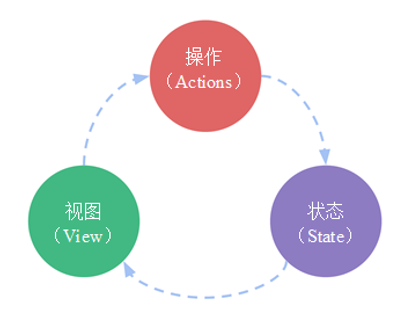
Vuex的工作流程如下图所示。
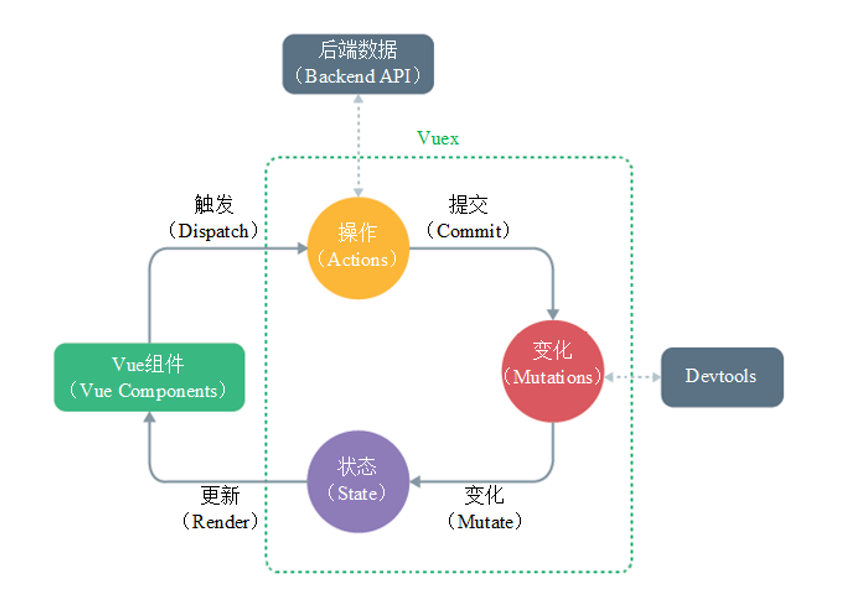
Vuex的安装方式主要有两种,一种是通过标签引入,另一种是使用包管理工具安装。
通过标签引入
使用Unpkg的CDN服务提供的Vuex文件,也可以将Vuex文件下载至本地再引入。
使用Unpkg的CDN服务引入Vuex。
<script src="https://unpkg.com/vuex@next"></script>
注意:
也可以从Vuex官方网站直接下载Vuex,下载后再将文件引入网页。
使用包管理工具安装
使用npm或yarn包管理工具安装Vuex。
# 使用npm包管理工具安装
npm install vuex --save
# 使用yarn包管理工具安装
yarn add vuex@4.0.2 --save
Vuex安装完成后,如何使用呢?
在项目中使用Vuex时,通常的做法是先在项目中创建一个store模块,然后导入并挂载store模块。store模块是用于管理状态数据的仓库。
① 编写store模块,创建src\store\index.js文件。
import { createStore } from 'vuex'
const store = createStore({
  state: {},//管理数据
  mutations: {},//更新数据
  actions: {},//定义事件处理方法
  getters: {},//再次编译,得到新的数据
  modules: {}//定义模块对象
})
export default store
② 在src\main.js文件中导入并挂载store模块。
import { createApp } from 'vue'
import './style.css'
import store from './store'	// 导入store模块
import App from './App.vue'
const app = createApp(App)
app.use(store) 			// 挂载store模块
app.mount('#app')
要求使用Vuex实现计数器案例:
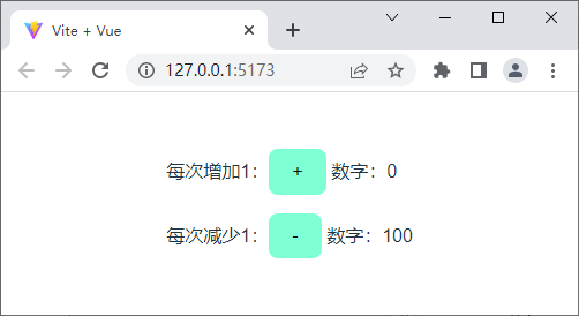
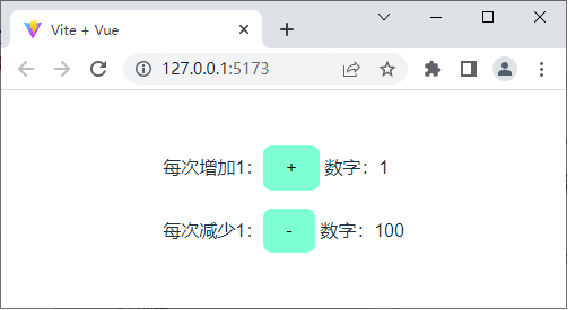
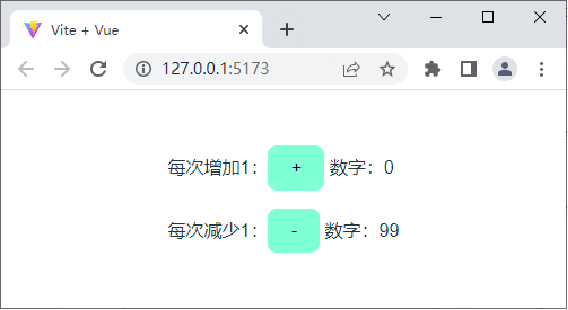
计数器初始页面中定义2个初始数字0和100,定义“+”和“-”2个按钮。每次单击“+”按钮,数字从0自增1;每次单击“-”按钮,数字会从100自减1。
计数器初始页面效果如下图所示。
在计数器初始页面中单击“+”按钮,数字从0变为1,效果如下图所示。
在计数器初始页面中单击“-”按钮,数字从100变为99,效果如下图所示。
讲解计数器案例的实现
清空src\App.vue文件中的内容,重新编写如下代码。
<template>
  <p>
    每次增加1:<button @click="increment">+</button>
    数字:0
  </p>
  <p>
    每次减少1:<button @click="reduction">-</button>
    数字:100
  </p>
</template>
<script setup>
const increment = () => { }
const reduction = () => { }
</script>
<style>
button {
  background-color: aquamarine;
}
</style>
创建src\store\index.js文件。
import { createStore } from 'vuex'
const store = createStore({
  state: {
    add: 0,
    reduce: 100
  },
  mutations: {
    increase(state) {
      state.add++
    },
    decrease(state) {
      state.reduce--
    }
  },
  actions: {},
  modules: {}
})
export default store
修改src\App.vue文件,提交increase()方法和decrease()方法。
<script setup>
import { useStore } from 'vuex'
const store = useStore()
const increment = () => {
  store.commit('increase')
}
const reduction = () => {
  store.commit('decrease')
}
</script>
在<template>模板中获取state中的数据并显示在页面中。
<p>
  每次增加1:<button @click="increment">+</button>
  数字:{{ this.$store.state.add }}
</p>
<p>
  每次减少1:<button @click="decrement">-</button>
  数字:{{ this.$store.state.reduce }}
</p>