
Install AutoSub Step to Step in Windows with Translate subtitle
Requeriments
Windows 32 or 64 bits.
Connection Internet.
Links Downloads
Python
FFMPEG
AutoInstall autosub_app 0.3.12.zip
SampleVideos Spanish - English.zip
Subtitle Editor Aegisub
For Version autosub 0.3.9
Note: Uninstall Python 3.x
Tutorial Video Youtube
Step 1. Install Python 2.7 (32 bits)
https://www.python.org/ftp/python/2.7.12/python-2.7.12.msi
## Note: Check Add Python.exe to Path
Step 2. Run cmd (Win+R)C:\Python27\Scripts\pip.exe install autosub
OrC:\Python27\Scripts\pip.exe install https://pypi.python.org/packages/35/7b/9d5361c0f7abfcc6d826a5279b1c4501f7616505629f6c54857587ec6e37/autosub-0.3.9.tar.gz
or
(Download Last version autosub https://pypi.python.org/pypi/autosub)C:\Python27\Scripts\pip.exe install "c:\youdownloaded\autosub-0.3.9.tar.gz"
Message Output Normal
Installing collected packages: autosub
Successfully installed autosub-0.3.9
Rename C:\Python27\Scripts\autosub autosub_app.py
4.1 In line 48 add ", delete=False"temp = tempfile.NamedTemporaryFile(suffix='.flac')
bytemp = tempfile.NamedTemporaryFile(suffix='.flac', delete=False)
4.2 Eliminate line 53 os.system('stty sane'). (Optional)
UPDATE For last Version Autosub (23 May 2017)
In Windows xp,7,8,10
With Program Notepad change lines :
Line 127 change
exe_file = os.path.join(path, program)
exe_file = os.path.join(path, program + ".exe")
Line 47 change
temp = tempfile.NamedTemporaryFile(suffix='.flac')
temp = tempfile.NamedTemporaryFile(suffix='.flac', delete=False)
Step 5. Download(https://ffmpeg.zeranoe.com/builds/) andCopy ffmpeg.exe to C:\Python27\
Step 6. Restart Windows
Step 7. Test Script C:\Python27\python.exe C:\Python27\scripts\autosub_app.py --list-languages
SampleVideos Spanish - English.zip
autosub_app 0.3.12.zip
Auto-generating subtitles for any video file
SpanishC:\Python27\python.exe C:\Python27\scripts\autosub_app.py -S es -D es TuVideo.mp4
EnglishC:\Python27\python.exe C:\Python27\scripts\autosub_app.py -S en -D en YouVideo.mp4
JapaneseC:\Python27\python.exe C:\Python27\scripts\autosub_app.py -S ja -D ja YouAnimeVideo.mp4
Optional
Compile script Python(Exe Executable)C:\Python27\python.exe -m compileall C:\Python27\scripts\autosub_app.py
RunC:\Python27\scripts\autosub_app.pyc YouVideo.mp4 (English Default)
Upgrade Pippython -m pip install --upgrade pip
One-Click EASY with SENDTO.
autosub_app.zip
Create batch by language (JA) AutoSub_Jap.bat and copy to directory SendTo
"shell:sendto"
"%APPDATA%\Microsoft\Windows\SendTo"
AutoSub_Jap.batC:\Python27\python.exe C:\Python27\Scripts\autosub_app.py -C 2 -S ja -D ja %1

http://www.howtogeek.com/howto/windows-vista/customize-the-windows-vista-send-to-menu/
7.- Translate your Subtitles
Download Subtitle Edit https://github.com/SubtitleEdit/subtitleedit/releases
SubtitleEdit-3.4.13-Setup.zip Or VersionPortable SE3413PL.zip
Run SubtitleEdit.exe
Open Subtitle (TuVideo.srt,YouAnimeVideo.srt,YouVideo)
Menu-Auto-Translate-(PowerbyGoogle)
From(Japanese) To:English
Translate

Or
https://sourceforge.net/projects/srt-tran/
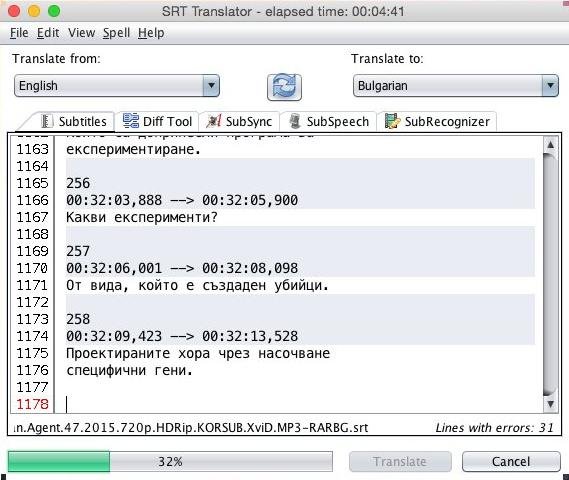
Results:
Comparison
Auto-Generated by Youtube
President Obama Addresses the Nation on the BP Oil Spill (inglés).Youtube.srt.txt
Generated by Script AutoSub
President Obama Addresses the Nation on the BP Oil Spill (inglés).AutoSub.srt.txt
Time Process: 01:15 Abot Minute
Times are best generated by AUTOSUB.
Errors Commons in Windows
-Error install pip"python setup.py egg_info"
Solution
Install Python 2.7 uninstall 3.x
"WindowsError [Error 2]"
C:\Python27>python.exe C:\Python27\scripts\autosub_app.py -S en -D en test.mp4
Traceback (most recent call last):
  File "C:\Python27\scripts\autosub_app.py", line 284, in <module>
    sys.exit(main())
  File "C:\Python27\scripts\autosub_app.py", line 210, in main
    audio_filename, audio_rate = extract_audio(args.source_path)
  File "C:\Python27\scripts\autosub_app.py", line 120, in extract_audio
    subprocess.check_output(command)
  File "C:\Python27\lib\subprocess.py", line 566, in check_output
    process = Popen(stdout=PIPE, *popenargs, **kwargs)
  File "C:\Python27\lib\subprocess.py", line 710, in __init__
    errread, errwrite)
  File "C:\Python27\lib\subprocess.py", line 958, in _execute_child
    startupinfo)
WindowsError: [Error 2]
Solution.
Copy ffmpeg.exe to C:\Python27\
or
Or ADD Path (Directory) File ffmpeg.
Examples: c:\ffmpeg\ , c:\Program Files\ffmpeg, c:\Mydownloads
Link Help Add Path(Directory)
http://www.computerhope.com/issues/ch000549.htm

Error infinite loop
"File "C:\Python27\lib\multiprocessing\forking.py", line 380"
"File "C:\Python27\lib\multiprocessing\forking.py", line 503"
ImportError : prepare(preparation_data)
Solution
Change name script C:\Python27\Scripts\autosub autosub_app.py
Error Permission denied Files Flac
c:...local\temp\tmpksjd.flac Permission denied
Solution:
Modify Script, close file. Link
#15
----------------------Before - Original-------------------------
class FLACConverter(object):
    def __init__(self, source_path, include_before=0.25, include_after=0.25):
        self.source_path = source_path
        self.include_before = include_before
        self.include_after = include_after

    def __call__(self, region):
        try:
            start, end = region
            start = max(0, start - self.include_before)
            end += self.include_after
            temp = tempfile.NamedTemporaryFile(suffix='.flac')
            command = ["ffmpeg", "-y", "-i", self.source_path,
                       "-ss", str(start), "-t", str(end - start),
                       "-loglevel", "error", temp.name]
            subprocess.check_output(command)
            os.system('stty sane')
return temp.read()----------------------After - Modified Option 1 ------------------------
class FLACConverter(object):
    def __init__(self, source_path, include_before=0.25, include_after=0.25):
        self.source_path = source_path
        self.include_before = include_before
        self.include_after = include_after

    def __call__(self, region):
        try:
            start, end = region
            start = max(0, start - self.include_before)
            end += self.include_after
            temp = tempfile.NamedTemporaryFile(suffix='.flac')
            temp.close()
            command = ["ffmpeg", "-y", "-i", self.source_path,
                       "-ss", str(start), "-t", str(end - start),
                       "-loglevel", "error", temp.name]
            subprocess.check_output(command)
            return open(temp.name, "rb").read()
----------------------after - Modified Option 2 ------------------------
class FLACConverter(object):
    def __init__(self, source_path, include_before=0.25, include_after=0.25):
        self.source_path = source_path
        self.include_before = include_before
        self.include_after = include_after

    def __call__(self, region):
        try:
            start, end = region
            start = max(0, start - self.include_before)
            end += self.include_after
            temp = tempfile.NamedTemporaryFile(suffix='.flac', delete=False)
            command = ["ffmpeg", "-y", "-i", self.source_path,
                       "-ss", str(start), "-t", str(end - start),
                       "-loglevel", "error", temp.name]
            subprocess.check_output(command)
            return temp.read()

        except KeyboardInterrupt:
            return
Message Normal Output Pip install autosub
Collecting autosub
  Downloading autosub-0.3.9.tar.gz
Collecting google-api-python-client>=1.4.2 (from autosub)
  Downloading google_api_python_client-1.5.1-py2.py3-none-any.whl (50kB)
Collecting requests>=2.3.0 (from autosub)
  Downloading requests-2.11.0-py2.py3-none-any.whl (514kB)
Collecting pysrt>=1.0.1 (from autosub)
  Downloading pysrt-1.1.1.tar.gz (104kB)
Collecting progressbar>=2.3 (from autosub)
  Downloading progressbar-2.3.tar.gz
Collecting six<2,>=1.6.1 (from google-api-python-client>=1.4.2->autosub)
  Downloading six-1.10.0-py2.py3-none-any.whl
Collecting uritemplate<1,>=0.6 (from google-api-python-client>=1.4.2->autosub)
  Downloading uritemplate-0.6.tar.gz
Collecting httplib2<1,>=0.8 (from google-api-python-client>=1.4.2->autosub)
  Downloading httplib2-0.9.2.zip (210kB)
Collecting oauth2client (from google-api-python-client>=1.4.2->autosub)
  Downloading oauth2client-3.0.0.tar.gz (77kB)
Collecting chardet (from pysrt>=1.0.1->autosub)
  Downloading chardet-2.3.0.tar.gz (164kB)
Collecting simplejson>=2.5.0 (from uritemplate<1,>=0.6->google-api-python-client>=1.4.2->autosub)
  Downloading simplejson-3.8.2-cp27-cp27m-win32.whl (65kB)
Collecting pyasn1>=0.1.7 (from oauth2client->google-api-python-client>=1.4.2->autosub)
  Downloading pyasn1-0.1.9-py2.py3-none-any.whl
Collecting pyasn1-modules>=0.0.5 (from oauth2client->google-api-python-client>=1.4.2->autosub)
  Downloading pyasn1_modules-0.0.8-py2.py3-none-any.whl
Collecting rsa>=3.1.4 (from oauth2client->google-api-python-client>=1.4.2->autosub)
  Downloading rsa-3.4.2-py2.py3-none-any.whl (46kB)
Installing collected packages: six, simplejson, uritemplate, httplib2, pyasn1, pyasn1-modules, rsa, oauth2client, google-api-python-client, requests, chardet, pysrt, progressbar, autosub
  Running setup.py install for uritemplate: started
    Running setup.py install for uritemplate: finished with status 'done'
  Running setup.py install for httplib2: started
    Running setup.py install for httplib2: finished with status 'done'
  Running setup.py install for oauth2client: started
    Running setup.py install for oauth2client: finished with status 'done'
  Running setup.py install for chardet: started
    Running setup.py install for chardet: finished with status 'done'
  Running setup.py install for pysrt: started
    Running setup.py install for pysrt: finished with status 'done'
  Running setup.py install for progressbar: started
    Running setup.py install for progressbar: finished with status 'done'
  Running setup.py install for autosub: started
    Running setup.py install for autosub: finished with status 'done'
Successfully installed autosub-0.3.9 chardet-2.3.0 google-api-python-client-1.5.1 httplib2-0.9.2 oauth2client-3.0.0 progressbar-2.3 pyasn1-0.1.9 pyasn1-modules-0.0.8 pysrt-1.1.1 requests-2.11.0 rsa-3.4.2 simplejson-3.8.2 six-1.10.0 uritemplate-0.6
For Version autosub 0.3.9
File For Windows Modified. Rename autosub_app.py.txt to autosub_app.py, and copy
C:\Python27\Scripts
autosub_app.py.txt
SampleVideos Spanish - English.zip
autosub_app 0.3.12.zip

