<!doctype html>
<html>
<head>
<meta charset="utf-8">
<title>11.2jQuery选择器之类选择器</title>
<style>
div{
width:200px;
height:200px;
border:2px solid #000;
margin:5px;
float:left;
}
</style>
<script src="../js/jquery-3.1.1.min.js"></script>
<script>
//页面加载完毕执行下面程序
$(function(){
//类选择器:通过类名选择页面元素
//JQ的格式:$('.class')
//jQuery中获取类对象
var $divJQ = $('.jq');//$divJQ是一个集合
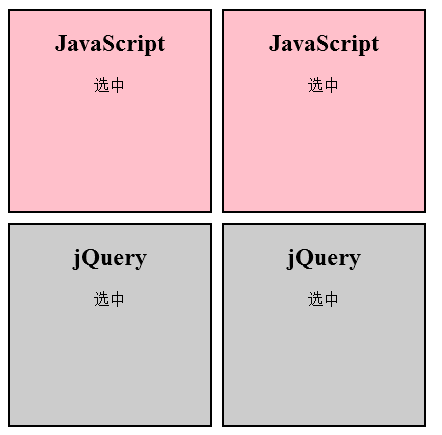
$divJQ.css('background-color','#CCC');
$divJQ.css('text-align','center');
//JavaScript实现
var divJS = document.getElementsByClassName('js');
//divJS是集合
//divJS[0].style.backgroundColor = 'yellow';
//divJS[1].style.backgroundColor = 'yellow';
//可以通过循环实现
var i;
for(i=0;i<divJS.length;i++)
{
divJS[i].style.backgroundColor = 'pink';
divJS[i].style.textAlign = 'center';
}
});
</script>
</head>
<body>
<div class="js">
<h2>JavaScript</h2>
<p>选中</p>
</div>
<div class="js">
<h2>JavaScript</h2>
<p>选中</p>
</div>
<div class="jq">
<h2>jQuery</h2>
<p>选中</p>
</div>
<div class="jq">
<h2>jQuery</h2>
<p>选中</p>
</div>
</body>
</html>
效果图