
交换机远程管理配置
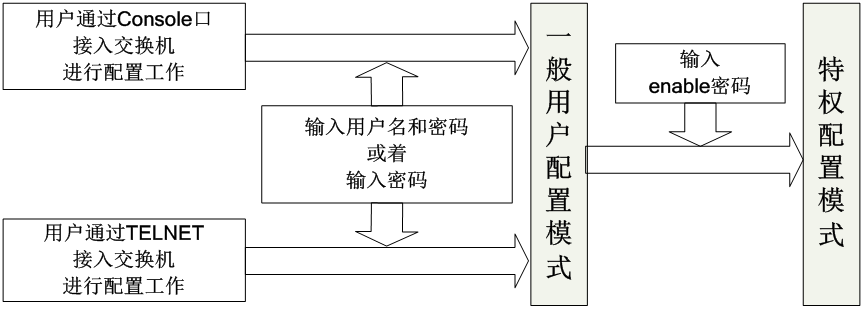
1.Console口管理安全配置(一)
配置要求:
用户从Console口进入到交换机一般用户配置模式时,要求检查用户名和密码。
Switch>enable
Switch#configure terminal
Switch(config)#username jyXXX password cisco123
//定义一个用户名为jyXXX,密码为cisco123的本地用户。
Switch(config)#line console 0 //进入Console线路配置模式
Switch(config-line)#login local
//Console口登录时验证本地配置的用户名和密码
Switch(config-line)#exec-timeout 10
//设置退出特权用户模式的超时时间为10分钟
Switch(config-line)#exit
Switch(config)#exit
Switch#write
Switch#reload //重启交换机
User Access Verification
Username: jyXXX
Password: *****
Switch>
2.Console口管理安全配置(二)
配置要求:用户从Console口进入到交换机一般用户配置模式时,只检查密码。
Switch>enable
Switch#configure terminal
Switch(config)#line console 0
Switch(config-line)#password cisco123
//Console口登录时验证密码
Switch(config-line)#login
Switch(config-line)#exec-timeout 10
Switch(config-line)#exit
Switch(config)#exit
Switch#write
Switch#reload
User Access Verification
Password: ****
Switch>
3.Telnet方式管理安全配置
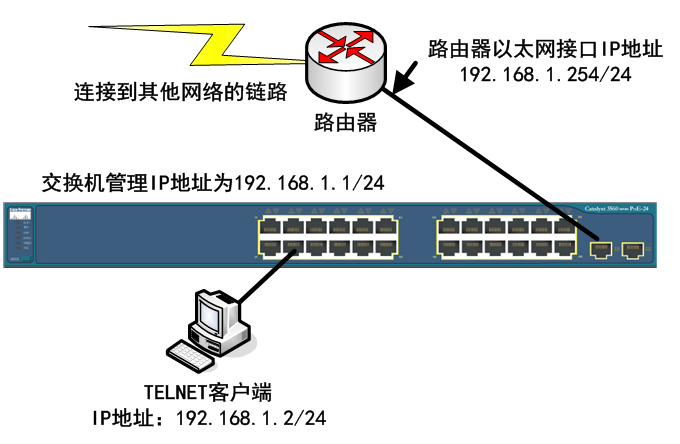
配置要求:用户TELNET登录进入到交换机一般用户配置模式时,要求检查用户名和
密码。
Switch>enable
Switch#configure terminal
Switch(config)#interface vlan 1
Switch(config-if)#ip address 192.168.1.1 255.255.255.0
//配置交换机的管理接口(VLAN 1虚接口)IP
Switch(config-if)#no shutdown
Switch(config-if)#exit
Switch(config)#ip default-gateway 192.168.1.254
//配置交换机的默认网关IP(与交换机相连接的路由器接口IP)
Switch(config)#username jyXXX password cisco124
Switch(config)#line vty 0 4
Switch(config-line)#login local
Switch(config-line)#exit
Switch(config)#
4.SSH方式管理安全配置(非对称加密方式)
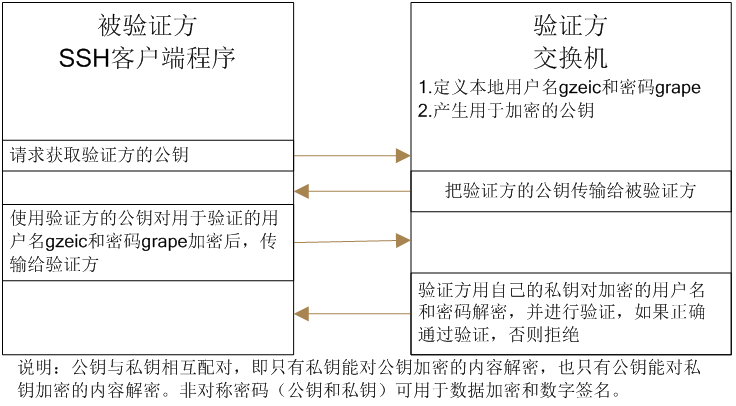
因为Telnet在网络上使用明文传送口令和数据,会造成对网络设备安全性的威
胁。通过使用SSH(Secure Shell),可以把所有传输的数据进行加密,故SSH方式安
全性较高。
Switch#configure terminal
Switch(config)#interface vlan 1
Switch(config-if)#ip address 192.168.1.1 255.255.255.0
Switch(config-if)#no shutdown
Switch(config-if)#ip domain-name qzjmc.cn
//设置交换机所在的域为qzjmc.cn
Switch(config)#crypto key generate rsa
//根据交换机的名称Switch.qzjmc.cn产生SSH所需的密钥
The name for the keys will be: Switch.myzone.com
Choose the size of the key modulus in the range of 360 to 2048 for your General Purpose Keys. Choosing a key modulus greater than 512 may take a few minutes.
How many bits in the modulus [512]: 2048
% Generating 2048 bit RSA keys, keys will be non-exportable...[OK]
Switch(config)#username jyXXX password cisco123
Switch(config)#line vty 0 4
Switch(config-line)#transport input ssh
//设置虚拟终端的接入为SSH方式,默认为transport input telnet,即默认情况下虚拟终端允许Telnet接入。
Switch(config-line)#login local
Switch(config-line)#exit
【教学视频】-Telnet远程管理 7.Telnet实验.exe(下载附件 36.14 MB)
实验十 交换机基本配置及远程管理配置New.doc(下载附件 467 KB)
1-(2018更新)从零开始学CCNA视频配套实验手册-配置交换机管理地址和默认网关.pdf(下载附件 247.97 KB)

