
1.4 路由器基本配置及其管理的安全配置
一、路由器基本配置命令
二、路由器基本配置操作示例
三、利用Console口登录路由器管理的安全配置
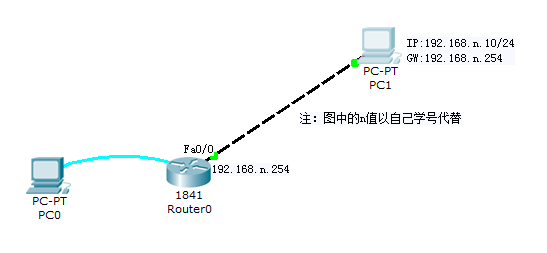
(一)路由器基本配置
Router>? //显示用户模式下的所有命令
Router>enable //进入特权模式
Router#show version //查看路由器版本信息
Router#show interface //显示路由器接口信息
Router#show ip interface brief //显示路由器接口的简要信息
Router#configure terminal
Router(config)# no ip domain-lookup //关闭域名解析
Router(config)# line console 0
Router(config-line)#logging synchronous
//Console线路开启输出同步
Router(config-line)#exec-timeout 0 0
//Console线路关闭线路超时
Router(config-line)#exit
Router(config)#hostname jy //路由器命名
jy(config)#enable password jy //配置路由器登录明文密码
jy(config)#enable secret cisco123 //配置路由器登录的加密密码
jy(config)#interface fastethernet0/0 //配置接口IP地址启用接口
jy(config-if)#ip address 192.168.1.254 255.255.255.0
jy(config-if)#no shutdown //启用接口
jy(config-if)#end
jy#show running-config
//查看路由器运行配置文件信息(保存在DRAM)
jy#show startup-config
//查看路由器启动配置文件信息(保存在NVRAM)
jy#copy running-config startup-config(等价于write)
//路由器运行配置文件信息复制至启动配置文件
(二)路由器管理的安全配置
1、 用户利用Console口登录路由器进行管理的安全配置
(PC0计算机连接路由器的Console口进行登录管理路由器)
方式一:验证用户名与密码
jy#configure terminal
jy(config)#username jyXXX password cisco
jy(config)#line console 0 //配置从控制台进入用户模式的安全登录验证
jy(config-line)#login local //验证本地配置的用户名和密码
jy(config-line)#exit
jy(config)#exit
jy#write //保存路由器配置
jy#reload //路由器重启
//路由器重新启动,通过Console登录时,提示需要输入用户名与密码进行身
份验证,输入正确的用户名与密码方可进入用户模式。
成功登录之后,进入特权模式,执行以下命令:
jy#show user //显示登录到路由器的用户信息
[选做]方式二:仅验证密码
jy# configure terminal
jy(config)#line console 0 //配置从控制台进入用户模式的安全登录验证
jy(config)#password cisco123
jy(config-line)#login //仅验证密码
jy(config-line)#exit
jy(config)#exit
jy#show user //显示登录到路由器的用户信息
jy#write //保存路由器配置
jy#reload //路由器重启
//路由器重新启动,通过Console登录时,提示需要输入密码进行验证,只有
输入正确的密码,方可进入用户模式。
2、 用户通过Telnet远程登录路由器进行管理的安全配置
(PC1计算机利用Telnet命令远程登录路由器)
方式一:验证用户名与密码方式
jy# configure terminal
jy (config)#username jyXXX password cisco
jy(config)#line vty 0 4
//配置Telnet登录进入用户模式的安全登录验证
jy(config-line)#login local //验证本地配置的用户名和密码
jy(config-line)#exit
[选做]方式二:仅验证密码方式
jy# configure terminal
jy(config)#line vty 0 4
//配置Telnet登录进入用户模式的安全登录验证
jy(config-line)#password cisco12345
jy(config-line)#login //仅验证密码
jy(config-line)#exit
在远程计算机客户端上执行Telnet远程登录命令,连接并登录路由器。
C:\>Telnet 路由器连接端口的IP地址
测试远程的计算机客户端能否成功连接并登录路由器
【提示】若路由器未配置enable密码,则虚拟终端Telnet方式只能进入路由
器的普通用户配置模式,而无法进入到特权模式。
路由器基本配置命令
Router>? 显示用户模式下的所有命令
Router>enable 进入特权模式
Router#
Router#configure terminal
Router(config)#no ip domain-lookup //关闭域名解析
Router(config)#line console 0
Router(config-line)#logging synchronous
//Console线路开启输出同步
Router(config-line)#exec-timeout 0 0
//Console线路关闭线路超时
Router(config-line)#end
Router#show version 查看路由器版本信息
Router#show interface 显示路由器接口信息
Router#show ip interface brief 显示路由器接口的简要信息
Router#configure terminal
Router(config)#
Router(config)#hostname jy 路由器命名
jy(config)#enable password jy 配置路由器登录明文密码
jy(config)#enable secret cisco123 配置路由器登录的加密密码
jy(config)#line console 0 配置从控制台进入用户模式登录口令
jy(config-line)#password jy
jy(config-line)#login
jy(config-line)#exit
jy(config)#interface f0/0 配置接口IP地址启用接口
jy(config-if)#ip address 192.168.1.254 255.255.255.0
jy(config-if)#no shutdown 启用接口
jy(config-if)#exit
jy(config)#line vty 0 4 配置Telnet登录的口令
jy(config-line)#password cisco
jy(config-line)#login
jy(config-line)#end
jy#show running-config
查看路由器运行配置文件信息(保存在DRAM)
jy#show startup-config
查看路由器启动配置文件信息(保存在NVRAM)
jy#copy running-config startup-config(等价于write)
路由器运行配置文件信息复制至启动配置文件
【参考视频】

