
页面布局
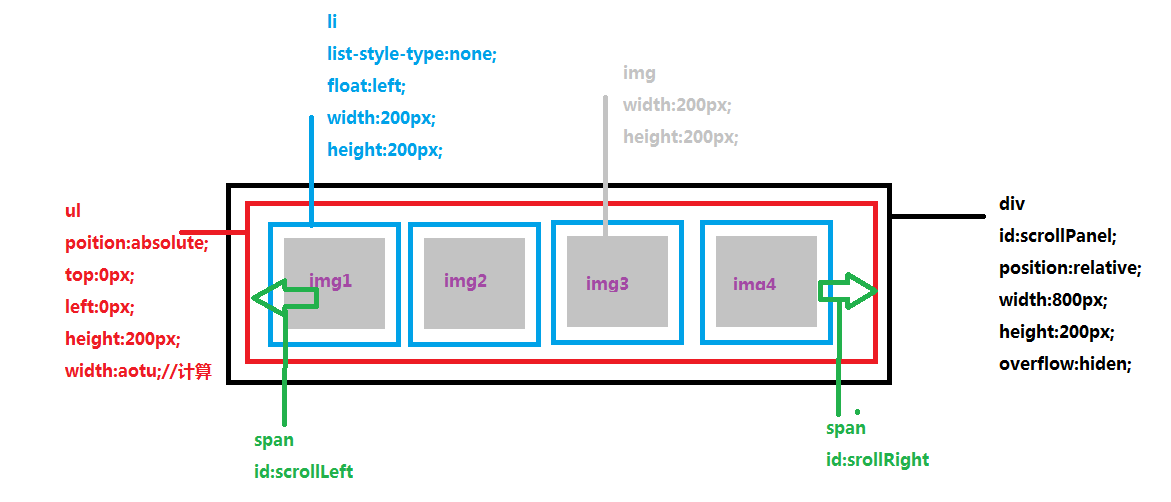
<!doctype html>
<html>
<head>
<meta charset="utf-8">
<title>17.1jQuery案例一无缝滚动</title>
<script src="../js/jquery-3.1.1.min.js"></script>
<script>
$(function(){
//1.定义并初始化变量
var speed = -2;//每次移动2个单位
var timer = null;//定时器
//2.计算ul的宽度:ulWidth
//liSize:列表个数
//liWidth:列表宽度
//ulWidth = liSize*liWidth
var $ul = $('#scrollPanel ul');
//获取$ul元素
ulHtml = $ul.html();
//ul元素翻倍
$ul.html(ulHtml+ulHtml);
//方法1
var allLi = $ul.children('li');//获取ul中的所有列表
//方法2
//var allLi2= $('#scrollPanel ul li');
var liSize = allLi.length;
console.log("列表元素个数"+liSize);
var liWidth = allLi.eq(0).width();
console.log("列表元素宽度"+liWidth);
var ulWidth = liSize*liWidth;
console.log("ul的宽度"+ulWidth);
$ul.width(ulWidth);//设置ul的宽度
//3.定义滚动函数
function silde(){
//向左滚动
if(speed<0)
{
var l = $ul.position().left;
if(l<=-ulWidth/2)
{
l =0;
}
l=l+speed;//
//更新定位
$ul.css({'left':l});
}
//向右滚动
if(speed>0)
{
//获取ul的左偏移量
var l = $ul.position().left;
if(l>=0)
{
l = -ulWidth/2;
}
l=l+speed;//
//更新定位
$ul.css({'left':l});
}
}
//滚动函数结束
//4.调用滚动函数
timer = setInterval(silde,30);
//5.鼠标移入移出ul的效果
$ul.mouseenter(function(){clearInterval(timer);});
$ul.mouseleave(function(){timer = setInterval(silde,30);});
//6.鼠标移入左按钮
$('#scrollLeft').mouseenter(function(){speed=-2; $(this).css('opacity',0.8);}).mouseleave(function(){$(this).css('opacity',0.2);});
//7.鼠标移入右按钮
$('#scrollRight').mouseenter(function(){speed=2;$(this).css('opacity',0.8);}).mouseleave(function(){$(this).css('opacity',0.2);});
});
</script>
<style>
*{ margin:0; padding:0;}
li{ list-style-type:none;}
#scrollPanel{
position:relative;
width:800px;
height:200px;
overflow:hidden;
margin:20px auto;
background-color:#CCC;
}
#scrollPanel ul{
position:absolute;
top:0px;
left:0px;/*滚动时候值改变*/
height:200px;
width:auto;/*根据元素个数计算*/
cursor:pointer;
}
#scrollPanel ul li{
float:left;
width:200px;
height:200px;
}
#scrollPanel ul li img{
width:200px;
height:200px;
}
#scrollLeft,#scrollRight{
width:20px;
height:20px;
line-height:20px;
text-align:center;
font-size:16px;
background-color:#CCC;
position:absolute;
top:90px;;
opacity:0.3;
cursor:pointer;
}
#scrollLeft{
left:5px;
}
#scrollRight{
right:5px;
}
</style>
</head>
<body>
<div id="scrollPanel">
<ul>
<li><img src="img/1.jpg"></li>
<li><img src="img/2.jpg"></li>
<li><img src="img/3.jpg"></li>
<li><img src="img/4.jpg"></li>
<li><img src="img/5.jpg"></li>
</ul>
<span id="scrollLeft"><</span>
<span id="scrollRight">></span>
</div>
</body>
</html>