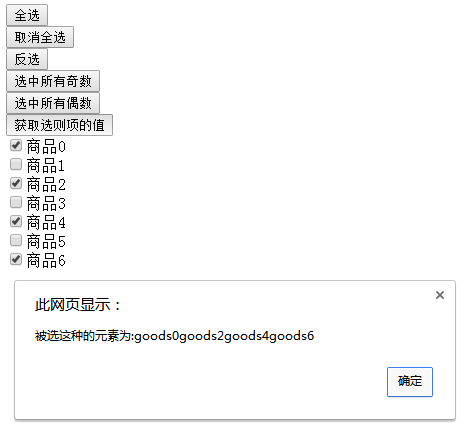
<!doctype html>
<html>
<head>
<meta charset="utf-8">
<title>12.8jQuery之checkbox各种选中操作</title>
<script src="../js/jquery-3.1.1.min.js"></script>
<script>
$(function(){
//1 全选
$('#btn1').click(function(){
//方法1
//$('.goodslist').attr('checked',true);
//方法2
//$('.goodslist').attr('checked','checked');
//方法3
$('.goodslist').prop('checked',true);
});
//2 取消全选
$('#btn2').click(function(){
//方法1
//$(':checkbox').attr('checked',false);
//方法2
//$(':checkbox').removeAttr('checked');
//方法3
$(':checkbox').prop('checked',false);
});
//3 反选
$('#btn3').click(function(){
$('.goodslist').each(function(index, element) {
//判断复选框的checked属性的值
//获取当前对象-->$(this)
//研究判断属性值得方法
//判断方法1 jQuery实现方法
//$(this).attr('checked')
//判断方法2 jQuery实现方法
$(this).is(':checked')
//判断方法3 jQuery实现方法
//$(this).prop('cheked')
//$(this).prop('cheked')-->返回值为真或者假
//判断方法4 JS的实现方法
//this.checked
//判断方法5 jQuery到JS的转化
//$(this).get(0).checked
//判断方法6
//$(this)[0].checked
if($(this).prop('checked'))//条件
{
//真
$(this).prop('checked',false);//改变成相反的值
}
else
{
//假
$(this).prop('checked',true);//改变成相反的值
}
});
});
//4 选中所有奇数
$('#btn4').click(function(){
$('.goodslist:odd').prop('checked',true);
});
// 选中所有偶数
$('#btn5').click(function(){
$('.goodslist:even').prop('checked',true);
});
//获取选择项的值-->通过.val()方法
$('#btn6').click(function(){
var text='';//存放值
$('.goodslist').each(function(index, element) {
if($(this).prop('checked'))
{
text+=$(this).val()+' ';
}
});//end each()
alert(text);
});
});
//建议:具有 true 和 false 两个属性的属性,如 checked, selected 或者 disabled 使用prop(),其他的使用 attr</script>
</head>
<body>
<!--按钮部分-->
<input type="button" id="btn1" value="全选"><br>
<input type="button" id="btn2" value="取消全选"><br>
<input type="button" id="btn3" value="反选"><br>
<input type="button" id="btn4" value="选中所有奇数"><br>
<input type="button" id="btn5" value="选中所有偶数"><br>
<input type="button" id="btn6" value="获取选择项的值"><br>
<!--checkbox-->
<input type="checkbox" class="goodslist" value="goods0">商品0<br>
<input type="checkbox" class="goodslist" value="goods1">商品1<br>
<input type="checkbox" class="goodslist" value="goods2">商品2<br>
<input type="checkbox" class="goodslist" value="goods3">商品3<br>
<input type="checkbox" class="goodslist" value="goods4">商品4<br>
<input type="checkbox" class="goodslist" value="goods5">商品5<br>
<input type="checkbox" class="goodslist" value="goods6">商品6<br>
</body>
</html>
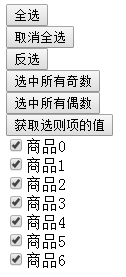
单击全选按钮
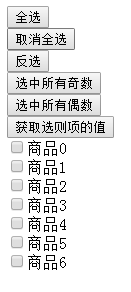
取消全选按钮
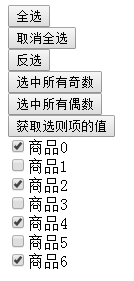
选中奇数按钮

选中偶数
获取选择项的值