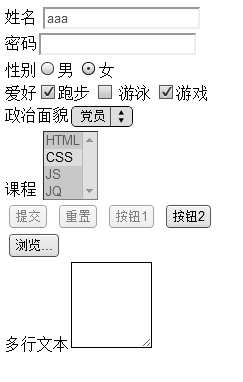
<!doctype html>
<html>
<head>
<meta charset="utf-8">
<title>11.12jQuery选择器之表单对象属性选择器</title>
<script src="../js/jquery-3.1.1.min.js"></script>
<script>
$(function(){
var $disable=$(':disabled');//选择不可用元素
var $enable = $(':enabled');//选择可用元素
var $check = $(':checked');//选择被选中的input元素
alert($check.length);
var $selected = $(':selected');//选择被选中的option元素
var $input1 = $('input');//获取input标签元素
//alert($input1.length);
var $input2 = $(':input');
//带冒号都属于过滤选择器
//:input获取表单中的元素包括input、select、textarea、button
//alert($input2.length);
//alert($disable.length);
//获取表单中的可用元素
var $formEnabled = $('#form1 :enabled');
//alert($formEnabled.length);
//alert($selected.length);
});
</script>
</head>
<body>
<form id="form1" method="post" action="check.jsp">
<label for="a">姓名</label>
<input type="text" name="a" id="a" value="aaa" disabled><br>
密码<input type="password"><br>
性别<input name="xb" type="radio" value="男" >男
<input name="xb" type="radio" value="女" checked>女<br>
爱好<input name="" type="checkbox" checked>跑步
<input name="" type="checkbox" > 游泳
<input name="" type="checkbox" checked>游戏<br>
政治面貌<select name="b">
<option>党员</option>
<option>群众</option>
<option>团员</option>
</select><br>
课程
<select multiple>
<option selected>HTML</option>
<option>CSS</option>
<option selected>JS</option>
<option selected>JQ</option>
</select><br>
<input name="" type="submit" value="提交" disabled>
<input name="" type="reset" value="重置" disabled>
<input name="" type="button" value="按钮1" disabled>
<button>按钮2</button>
<input type="hidden" value="hidden">
<br>
<input type="file"><br>
多行文本<textarea rows="5" cols="10"></textarea>
</form>
</body>
</html>