猜拳游戏
上一节
下一节
| <!doctype html> | |
| <html> | |
| <head> | |
| <meta charset="utf-8"> | |
| <title>猜拳游戏</title> | |
| <style> | |
| *{ | |
| margin:0; | |
| padding:0; | |
| } | |
| #panel{ | |
| width:600px; | |
| height:560px; | |
| background:#F09; | |
| margin:10px auto; | |
| } | |
| #gameTitle{ | |
| width:100%; | |
| height:40px; | |
| line-height:40px; | |
| text-align:center; | |
| font-size:24px; | |
| background:#366; | |
| } | |
| .guest{ | |
| width:40%; | |
| height:200px; | |
| background:#F30; | |
| text-align:center; | |
| float:left; | |
| } | |
| .guest p{ | |
| margin-top:10px; | |
| } | |
| .guest p input{ | |
| height:40px; | |
| margin-top:10px; | |
| } | |
| .guest img{ | |
| margin-top:20px; | |
| width:120px; | |
| height:120px; | |
| display:none; | |
| } | |
| .vs{ | |
| width:20%; | |
| height:200px; | |
| line-height:200px; | |
| font-size:36px; | |
| background:#6FF; | |
| float:left; | |
| text-align:center; | |
| } | |
| #result{ | |
| width:100%; | |
| height:80px; | |
| background:#369; | |
| text-align:center; | |
| line-height:80px; | |
| font-size:36px; | |
| color:#FFF; | |
| float:left; | |
| } | |
| .bottom{ | |
| width:100%; | |
| height:40px; | |
| line-height:40px; | |
| text-align:center; | |
| font-size:24px; | |
| color:#FFF; | |
| background:#36F; | |
| float:left; | |
| } | |
| .bottom span{ | |
| padding-right:30px; | |
| } | |
| </style> | |
| <script> | |
| window.onload = function() | |
| { | |
| //调用霓虹灯效果函数 | |
| setLightColor(); | |
| //调用猜拳游戏 | |
| guestGame(); | |
| }; | |
| //创建setLightColor()函数 | |
| //目的:将字符串重新转换,实质上是字符串的拼接。 | |
| function setLightColor() | |
| { | |
| //alert("霓虹灯效果函数!"); | |
| //获取标题对象 | |
| var oTitle = document.getElementById('gameTitle'); | |
| //获取标题对象的值 | |
| var titleText = oTitle.innerHTML; | |
| //计算标题的长度 | |
| var titleSize = titleText.length; | |
| //alert(titleText+"的长度为"+titleSize); | |
| //定义一个颜色数组 | |
| var colorArray = new Array("red","green","blue","orange","pink","yellow"); | |
| //计算颜色数组长度 | |
| var colorSize = colorArray.length; | |
| //定义颜色数组索引 | |
| var colorIndex = 0; | |
| //alert(colorArray+"的长度为"+colorSize); | |
| //字符串拼接函数 | |
| function changeString() | |
| { | |
| //定义一个接收的字符串 | |
| var newString = ""; | |
| for(var i=0;i<titleSize;i++) | |
| { | |
| //console.log(newString); | |
| newString+="<font color="+colorArray[colorIndex]+">"+titleText[i]+"</font>"; | |
| colorIndex++;//颜色索引值加1 | |
| if(colorIndex==colorSize) | |
| colorIndex = 0; | |
| }//end for | |
| //将转换后的字符串给oTitle对象 | |
| oTitle.innerHTML = newString; | |
| //添加定时器,每隔200毫秒执行一次自身 | |
| setTimeout(changeString,200); | |
| }//end changeString() | |
| //调用changeString()函数 | |
| changeString(); | |
| } | |
| //猜拳函数 | |
| function guestGame() | |
| { | |
| //alert("猜拳游戏!"); | |
| //1. 定义变量 | |
| var totalCount = 0 ;//总局数 | |
| var winCount = 0 ;//赢的局数 | |
| var failCount = 0 ;//输的局数 | |
| var drawCount = 0 ;//和的局数 | |
| //2. 获取对象 | |
| var oMyImg = document.getElementById('myImg');//我的选择 | |
| var oComputer = document.getElementById('computer');//电脑选择 | |
| var oCurrent = document.getElementById('current');//当前的选择 | |
| var oResult = document.getElementById('result');//比赛结果 | |
| var oSelect = document.getElementById('select');//选择猜拳 | |
| var oBegin = document.getElementById('begin');//开始游戏 | |
| var oReset = document.getElementById('reset');//重置游戏 | |
| var oAll = document.getElementById('all');//总局数 | |
| var oWin = document.getElementById('win');//赢 | |
| var oFail = document.getElementById('fail')//输 | |
| var oDraw = document.getElementById('draw');//和 | |
| //3.选择出拳显示图片 | |
| oSelect.onchange = function() | |
| { | |
| //获得值 | |
| var selectValue = oSelect.value; | |
| //alert(selectValue); | |
| //显示当前选择的图片 | |
| //调用更改图片的方法 | |
| changeImg(oCurrent,selectValue); | |
| }; | |
| //4.更改图片的方法 | |
| /* | |
| 方法名:changeImg | |
| obj:图片对象 | |
| value:图片的索引值 | |
| */ | |
| function changeImg(obj,value) | |
| { | |
| //alert(value); | |
| switch(value) | |
| { | |
| case "-1" : | |
| obj.style.display = "none";//不显示 | |
| break;//跳出 | |
| case "0" : | |
| obj.style.display = "inline";//显示 | |
| obj.src = "upload/0.png";//显示剪刀 | |
| break; | |
| case "1" : | |
| obj.style.display = "inline";//显示 | |
| obj.src = "upload/1.png";//显示石头 | |
| break; | |
| case "2" : | |
| obj.style.display = "inline";//显示 | |
| obj.src = "upload/2.png";//显示布 | |
| break; | |
| }//end switch | |
| }//end changeImg() | |
| //5. 比赛结果判定函数 | |
| //给开始按钮添加事件 | |
| oBegin.onclick = function() | |
| { | |
| //通过数照图片 | |
| var selectValue = oSelect.value; | |
| //判断selectValue值 | |
| if(selectValue==-1) | |
| { | |
| alert("请选择石头、剪刀、布!"); | |
| return;//结束该函数 | |
| } | |
| //显示图片 | |
| changeImg(oMyImg,selectValue); | |
| //computerValue的范围是:0 1 2中的一个 | |
| var computerValue = Math.round(Math.random()*10)%3; | |
| //var computerValue = '1'; | |
| //computerValue+""强制转换成字符型数据 | |
| changeImg(oComputer,computerValue+""); | |
| //调用猜拳结果判定函数 | |
| result(selectValue,computerValue); | |
| };//end oBegin.onclick | |
| //6.猜拳结果函数 | |
| function result(selectValue,computerValue) | |
| { | |
| //分析:如何判定输赢? | |
| //输赢的判断转换成selectValue和computerValue值得判断 | |
| /* | |
| 剪刀:0 石头:1 布:2 | |
| 和: | |
| selectValue=0,computerValue=0; 00 | |
| selectValue=1,computerValue=1; 11 | |
| selectValue=2,computerValue=2; 22 | |
| 赢: | |
| selectValue=0,computerValue=2; 02 | |
| selectValue=1,computerValue=0; 10 | |
| selectValue=2,computerValue=1; 21 | |
| 输: | |
| selectValue=0,computerValue=1; 01 | |
| selectValue=1,computerValue=2; 12 | |
| selectValue=2,computerValue=0; 20 | |
| //转换成判断连接后的字符串 | |
| valule = selectValue+""+computerValue | |
| */ | |
| var value = selectValue+""+computerValue; | |
| switch(value) | |
| { | |
| case '00' : | |
| case '11' : | |
| case '22' : | |
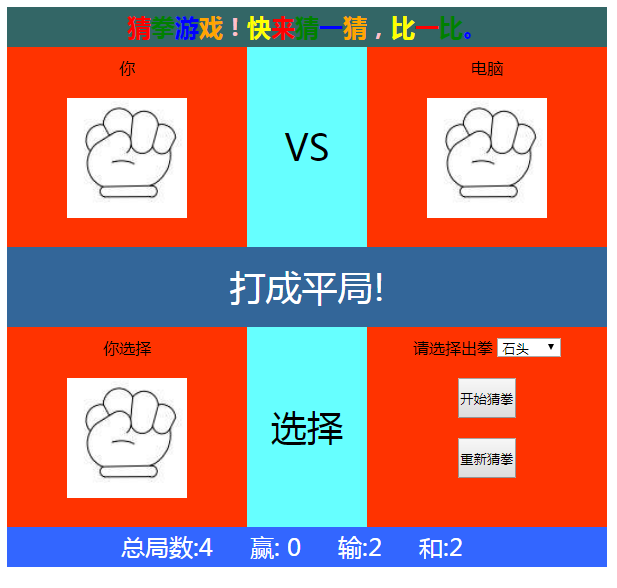
| oResult.innerHTML = "打成平局!"; | |
| drawCount++; | |
| oDraw.innerHTML = ""+drawCount; | |
| break; | |
| case '02' : | |
| case '10' : | |
| case '21' : | |
| oResult.innerHTML = "你赢了!"; | |
| winCount++; | |
| oWin.innerHTML = ""+winCount; | |
| break; | |
| default: | |
| oResult.innerHTML = "你输了"; | |
| failCount++; | |
| oFail.innerHTML = ""+failCount; | |
| break; | |
| }//end switch | |
| totalCount++; | |
| oAll.innerHTML = ""+totalCount; | |
| }//end result | |
| //7.编写猜拳游戏初始化函数 | |
| //为重新猜拳按钮添加事件 | |
| oReset.onclick = init; | |
| function init() | |
| { | |
| //恢复所有对象的默认值 | |
| //恢复图片显示的属性为none | |
| oMyImg.style.display = 'none'; | |
| oComputer.style.display = 'none'; | |
| oCurrent.style.display ='none'; | |
| oResult.innerHTML="比赛结果"; | |
| oSelect.value = '-1'; | |
| oAll.innerHTML = '0'; | |
| oWin.innerHTML = '0'; | |
| oFail.innerHTML = '0'; | |
| oDraw.innerHTML = '0'; | |
| }//end init() | |
| }//end guestGame() | |
| </script> | |
| </head> | |
| <body> | |
| <div id="panel"> | |
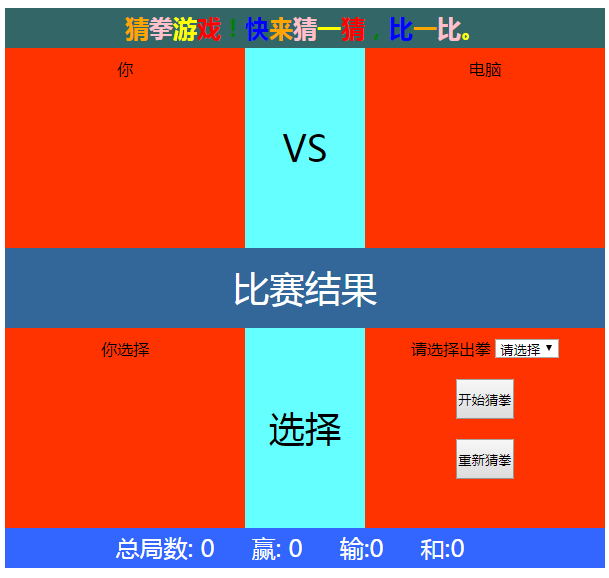
| <h2 id="gameTitle">猜拳游戏!快来猜一猜,比一比。</h2> | |
| <!--<h2 id="gameTitle"><font color="red">猜</font><font color="green">拳</font><font color="blue">游</font>戏!快来猜一猜,比一比。</h2>--> | |
| <div class="guest"> | |
| <p>你</p> | |
| <img id="myImg" src="upload/0.png"/> | |
| </div> | |
| <div class="vs">VS</div> | |
| <div class="guest"> | |
| <p>电脑</p> | |
| <img id="computer" src="upload/1.png"/> | |
| </div> | |
| <div id="result">比赛结果</div> | |
| <div class="guest"> | |
| <p>你选择</p> | |
| <img id="current" src="upload/2.png"/> | |
| </div> | |
| <div class="vs">选择</div> | |
| <div class="guest"> | |
| <p> | |
| 请选择出拳 | |
| <select id="select"> | |
| <option value="-1">请选择</option> | |
| <option value="0">剪刀</option> | |
| <option value="1">石头</option> | |
| <option value="2">布</option> | |
| </select> | |
| </p> | |
| <p> | |
| <input id="begin" type="button" value="开始猜拳"/> | |
| </p> | |
| <p> | |
| <input id="reset" type="button" value="重新猜拳"/> | |
| </p> | |
| </div> | |
| <div class="bottom"> | |
| 总局数:<span id="all"> 0</span> | |
| 赢:<span id="win"> 0</span> | |
| 输:<span id="fail">0</span> | |
| 和:<span id="draw">0</span> | |
| </div> | |
| </div> | |
| </body> | |
| </html> | |