URL:Uniform Resource Locator,统一资源定位符。
在Internet上访问的每一个网页文件,都有一个访问标记符,用于唯一标识它的访问位置,以便浏览器可以访问到,这个访问标记符称为URL。
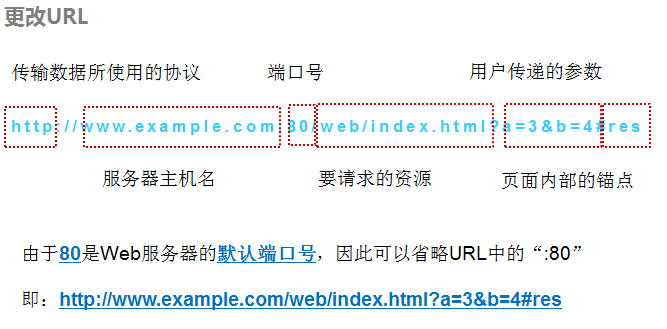
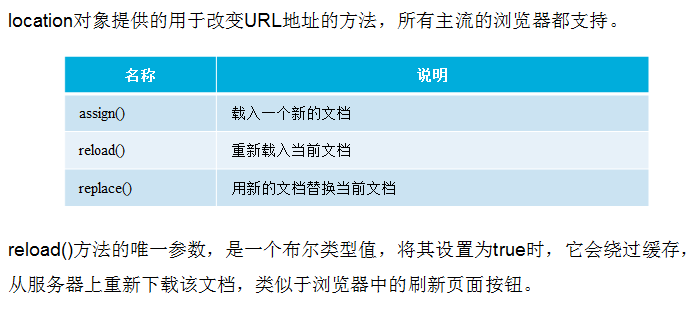
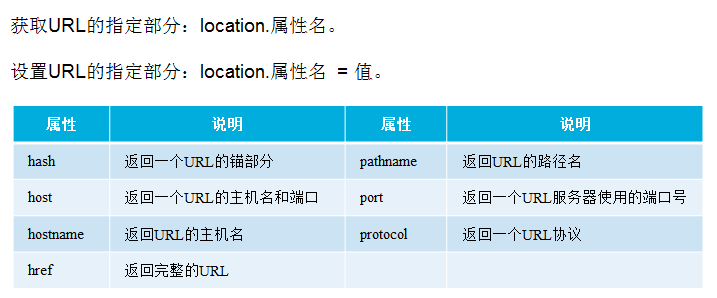
1.更改URL
2.获取URL参数
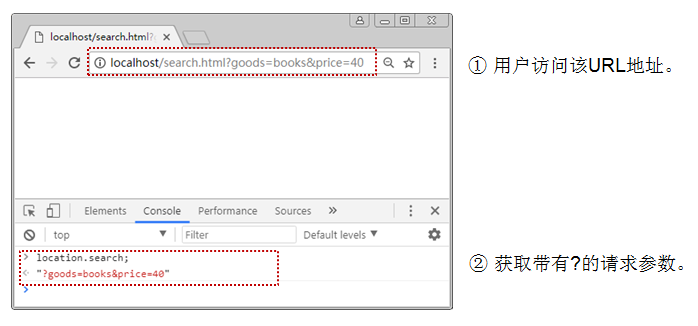
Web开发中,经常通过URL地址传递的参数执行指定的操作,如商品的搜索,排序等。此时,可以利用location对象提供的search属性返回URL地址中的参数。
3.参考代码
<!DOCTYPE html>
<html>
<head>
<meta charset="UTF-8">
<title>location对象方法与属性</title>
</head>
<body>
<input type="button" name="" id="" value="载入新文档" onclick="newPage()"/>
<input type="button" name="" id="" value="刷新页面" onclick="freshPage()" />
<input type="button" name="" id="" value="替换当前文档" onclick="replacePage()" />
<p id="time"></p>
<script type="text/javascript">
var ds = new Date();
var d = ds.getTime();
var t2 = ds.toLocaleTimeString();//返回时间字符串
var t1 = ds.toLocaleDateString();//返回日期字符串
document.getElementById("time").innerHTML = t1+t2;
function newPage(){
window.location.assign('index.html');//载入一个新文档
}
function freshPage()
{
location.reload();//重新载入当前文档
}
function replacePage(){
location.replace('index.html');//用新文档替换当前文档
}
console.log(location.hash);//返回一个URL的锚部分
console.log(location.host);//返回URL主机名和端口
console.log(location.hostname);//返回URL助教名
console.log(location.href);//返回完整的URL
console.log(location.pathname);//返回URL路径
console.log(location.port);//返回一个URL服务器使用的端口号
console.log(location.protocol);//返回一个URL协议
</script>
</body>
</html>
[Web浏览器] "" /myjs/6.3location.html (28)
[Web浏览器] "127.0.0.1:8020" /myjs/6.3location.html (29)
[Web浏览器] "127.0.0.1" /myjs/6.3location.html (30)
[Web浏览器] "http://127.0.0.1:8020/myjs/6.3location.html" /myjs/6.3location.html (31)
[Web浏览器] "/myjs/6.3location.html" /myjs/6.3location.html (32)
[Web浏览器] "8020" /myjs/6.3location.html (33)
[Web浏览器] "http:" /myjs/6.3location.html (34)

