自定义HealthIndicator
health端点用于查看Spring Boot应用的健康状态,提供了用于检测磁盘的DiskSpaceHealthIndicator、检测DataSource连接是否可用的DataSourceHealthIndicator、检测XXX内置服务(XXX代表内置的Elasticsearch、JMS、Mail、MongoDB、Rabbit、Redis、Solr等)是否可用的XXXHealthIndicator等健康指标检测器。在Spring Boot中,这些检测器都是通过HealthIndicator接口实现,并且根据依赖关系的引入实现自动化装配。
当Spring Boot自带的HealthIndicator接口实现类不能满足我们的需求时,就需要自定义HealthIndicator接口实现类。自定义HealthIndicator接口实现类很简单,只需要实现HealthIndicator接口,并重写接口方法health,返回一个Health对象。
【例10-3】自定义HealthIndicator。
1.创建HealthIndicator接口实现类MyHealthIndicator
在应用ch10_2中,创建名为com.ch.ch10_2.health的包,并在该包中创建一个HealthIndicator接口实现类MyHealthIndicator。在该类中重写接口方法health,并使用@Component注解将该类声明为组件对象。
@Component
public class MyHealthIndicator implements HealthIndicator{
@Override
public Health health() {
int errorCode = check();
if(errorCode != 0) {
//down方法表示异常,withDetail方法添加任意多的异常信息
return Health.down().withDetail("message", "error:" + errorCode).build();
}
//up方法表示健康
return Health.up().build();
}
/**
* 模拟返回一个错误状态
*/
private int check() {
return 1;
}
2.将健康详细信息显示给所有用户
在配置文件application.properties中,配置将详细健康信息显示给所有用户。配置内容如下:
#将详细健康信息显示给所有用户
management.endpoint.health.show-details=always
3.测试运行
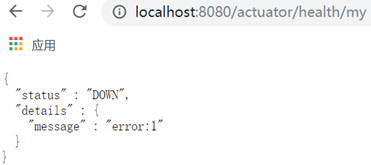
health的对象名默认为类名去掉HealthIndicator后缀,并且首字母小写,因此该例的health对象名为my。
启动应用程序主类Ch102Application,并通过“http://localhost:8080/actuator/health/my”测试运行,效果如图10.22所示。