目录

  • 1 第一单元
    • 1.1 版权声明
    • 1.2 晶体衍射实验实践指导
    • 1.3 晶体学介绍
    • 1.4 衍射实验室培训方案
    • 1.5 晶体衍射实验的总体步骤
    • 1.6 晶体图片
  • 2 晶体上样操作
    • 2.1 仪器开关机步骤
    • 2.2 液氮cryo开关操作
    • 2.3 晶体样品装样过程
    • 2.4 显微镜下的晶体挑选
    • 2.5 衍射实验-晶体上样及对心介绍
    • 2.6 晶体对心过程
    • 2.7 Synergy仪器的开关门及上样
    • 2.8 FRX仪器的开关门及上样
    • 2.9 大分子晶体预先冷冻上样方法
    • 2.10 测角头事故案例
    • 2.11 封管测试方法
  • 3 数据收集软件操作
    • 3.1 晶体衍射实验软件操作
    • 3.2 CrysAlispro-小分子数据采集
      • 3.2.1 测试时长
    • 3.3 CrysAlispro-大分子晶体粗筛设置
    • 3.4 高温实验操作步骤
    • 3.5 晶体衍射数据质量判定
    • 3.6 twin indexing
    • 3.7 append data collection
  • 4 结构解析和精修
    • 4.1 结构解析介绍
    • 4.2 分析软件安装
      • 4.2.1 software updates - platon
      • 4.2.2 software updates - shelx
    • 4.3 结构解析操作
    • 4.4 checkcif report -olex2
    • 4.5 checkcif report - server
    • 4.6 CIF文件生成晶体学数据表
    • 4.7 晶体数据处理并生成MTZ
    • 4.8 晶面指标化-drag mode
    • 4.9 晶面指标化-snap mode
    • 4.10 去除精修的限制命令
    • 4.11 如何查看分析结果-cif文档?
    • 4.12 对称轴上的无序精修-part -1
    • 4.13 EXYZ和EADP-OLEX2
    • 4.14 phasing simulated annealing and refinement
    • 4.15 position disorder modeling - two methods
    • 4.16 phasing - shelxD
    • 4.17 EXYZ-disorder modeling
    • 4.18 Fragment DB application case
    • 4.19 import model using OLEX2
    • 4.20 add symmetry via Platon
    • 4.21 part-1 Na3HCO3CO3
    • 4.22 phasing by MR(分子置换)with PHENIX
    • 4.23 checkcif using platon
  • 5 粉末衍射技术
    • 5.1 粉末衍射样品制备
    • 5.2 简易的粉末衍射零点校正方法
    • 5.3 粉末衍射实验 - 步长0.02?
    • 5.4 结晶度
    • 5.5 实操-寻峰与报告
    • 5.6 溶剂体积计算软件
    • 5.7 择优取向对峰强和峰位置的影响
    • 5.8 样品研磨过筛与不研磨样品测试差异
  • 6 蛋白结构精修
    • 6.1 tutorial结构精修
  • 7 晶体结构缺陷分析技术
    • 7.1 案例1-弥散散射-对分布函数
    • 7.2 案例2-diffuse scattering
    • 7.3 run discus
    • 7.4 read and plot
      • 7.4.1 build a crystal
      • 7.4.2 build a disordered crystal
      • 7.4.3 disorder and vacancy
    • 7.5 RMC fitting to pdf date
  • 8 checkcif回复及其修正
    • 8.1 VRF回复方法
    • 8.2 412_ALERT_2_B and 417_Alert_2_A and 416
    • 8.3 PLAT342_ALERT_3_B回复
    • 8.4 THETM01_ALERT_3_A
    • 8.5 PLAT029_ALERT_3_A
    • 8.6 PLAT910_ALERT_3_B
    • 8.7 PLAT035_ALERT_1_B
    • 8.8 Short H--H contacts
    • 8.9 196_alert_1_B no temp
    • 8.10 312_alert_2_A
    • 8.11 415_alert_2_A
    • 8.12 430_alert_2_A
    • 8.13 O70_Alert_1_A
    • 8.14 934_ALERT_3_A
    • 8.15 316_ALERT_2_A
    • 8.16 413_414_ALERT_2_A
    • 8.17 O35_ALERT_1_B
    • 8.18 196_ALERT_1_B
    • 8.19 112_ALERT_2_B
    • 8.20 417/410_short d-h and h-h
  • 9 审稿人意见回复案例
    • 9.1 实际案例1-限制与对称
    • 9.2 实际案例2- atom list out of sequence
  • 10 虚拟仿真实验
    • 10.1 虚拟仿真实验体验介绍
    • 10.2 虚拟仿真实验体验项目
  • 11 FAQ常见问题
    • 11.1 如何查看晶体结构?
    • 11.2 TwinRot不正常工作
    • 11.3 twin检测
    • 11.4 OLEX多个溶剂分子的输入格式
    • 11.5 如何生成二维衍射图片
    • 11.6 如何判断预实验结果的好坏?
    • 11.7 什么样的数据才能用于结构解析?
    • 11.8 如何查看晶体在测试过程中是否移动?
    • 11.9 衍射点拖尾能用来解析结构吗?
    • 11.10 label atom and bond
    • 11.11 Z and Z'
    • 11.12 Laue group 和 点群
    • 11.13 flack参数的意义
    • 11.14 0.63的占位可以限制在0.5吗?
    • 11.15 P21 或者 P21C
    • 11.16 rms sigma / rms deviation
    • 11.17 how to use CCDC
    • 11.18 change asymmetric unit
    • 11.19 change asymmetric unit - H2O
    • 11.20 data collection and refinement for paper writing
    • 11.21 变换晶胞参数取向和空间群
    • 11.22 查看无序分子占位信息
    • 11.23 crystalline boundary 晶界
    • 11.24 移除无序部分,保存为有序结构-1
    • 11.25 移除无序部分,保存为有序结构-2
    • 11.26 C2/c or I2/a? which one should be choosed?
    • 11.27 Conventional and reduced cell
    • 11.28 twinning introduction
    • 11.29 same.sadi mismatch
    • 11.30 TITL error
    • 11.31 COD结构数据库应用-查找AlF3
    • 11.32 Rint for HKLF4 and HKLF5
    • 11.33 optimal crystal size and shape
    • 11.34 修改datablock的名称
    • 11.35 cif生成粉末衍射图和比对
  • 12 结晶实验操作
    • 12.1 结晶实验-结晶机器人操作
      • 12.1.1 结晶机器人操作
      • 12.1.2 结晶机器人关机步骤
      • 12.1.3 LCP设置不当与96板运行
      • 12.1.4 仪器未按照流程关机事故
      • 12.1.5 毛刷清洗
      • 12.1.6 非正常暂停后重启仪器步骤
      • 12.1.7 泵的开关on 还是off
    • 12.2 使用常见误操作
      • 12.2.1 96针清洗没有清洗
      • 12.2.2 水槽没有归位
      • 12.2.3 导向板未归位
    • 12.3 维护
      • 12.3.1 查看96针状态
      • 12.3.2 导板不能下滑
    • 12.4 考核方法
  • 13 JAN UVEX-P 操作
    • 13.1 UVEX - P 操作步骤
    • 13.2 问题1 - 紫外过曝使用
  • 14 液体配比仪操作
VRF回复方法

General steps for checkcif:

1) go to the website checkcif web

2) use the browse button to upload the cif file

3) send the file for checking

reference: https://journals.iucr.org/services/cif/checking/checkfaq.html


Method 1:

如何正确的使用checkcifVRF? (instruction from prof. Tony)

1) Go to checkcif website; https://checkcif.iucr.org/

2) upload cif file

3) choose the output option for level A and B alerts; then send cif for checking.
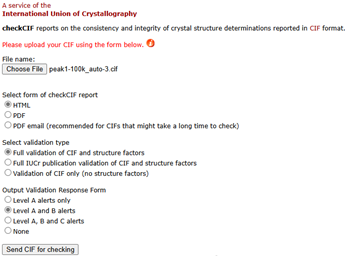

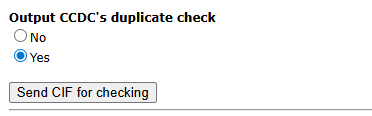
4)choose yes for output CCDC's duplicate check
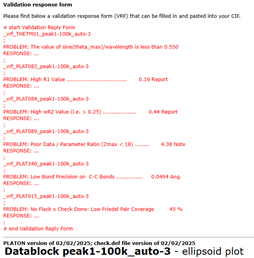
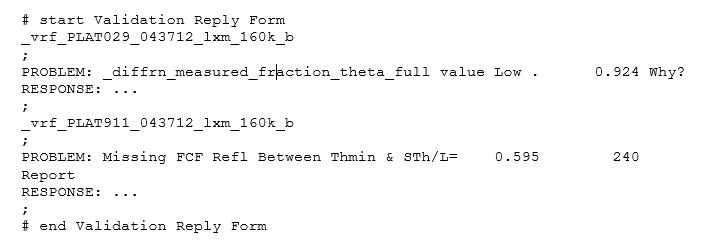
5) add VRF in cif file after the data block.
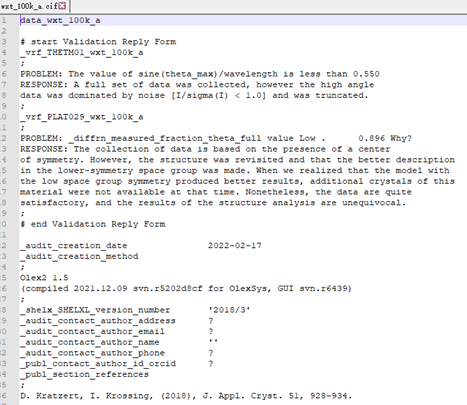

5) Once you have done that, run the checkCIF again with new cif file. 

***very important note: please choose the same alerts output as shown in step 3.

Through checkCIF again and you will see the explanation(s) automatically inserted under the relevant item in the report. If nothing appears, it is usually because you changed the data block name after you inserted the VRF text, because the VRF header has to also contain the same name as the data block. See my attached examples. L2201 is the data block header and the VRF also contains"L2201": _vrf_PLAT420_L2201


Method 2

1 Use olex2 to refine the structure;

2 use platon to validate the structure;

VRF file will be generated by platon.
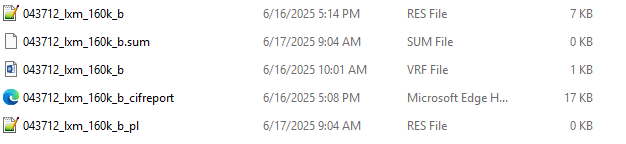

3 copy these lines into the end of the cif  file.
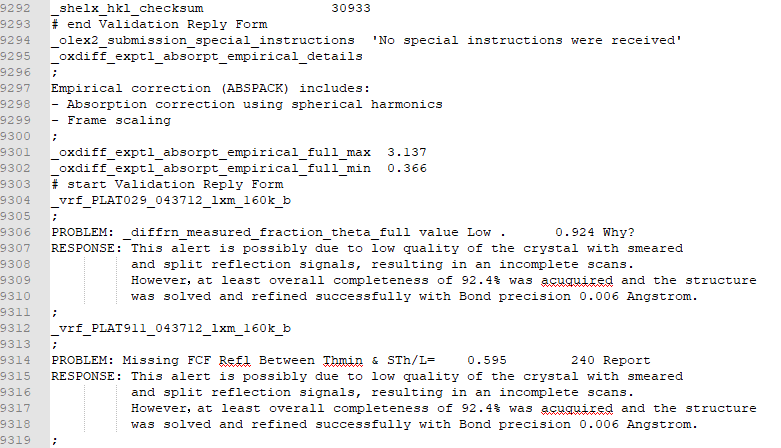

4 use checkcif program embeded in the olex2 for generating checkcif report with Author response.
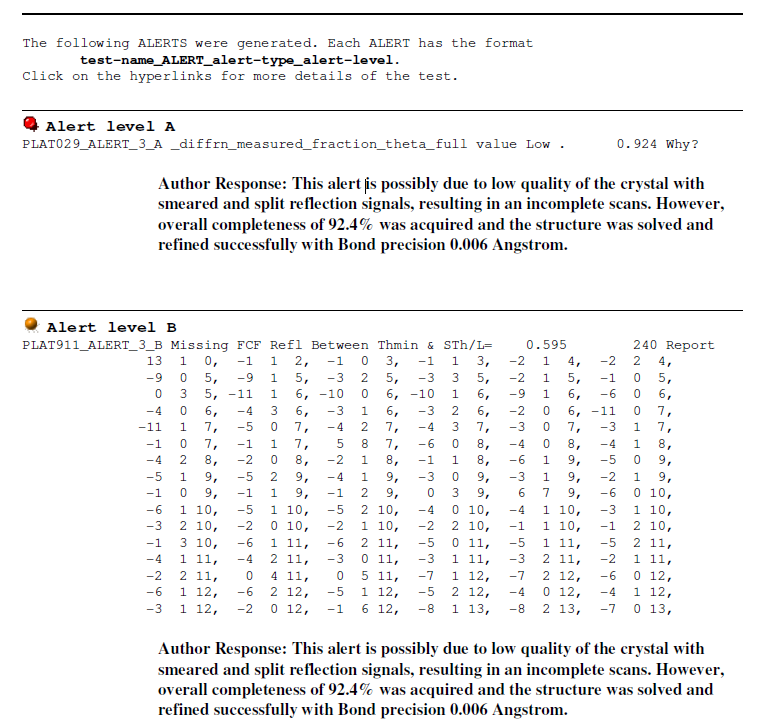


Method 3

1 run checkcif

2 save checkcif file to word format

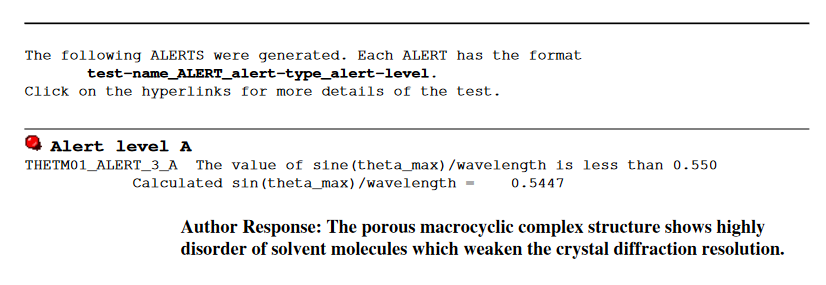
3 insert author response in corresponding place

4 save file *.doc or *.pdf, both are fine.

see example: