
图标:


<!doctype html>
<html>
<head>
<meta charset="utf-8">
<title>17.7jQuery案例七五星评分</title>
<style>
*{
margin:0;
padding:0;
}
li{
list-style-type:none;
}
#starWrap li{
float:left;
position:relative;
width:44px;
height:42px;
margin-right:10px;
cursor:pointer;
}
.height{ background-image:url(imgs/star1.png); }
.noheight{ background-image:url(imgs/star.png); }
#score{
clear:both;
height:42px;
width:44px;
text-align:center;
line-height:42px;
font-size:16px;
font-weight:bolder;
}
</style>
<script src="test/jquery-3.1.1.min.js"></script>
<script>
$(function(){
var score = 0;
$('#starWrap li').mouseenter(function(){
var index = $(this).index();
console.log(index);
$(this).removeClass('noheight').addClass('height')
.prevAll('li').removeClass('noheight').addClass('height');
$(this).nextAll('li').removeClass('height').addClass('noheight');
var s = (index+1)*2;
$('#score').html(s.toFixed(1)+'分');
});
$('#starWrap li').mouseleave(function(){
var $cur = $('#starWrap li.current');
if(score>0)
{
$cur.removeClass('noheight').addClass('height')
$cur.prevAll('li').removeClass('noheight').addClass('height');
$cur.nextAll('li').removeClass('height').addClass('noheight');
$('#score').html(score.toFixed(1)+'分');
}
else
{$('#starWrap li').removeClass('height').addClass('noheight');
$('#score').html('0.0分');
}
});
$('#starWrap li').click(function(){
$(this).addClass('current')
.siblings().removeClass('current');
var index = $(this).index();
score = (index+1)*2;
$('#score').html(s.toFixed(1)+'分');
});
});
</script>
</head>
<body>
<ul id="starWrap">
<li class="noheight"></li>
<li class="noheight"></li>
<li class="noheight"></li>
<li class="noheight"></li>
<li class="noheight"></li>
</ul>
<div id="score">0.0分</div>
</body>
</html>

//////////////////////////////////////////////////////
<!DOCTYPE html>
<html lang="en">
<head>
<meta charset="UTF-8">
<title>jQuery简单实用的五角星评分特效 </title>
<style>
* {
padding: 0;
margin: 0;
}
.comment {
font-size: 40px;
color: darksalmon;
margin:0 auto; width:200px; height:100px;
}
.comment li {
float: left;
cursor:pointer;
}
ul {
list-style: none;
}
</style>
<script src="js/jquery3.3.1.min.js"></script>
<script>
$(function () {
var wjx_s = "★";
var wjx_k = "☆";
//1. 给所有的li注册mouseenter事件
$(".comment li").mouseenter(function () {
//2. 让当前li和前面所有的li变成实心,让后面所有的兄弟变成空心
//前面兄弟:prevAll():
//后面兄弟:nextAll():
$(this).text(wjx_s).prevAll().text(wjx_s);
$(this).nextAll(wjx_k);
});
//2. 离开ul的时候,把所有的li变成空心
$(".comment").mouseleave(function () {
$(this).children().text(wjx_k);
//如果我知道了我刚刚点了那个五角星
//可以让点的那个五角星以及前面的兄弟变成实心就可以。
//4. 找到我点击的那个li
$("li.current").text(wjx_s).prevAll().text(wjx_s)
});
//3. 给所有的li注册点击事件,点击的时候,留下点东西(class)
$(".comment li").click(function () {
$(this).addClass("current").siblings().removeClass("current")
})
})
</script>
</head>
<body>
<br><br><br>
<ul class="comment">
<li>☆</li>
<li>☆</li>
<li>☆</li>
<li>☆</li>
<li>☆</li>
</ul>
</body>
</html>
初始效果图

鼠标单击第三个星效果

/////////////////////////////////////////////////
<!DOCTYPE html>
<html lang="en">
<head>
<meta charset="UTF-8">
<title>jQuery鼠标滑过五角星打分星级评分代码</title>
<script src="js/jquery.js"></script>
<link rel="stylesheet" type="text/css" href="css/css.css">
</head>
<body>
<div id="starRating">
<p class="photo">
<span><i class="high"></i><i class="nohigh"></i></span>
<span><i class="high"></i><i class="nohigh"></i></span>
<span><i class="high"></i><i class="nohigh"></i></span>
<span><i class="high"></i><i class="nohigh"></i></span>
<span><i class="high"></i><i class="nohigh"></i></span>
</p>
<p class="starNum">0.0分</p>
<div class="bottoms">
<a class="garyBtn cancleStar">取消评分</a>
<a class="blueBtn sureStar">确认</a>
</div>
</div>
<script>
$(function () {
//评分
var starRating = 0;
$('.photo span').on('mouseenter',function () {
var index = $(this).index()+1;
$(this).prevAll().find('.high').css('z-index',1)
$(this).find('.high').css('z-index',1)
$(this).nextAll().find('.high').css('z-index',0)
$('.starNum').html((index*2).toFixed(1)+'分')
})
$('.photo').on('mouseleave',function () {
$(this).find('.high').css('z-index',0)
var count = starRating / 2
if(count == 5) {
$('.photo span').find('.high').css('z-index',1);
} else {
$('.photo span').eq(count).prevAll().find('.high').css('z-index',1);
}
$('.starNum').html(starRating.toFixed(1)+'分')
})
$('.photo span').on('click',function () {
var index = $(this).index()+1;
$(this).prevAll().find('.high').css('z-index',1)
$(this).find('.high').css('z-index',1)
starRating = index*2;
$('.starNum').html(starRating.toFixed(1)+'分');
alert('评分:'+(starRating.toFixed(1)+'分'))
})
//取消评分
$('.cancleStar').on('click',function () {
starRating = 0;
$('.photo span').find('.high').css('z-index',0);
$('.starNum').html(starRating.toFixed(1)+'分');
})
//确定评分
$('.sureStar').on('click',function () {
if(starRating===0) {
alert('最低一颗星!');
} else {
alert('评分:'+(starRating.toFixed(1)+'分'))
}
})
})
</script>
</body>
</html>
//样式
#starRating .photo span {
position: relative;
display: inline-block;
width: 44px;
height: 42px;
overflow: hidden;
margin-right: 23px;
cursor: pointer;
}
#starRating .photo span:last-child {
margin-right: 0px;
}
#starRating .photo span .nohigh {
position: absolute;
width: 44px;
height: 42px;
top: 0;
left: 0;
background: url("../img/star.png");
}
#starRating .photo span .high {
position: absolute;
width: 44px;
height: 42px;
top: 0;
left: 0;
background: url("../img/star1.png");
}
#starRating .starNum {
font-size: 26px;
color: #de4414;
margin-top: 4px;
margin-bottom: 10px;
}
#starRating .bottoms {
height: 54px;
border-top: 1px solid #d8d8d8;
}
#starRating .photo {
margin-top: 30px;
}
#starRating .bottoms a {
margin-bottom: 0;
}
#starRating .bottoms .garyBtn {
margin-right: 57px!important;
}
#starRating .bottoms a {
width: 130px;
height: 35px;
line-height: 35px;
border-radius: 3px;
display: inline-block;
font-size: 16px;
transition: all 0.2s linear;
margin: 16px 0 22px;
text-align: center;
cursor: pointer;
}
.garyBtn {
margin-right: 60px!important;
background-color: #e1e1e1;
color: #999999;
}
.blueBtn {
background-color: #1968b1;
color: #fff;
}
.blueBtn:hover {
background: #0e73d0;
}
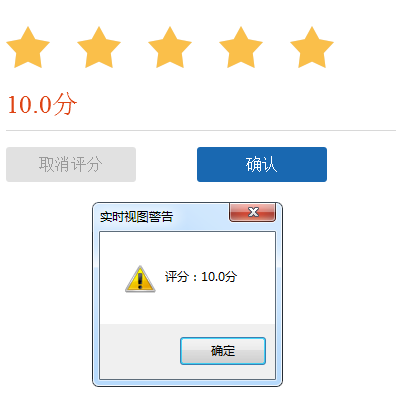
效果图

单击最后一个五角星
///////////////////////////////////////////////////////////////////
<!doctype html>
<html>
<head>
<meta charset="utf-8">
<title>jQuery案例六五角星评分</title>
<script src="../js/jquery-3.1.1.min.js"></script>
<script>
$(function(){
//全局变量
var score = 0;//成绩初始值
//为所有的li注册mouseenter事件
$('#star li').mouseenter(function(){
var index = $(this).index();//获取当前对象索引
var cur_score = (index+1)*2;//计算分值
$('#score').html(cur_score+"分");//设置分数
//将当前li变成实心的星号
$(this).find('.h').show();
$(this).find('.noh').hide();
//当前元素前面的元素设置成实心星号
$(this).prevAll().find('.h').show();
$(this).prevAll().find('.noh').hide();
//当前元素后面的元素设置成空心星号
$(this).nextAll().find('.h').hide();
$(this).nextAll().find('.noh').show();
});
//为所有li注册click事件
$('#star li').click(function(){
var index = $(this).index();//获取当前对象索引
var cur_score = (index+1)*2;//计算分值
//cur_score局部变量
//score全局变量
score = cur_score;
$('#score').html(score+"分");//设置分数
//将当前li变成实心的星号
//将当前li变成实心的星号
$(this).find('.h').show();
$(this).find('.noh').hide();
//当前元素前面的元素设置成实心星号
$(this).prevAll().find('.h').show();
$(this).prevAll().find('.noh').hide();
//当前元素后面的元素设置成空心星号
$(this).nextAll().find('.h').hide();
$(this).nextAll().find('.noh').show();
});
//为ul注册mouseleave事件
$('#star').mouseleave(function(){
$(this).find('.h').hide();
$(this).find('.noh').show();
var n= score/2;
if(n==5)
{
$(this).find('.h').show();
$(this).find('.noh').hide();
}
else{
$('#star li').eq(n).prevAll().find('.h').show();
$('#star li').eq(n).prevAll().find('.noh').hide();
}
//分值
$('#score').html(score+"分");
});
});
</script>
<style>
*{
padding:0;
margin:0;
}
#star{
width:200px;
height:40px;
font-size:40px;
color:#F69;
cursor:pointer;
margin:20px auto;
}
#star li{
list-style-type:none;
float:left;
width:40px;
height:40px;
text-align:center;
line-height:40px;
position:relative;
}
#star li img{
position:absolute;
top:0;
left:0;
width:40px;
height:40px;
}
#star li img.h{
display:none;
}
#score{
width:200px;
height:40px;
line-height:40px;
text-align:center;
font-size:40px;
margin:0 auto;
}
</style>
</head>
<body>
<ul id="star">
<li>
<img class="h" src="img4/star1.png">
<img class="noh" src="img4/star2.png">
</li>
<li>
<img class="h" src="img4/star1.png">
<img class="noh" src="img4/star2.png">
</li>
<li>
<img class="h" src="img4/star1.png">
<img class="noh" src="img4/star2.png">
</li>
<li>
<img class="h" src="img4/star1.png">
<img class="noh" src="img4/star2.png">
</li>
<li>
<img class="h" src="img4/star1.png">
<img class="noh" src="img4/star2.png">
</li>
</ul>
<p id="score">0分</p>
</body>
</html>

