<!doctype html>
<html>
<head>
<meta charset="utf-8">
<title>13.3jQuery元素外插入节点的方法</title>
<script src="../js/jquery-3.1.1.min.js"></script>
<script>
$(function(){
//1.after():在每个匹配的元素后插入内容
//创建一个内容元素
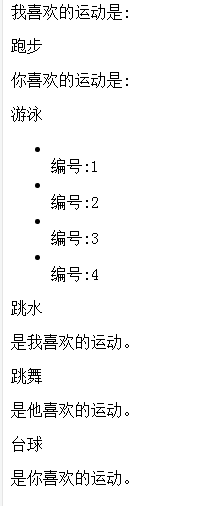
var $run = $("<span>跑步</span>");
//匹配的元素:$('#p1')
//执行方法
$('#p1').after($run);
//执行后代码:<p id="p1">我喜欢的运动是:</p><span>跑步</span>
//2.insertAfert():将所有匹配的元素插入到指定的元素后
var $swim = $("<span>游泳</span>");
$swim.insertAfter($("#p2"));
//执行后的代码:<p id="p1">我喜欢的运动是:</p><span>游泳</span>
//3.after(function(index,html){return "";}):带参数的方法
$("li").after(function(index,html){
return "<span>编号:"+(index+1)+"<span>";
});
//4.before():在每个匹配的元素前插入内容
var $jump = $("<span>跳水</span>");
$("#p3").before($jump);
//5.insertBefore():将所欲匹配元素插入到指定元素前
var $dance = $("<span>跳舞</span>");
$dance.insertBefore($("#p4"));
//6.before(function(index,html){return "";}):带参数的方法
$("#p5").before(function(index,html){
return "<span>台球</span>";
});
});
</script>
</head>
<body>
<p id="p1">我喜欢的运动是:</p>
<p id="p2">你喜欢的运动是:</p>
<ul>
<li></li>
<li></li>
<li></li>
<li></li>
</ul>
<p id="p3">是我喜欢的运动。</p>
<p id="p4">是他喜欢的运动。</p>
<p id="p5">是你喜欢的运动。</p>
</body>
</html>
运行效果