
Section 3 Digital Radiography (DR)
Lead-in Questions
1. Compared with CR, which advantages and limitations does DR have?
2. Could you list the main components of DR?
3. If you were a X-ray technician, do you know how to operate DR correctly? And which details are essential to pay attention?
4. If you were a medical equipment engineer, how would you maintain DR?
5. Could you describe your prediction on the future DR according to your professional experience?
Text
CR solves the digitization of conventional radiology. However, CR cannot realize the overall digitization of X-ray radiography. It does not change the workflow of conventional radiologic examination. Its indirect transformation and indirect reading way inevitably lead to many problems, for example, losing information and scattering in the process of image information processing.
The presence of digital X-ray detector, represented by DR with flat panel detector (FPD), is a great progress of medical radiography technology. Without artificial help, DR can directly transform the X-ray passing through patients into digital images, save and display them in the computer.
1. Operating principle
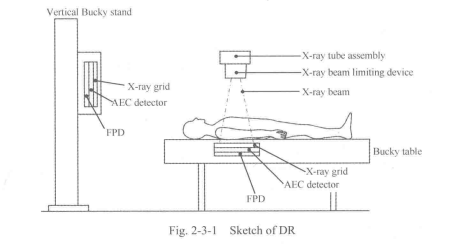
The X-ray high-voltage generator supplies the power required to generate X-rays to the X-ray tube assembly. The X-ray tube assembly generates the X-rays. The generated X-ray beam is adjusted to a set exposure field by the beam limiting device. The X-ray beam passes through the patienfs body and is detected by the automatic exposition control (AEC) detector. Scattered radiation is reduced by the X-ray grid. The flat panel detector detects the X-rays that have passed through the patient's body, converts them into electrical signals using X-ray scintillation effects, and sends the signals (digital image signals) to the digital radiography system(See Fig. 2-3-1).
The digital radiography system performs image processing on the received digital image signals, integrates the corresponding patient infomiation into the obtained data, and then displays the image. The displayed image can be recorded on the hard disk (HD) and transferred to peripheral units (PC, printer, etc.).
1. Features
This system is an X-ray radiography system for radiography examination for clinical purposes, which has the following features.
(1) This system provides high-quality images using a flat panel detector in combination.
(2) The acquired images are displayed on the liquid crystal display (LCD) panel about 3 seconds. The images can then be output to external devices such as image servers or imagers, enabling efficient examination.
(3) The use of the portable FPD allows radiography to be performed at any position according to the patient environment and patient position.
(4) A color LCD screen that can be seen easily has been employed for display. In addition, if the touch panel monitor kit is used, almost all the operations necessary for examination can be performed using the touch panel in the control room.
(5) Almost all the operations are automated, significantly reducing the examination data entry work. Additional radiography and changes in radiography orders based on the type of order, the patient's condition or the patient's physical characteristics can be performed with one-touch operation.
(6) Stable output with less noise and ripple can be obtained under all radiographic conditions because a high-frequency inverter is used.
(7) Various types of image processing can be perfbnned for acquired radiographic images.
2. Configuration
(1) System configuration includes: diagnostic X-ray high-voltage generator; ceiling- suspended tube support; X-ray tube assembly; X-ray beam limiting device; digital radiography (including X-ray flat panel detector); floating-top bucky table; direct radiographic unit.
(2) System options includes: handgrip; tabletop protective mat; tabletop protective mat cover; simple-type compression band; mechanical auto center stop.
(3) Example of the combination of units is seen in Fig, 2-3-2.
(4) Units to be used in the patient environment are as listed below in Table 2-3-1.
3. Environmental conditions
In order to maintain the performance of the system and ensure long service life, be sure to observe the environmental conditions specified below. Failure to do so may result in damage to the FPD. The FPD contains an X-ray detection unit and is sensitive to environmental conditions. Special care is therefore required. If the operating conditions are not observed, the surface temperature of the FPD may increase.
The unit should not be operated in an environment where:
(1) Harmful gases may be present.
(2) Exposure to steam is possible.
(3) Exposure to water droplets is possible.
(4) Exposure to large amounts of dust is possible.
(5) Exposure to oil vapors is possible.
(6) Exposure to salt air is possible.
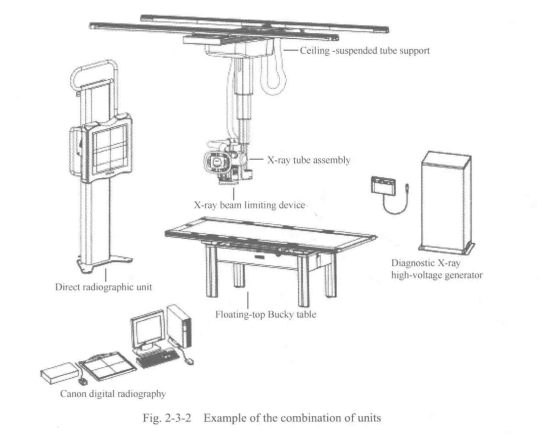
Table 2-3-1 Unites to be used in the patient environment
Unit name | Installed room | Installed locations |
Diagnostic X-ray high-voltage generator Ceiling-suspended tube support X-ray tube assembly X-ray beam limiting device Floating-top Bucky table Direct radiographic unit | Examination room | Other than the patient environment In the patient environment In the patient environment In the patient environment In the patient environment In the patient environment |
Canon digital radiography | Control room | Other than the patient environment |
(7) Exposure to explosive gases is possible.
(8) Exposure to excessive vibration or shock is possible.
(9) The floor is sloped.
(10) Abnormal fluctuations in line voltage may occur.
(11) Excessive drops in line voltage may occur under load.
(12) Exposure to direct sunlight is possible.
(13) Ventilation (after disinfection) is inadequate.
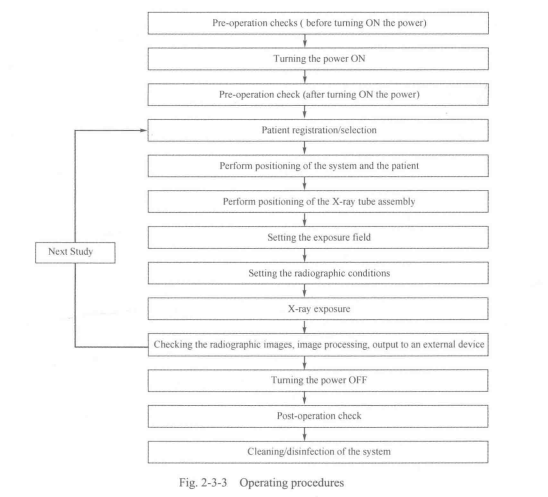
5. Operating procedures
The operating procedures are seen in Fig. 2-3-3 below.
6. Pre-operational checks
To ensure safe and correct system operation, perform the pre-operational checks.
6.1 Checks for the system
6.1.1 Checks before turning ON the power
Confirm that there is no contrast medium or water or blood on the each unit.
6.1.2 Checks after turning ON the power
(1) Check for abnormal sound or smell.
(2) After all units in the system are started, confirm that radiographic images can be displayed.
6.2 Checks for the X-ray high-voltage generator
6.2.1 Checks before turning ON the power
6.2.2 Checks after turning ON the power
(1) Generate X-rays (also for aging); Check kV, mA, s; Checks for abnomial sound (check the rotating sound of the X-ray tube, etc.).
(2) Operation of the intercom, etc.
(3) Confirm that the lamp fbr indicating operating status lights.
(4) Check the door interlock status.
6.3 Checks for the ceiling-suspended tube support
6.3.1 Checks before turning ON the power
6.3.2 Checks after turning ON the power
(1) Rotation and swing operation.
(2) Vertical movement.
(3) Longitudinal/lateral movement.
6.4 Checks for the X-ray beam limiting device
6.4.1 Checks before turning ON the power
6.4.2 Checks after turning ON the power
(1) Confirm that the lamp indicating the selected X-ray tube assembly lights.
(2) Confinn that the light-field lamp lights and goes out normally.
6.5 Checks for the direct radiographic unit
6.5.1 Checks before turning ON the power
(1) Confirm that the appropriate X-ray grid is mounted.
(2) Confirm that the FPD tray can be pulled out/inserted smoothly.
6.5.2 Checks after turning ON the power
6.6 Checks for the digital radiography
6.6.1 Checks before turning ON the power
6.6.2 Checks after turning ON the power
(1) Confirm that the keyboard and touch panel display are operating normally.
(2) Confirm that the touch panel display is not showing an error message.
(3) Confirm that the date is correct.
(4) Confirm that the mirroring drive alarm lamp is not lit red.
(5) Confirm that the FPD power lamp lights.
7. Operating procedures
7.1 Turning ON the power
(1) Turn ON the circuit breaker of the distribution board.
(2) Turn ON the power of the X-ray high-voltage generator.
(3) Turning ON the power of the digital radiography.
7.2 Positioning the patient
Position the patient appropriately, according to the radiographic position or technique used.
7.2.1 Performing radiography using the Bucky table
(1) When radiography with the Bucky table is performed (such as for abdomen), carry out positioning with the patient placed on the tabletop.
(2) Securing the FPD; positioning the patient.
7.2.2 Operating procedures for the direct radiographic unit
(1) If radiography with the direct radiographic unit is being performed (such as chest radiography), ask the patient to stand on the front of the units, and position the patient.
(2) Securing the FPD; adjustment of the image receptor; positioning the patient; lateral radiography; removing the FPD.
7.3 Positioning of the X-ray tube assembly
Use the ceiling-suspended tube support to move the X-ray tube assembly to the radiographic center relative to the positioned patient and the FPD.
7.4 Operating procedures fbr the X-ray beam limiting device
Set the radiation field; set the beam quality filter.
7.5 Radiography with the digital radiography
7.6 Operating procedures fbr the X-ray high-voltage generator
Set the radiographic conditions manually; set and register the radiographic condition programs; automatic exposure control (AEC) setting.
7.7 Turning OFF the power
Set the power switch of the diagnostic X-ray high-voltage generator to OFF. The system power is turned OFF. Turn OFF the power of the digital radiography. Set the breaker at the distribution board to OFF.
8. Post-operational checks
After use of the system, perform the following checks to ensure that the system is ready fbr the next use.
8.1 Post-operational checks of the system
8.2 Post-operational checks of the ceiling-suspended tube support
Set the tube support position as below.
(1) Vertical movement: uppermost position;
(2) Longitudinal and lateral movements: stroke end;
(3) Rotational movements: position.
8.3 Post-operational checks of the X-ray beam limiting device
The X-ray beam limiting device should be returned to the standard rotation position.
8.4 Post-operational checks of the floating-top bucky table
8.5 Post-operational checks of the direct radiographic unit
8.6 Post-operational checks of the digital radiography
(1) Checks before turning OFF the power.
(2) Checks after turning OFF the power.
(3) Installation check; safety check; cleanliness check.
8.7 Cleaning
After operating the system, clean the system, the units used in combination and the room.
8.8 Disinfection
8.9 Sterilization
9. Preventive maintenance
Preventive maintenance is necessary to ensure the safety and performance of the system. It is the user's responsibility to perform or arrange fbr preventive maintenance of the unit.
Daily checks, periodic inspection and replacement of consumable parts, and periodically replaced parts are included in preventive maintenance.
New Words
beam [bi:m] | n.光束 |
scintillation [.smt^lefan] | n.闪烁 |
scatter ['skaeto] | vt.散射 |
server ['s3:vs] | n.服务器 |
registration [red3i'streijbn] | n.注册 |
abnormal [aeb^onnl] | adj.异常的 |
status [*steitos] | n.状态 |
flicker ['fliks] | vi.闪烁 |
tray [trei] | n.托盘 |
vertical ['v3:tikl] | adj.垂直的,直立的 |
longitudinal [.londsi'tjuzdml] | adj.纵向的 |
inspection [m*spekjbn] | n.检査 |
periodic [.piorfndik] | adj.定期的 |
performance [p9,fb:mans] | ”.性能 |
lateral ['lastarol] | adj.横向的,侧面的 |
sterilization [.sterolafzeijsn] | n.消毒 |
disinfection [.disin'feljbn] | n.杀菌 |
maintenance ['memtansns] | n.维护 |
preventive [prfventiv] | adj.预防的 |
Professional Phrases
1. digital radiography
2. exposure field
3. scattered radiation
4. flat panel detector (FPD)
5. high-frequency inverter
6. X-ray beam limiting device
7. light-field lamp
8. preventive maintenance
9. X-ray high-voltage generator
10. ceiling-suspended tube support
11. X-ray tube assembly
12. fioating-top Bucky table
13. direct radiographic unit
14. handgrip
15. tabletop protective mat
16. tabletop protective mat cover床板护垫套
17. simple-type compression band简 易式压力带
18. mechanical auto center stop机械制动组件
Key Notes to the Text
1. Its indirect transformation and indirect reading way inevitably lead to many problems, for example, losing information and scattering in the process of image information processing.
它(CR)的间接转换、间接读出方式不可避免地引发了许多问题,比如,在影像信息处 理过程中存在着散射及信息丢失等问题。
2. The generated X-ray beam is adjusted to a set exposure field by the beam limiting device.
X射线限束器可调节发射的X射线束的辐射范围。
3. The digital radiography system performs image processing on the received digital image signals, integrates the corresponding patient information into the obtained data, and then displays the image.
数字X射线成像系统对收到的数字图像信号进行处理,与对应的病人信息整合,并将 其显示在显示器上。
4. If radiography with the direct radiographic unit is being performed (such as chest radiography), ask the patient to stand on the front of the units, and position the patient.
如果需要直接数字化摄影单元对胸部拍摄,让患者站在立式摄影架前定位。
Item Detection
I ・ Answer the following questions according to the text.
1. Compared with CR, what is the advantage of DR?
2. Which components are the basic configuration of DR?
3. Referring to environmental conditions, in which situation is DR forbidden to be operated?
4. How can technicians perform an examination with DR?
5. What should technicians do after DR examination?
II. Translate the following professional words into Chinese.
1. assembly2. portable3. intercom4. automate
5. mount6. replacement7. peripheral
III. Translate the following professional phrases into Chinese.
1. hard disk2. peripheral unit3. pre-operational check
4. post-operational check5. system configuration6. system options
7. periodic inspection
IV. Translate the following sentences into Chinese.
1. Without artificial help, DR can directly transform the X-ray passing through patients into digital images, save and display them in the computer.
2. The flat panel detector detects the X-rays that have passed through the patient's body, converts
them into electrical signals using X-ray scintillation effects, and sends the signals (digital image signals) to the digital radiography system.
3. Stable output with less noise and ripple can be obtained under all radiographic conditions because a high-frequency inverter is used.
4. Preventive maintenance is necessary to ensure the safety and performance of the system.
Scenario Simulation
After passed the interview, Darcy was asked to take a conventional medical examination for entry. Chest radiography is one of the examination. Thus, he came to the radiology department.
Darcy: Hi. Here is the slip for my examination. The doctor asked me to have my chest X-rayed here.
Terrance: OK. Let's check the infbnnation first. Darcy, right? And your examination is Chest PA &LAT.
Darcy: Yes.
Terrance: Please follow my tips and corporate with me. Take off your jacket and accessories in order to get a clear image. And stand in front of the detector like this. When asked to hold your breathe, you must have a deep breathe and hold for a few seconds.
Darcy: OK.
After about five seconds. Terrance Exposed and Came in.
Terrance: Finished. Wear your clothes and accessories.
Darcy: Thank you. When can I get my result?
Terrance: We will send results directly to your company. If you need any details, please ask them.
Darcy: I get it. Bye.

