
【例7-4】解析网络JSON数据
直接使用【例7-3】的布局文件activity_volley.xml
教学视频
主控制程序WeatherActivity.java的源代码如下:
package com.example.chap07;
import android.os.Bundle;
import android.util.Log;
import android.view.View;
import android.widget.Button;
import android.widget.TextView;
import androidx.appcompat.app.AppCompatActivity;
import com.android.volley.NetworkResponse;
import com.android.volley.ParseError;
import com.android.volley.RequestQueue;
import com.android.volley.Response;
import com.android.volley.VolleyError;
import com.android.volley.toolbox.HttpHeaderParser;
import com.android.volley.toolbox.JsonObjectRequest;
import com.android.volley.toolbox.Volley;
import org.json.JSONException;
import org.json.JSONObject;
import java.io.UnsupportedEncodingException;
/*JSON数据样本
{ "weatherinfo": {
"city": "北京",
"cityid": "101010100",
"temp1": "18℃",
"temp2": "31℃",
"weather": "多云转阴",
"img1": "d1.gif",
"img2": "n1.gif",
"ptime": "08:00"
}
}*/
//【例7-4】应用Volley框架解析JSON数据。
public class WeatherActivity extends AppCompatActivity
implements View.OnClickListener {
Button Btn;
TextView txt;
String url = "http://www.weather.com.cn/data/cityinfo/101010100.html";
@Override
protected void onCreate(Bundle savedInstanceState) {
super.onCreate(savedInstanceState);
setContentView(R.layout.activity_volley);
Btn = (Button) findViewById(R.id.btn);
txt = (TextView) findViewById(R.id.txt);
Btn.setOnClickListener(this);
}
@Override
public void onClick(View v) {
Response.Listener alistener = new Response.Listener<JSONObject>(){
@Override
public void onResponse(JSONObject response) {
try {
JSONObject mjson=response.getJSONObject("weatherinfo");
String city=new String(mjson.getString("city"));
String cityid=new String(mjson.getString("cityid"));
String temp1=new String(mjson.getString("temp1"));
String temp2=new String(mjson.getString("temp2"));
String weather=new String(mjson.getString("weather"));
String img1=new String(mjson.getString("img1"));
String img2=new String(mjson.getString("img2"));
String ptime=new String(mjson.getString("ptime"));
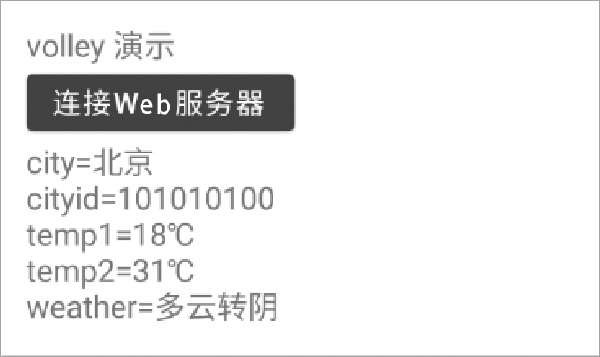
String s="city=" + city + "\ncityid=" + cityid + "\ntemp1="
+ temp1 + "\ntemp2=" + temp2 + "\nweather=" + weather;
txt.setText(s);
} catch (JSONException e) {
e.printStackTrace();
}
}
};
// 初始化请求队列
RequestQueue mQueue = Volley.newRequestQueue(this);
// 提要求,接收JSON对象
JsonObjectRequest request = new JsonObjectRequest(
url,
alistener,
volleyError -> txt.setText("网页访问失败"));
// 请求队列把要求带上
mQueue.add(request);
}
}
打开AndroidManifest.xml,设置网络权限,配置要启动的Activity类名为WeatherActivity。

