
【例7-3】 从Web服务器读取JSON数据
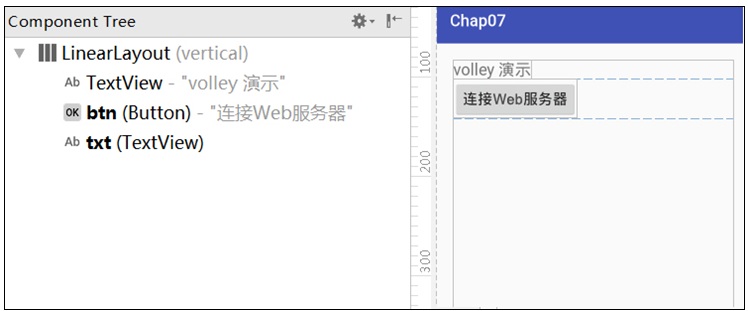
可搭建一个服务器放JSON文件jsonData.json,或者去外网访问JSON数据,例如中国天气网北京的数据:
http://www.weather.com.cn/data/cityinfo/101010100.html
教材准备的jsonData.json文件内容如下:
{"weatherinfo":{"city":"北京","cityid":"101010100","temp1":"18℃","temp2":"31℃","weather":"多云转阴", "img1":"d1.gif", "img2":"n1.gif", "ptime":"08:00"}}
教学视频
布局文件activity_volley.xml源代码如下:
<?xml version="1.0" encoding="utf-8"?>
<!--【例7-3】应用Volley框架从Web服务器读取JSON数据-->
<LinearLayout xmlns:android="http://schemas.android.com/apk/res/android"
android:layout_width="match_parent"
android:layout_height="match_parent"
android:layout_marginLeft="20dp"
android:layout_marginRight="20dp"
android:layout_marginTop="20dp"
android:orientation="vertical">
<TextView
android:layout_width="wrap_content"
android:layout_height="wrap_content"
android:text="volley 演示"
android:textSize="20sp" />
<Button
android:layout_width="wrap_content"
android:layout_height="wrap_content"
android:text="连接Web服务器"
android:id="@+id/btn"
android:textSize="18sp" />
<TextView
android:id="@+id/txt"
android:layout_width="wrap_content"
android:layout_height="wrap_content"
android:textSize="20sp"
android:text=""
/>
</LinearLayout>
控制文件VolleyActivity.java的源代码如下:
package com.example.chap07;
import android.os.Bundle;
import android.util.Log;
import android.view.View;
import android.widget.Button;
import android.widget.TextView;
import com.android.volley.NetworkResponse;
import com.android.volley.ParseError;
import com.android.volley.RequestQueue;
import com.android.volley.Response;
import com.android.volley.VolleyError;
import com.android.volley.toolbox.HttpHeaderParser;
import com.android.volley.toolbox.StringRequest;
import com.android.volley.toolbox.Volley;
import androidx.appcompat.app.AppCompatActivity;
import java.io.UnsupportedEncodingException;
//【例7-3】应用Volley框架从Web服务器读取JSON数据
public class VolleyActivity extends AppCompatActivity
implements View.OnClickListener
{
Button Btn;
TextView txt;
@Override
protected void onCreate(Bundle savedInstanceState) {
super.onCreate(savedInstanceState);
setContentView(R.layout.activity_volley);
Btn=(Button)findViewById(R.id.btn);
txt = (TextView)findViewById(R.id.txt);
Btn.setOnClickListener(this);
}
//String url="http://www.weather.com.cn/data/city3jdata/china.html";//大的地区编号
//String url="http://www.weather.com.cn/data/city3jdata/provshi/10128.html"; //广东省城市编号
String url="http://www.weather.com.cn/data/cityinfo/101010100.html"; //北京天气
@Override
public void onClick(View v) {
RequestQueue mQueue = Volley.newRequestQueue(this);
StringRequest stringRequest = new StringRequest(
//第 1个参数,目标服务器的URL地址
url,
//第2个参数,服务器响应成功的回调
new Response.Listener<String>() { //Volley的监听器
@Override
public void onResponse(String response)
{ txt.setText(response); }//onResponse()方法获取接收到的数据值
},
//第3个参数,服务器响应失败的回调
new Response.ErrorListener() {
@Override
public void onErrorResponse(VolleyError error)
{ Log.e("TAG", error.getMessage(), error); }
})
{
@Override
protected Response<String> parseNetworkResponse(
NetworkResponse response) {
try { //将Volley默认的ISO-8859-1格式转换为utf-8格式
String jsonString = new String(response.data, "UTF-8"); //要和前面的String 类型一致
return Response.success(jsonString,
HttpHeaderParser.parseCacheHeaders(response));
} catch (UnsupportedEncodingException e) {
return Response.error(new ParseError(e));
} catch (Exception je) {
return Response.error(new ParseError(je)) ;
}
}
};
mQueue.add(stringRequest);
} //onClick()_end
}
打开AndroidManifest.xml,设置网络权限,配置要启动的Activity类名为VolleyActivity。

