
【例6-4】 ImageView图像浏览示例
将事先准备好的多张图片复制到资源drawable目录。
教学视频
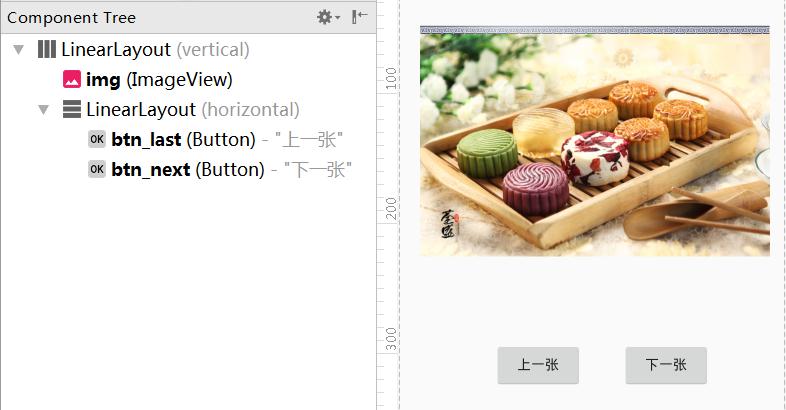
布局文件layout_photo.xml的源代码
<?xml version="1.0" encoding="utf-8"?>
<!--【例6-4】ImageView图像浏览示例。 -->
<LinearLayout xmlns:android="http://schemas.android.com/apk/res/android"
android:layout_width="fill_parent"
android:layout_height="fill_parent"
android:gravity="center|fill"
android:orientation="vertical"
android:layout_marginTop="20dp"
android:layout_marginLeft="20dp">
<ImageView
android:id="@+id/img"
android:layout_width="350dip"
android:layout_height="400dip"
android:layout_centerVertical="true"
android:src="@drawable/pic2" />
<LinearLayout
android:layout_width="fill_parent"
android:layout_height="wrap_content"
android:gravity="center"
android:orientation="horizontal">
<Button
android:id="@+id/btn_last"
android:layout_width="wrap_content"
android:layout_height="wrap_content"
android:text="上一张" />
<Button
android:id="@+id/btn_next"
android:layout_width="wrap_content"
android:layout_height="wrap_content"
android:layout_marginLeft="40dp"
android:text="下一张" />
</LinearLayout>
</LinearLayout>
控制文件PhotoActivity.java的源代码如下:
package com.example.chap06;
import android.app.Activity;
import android.os.Bundle;
import android.view.View;
import android.view.View.OnClickListener;
import android.widget.Button;
import android.widget.ImageView;
//【例6-4】ImageView图像浏览示例。
public class PhotoActivity extends Activity
implements OnClickListener
{
ImageView img;
Button btn_last, btn_next;
//存放图片id的int数组
private int[] imgs={
R.drawable.pic0,
R.drawable.pic1,
R.drawable.pic2 };
int index=1;
@Override
public void onCreate(Bundle savedInstanceState) {
super.onCreate(savedInstanceState);
setContentView(R.layout.layout_photo);
img = (ImageView)findViewById(R.id.img);
btn_last = (Button)findViewById(R.id.btn_last);
btn_next = (Button)findViewById(R.id.btn_next);
btn_last.setOnClickListener(this);
btn_next.setOnClickListener(this);
img.setScaleType(ImageView.ScaleType.CENTER_CROP);
}
public void onClick(View v)
{
if(v==btn_last)
{
if(index>0)
index--;
else
index=imgs.length-1;
}
if(v==btn_next)
{
if(index<imgs.length-1)
index++;
else
index=0;
}
img.setImageResource(imgs[index]);
}
}
打开项目配置文件AndroidManifest.xml,配置要启动的Activity类名为 PhotoActivity。

