
【例5-3】 解析JSON格式数据示例
这里设计三种示例:解析单个json数据,解析多个json数据,解析json文件。
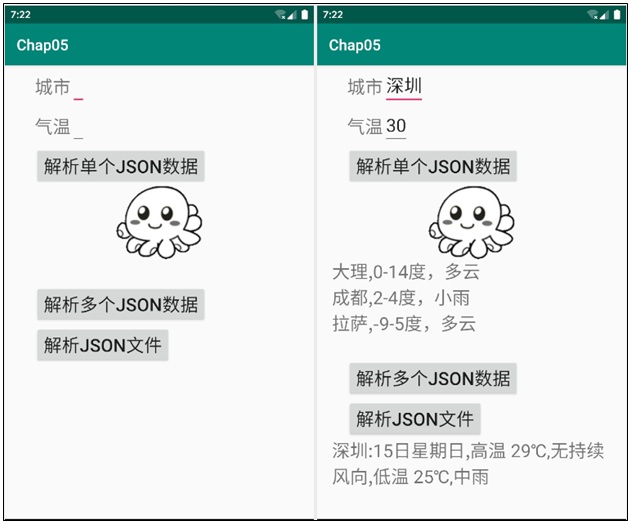
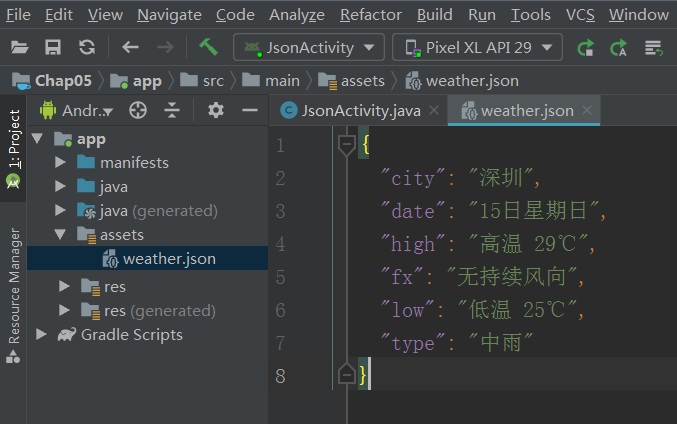
JSON是一种轻量级的数据交换格式,制作一个文本文件weather.json放到assets目录。文件weather.json内容如下:
{"city":"深圳","date":"15日星期日","high":"高温 29℃","fx":"无持续风向","low":"低温 25℃","type":"中雨"}
教学视频
布局文件 activity_json.xml的源代码
<?xml version="1.0" encoding="utf-8"?>
<LinearLayout xmlns:android="http://schemas.android.com/apk/res/android"
xmlns:app="http://schemas.android.com/apk/res-auto"
android:layout_width="match_parent"
android:layout_height="match_parent"
android:layout_marginLeft="20dp"
android:layout_marginRight="20dp"
android:orientation="vertical"
android:weightSum="1">
<LinearLayout
android:layout_width="match_parent"
android:layout_height="wrap_content"
android:orientation="horizontal">
<TextView
android:id="@+id/textView"
android:layout_width="wrap_content"
android:layout_height="wrap_content"
android:layout_marginLeft="20dp"
android:layout_marginTop="2dp"
android:text="城市"
android:textSize="24sp" />
<EditText
android:id="@+id/editText"
android:layout_width="wrap_content"
android:layout_height="wrap_content"
android:inputType="textPersonName"
android:textSize="24sp" />
</LinearLayout>
<LinearLayout
android:layout_width="match_parent"
android:layout_height="wrap_content"
android:orientation="horizontal">
<TextView
android:id="@+id/textView2"
android:layout_width="wrap_content"
android:layout_height="wrap_content"
android:layout_marginLeft="20dp"
android:layout_marginTop="2dp"
android:text="气温"
android:textSize="24sp" />
<EditText
android:id="@+id/editText2"
android:layout_width="wrap_content"
android:layout_height="wrap_content"
android:inputType="textPersonName"
android:textSize="24sp" />
</LinearLayout>
<LinearLayout
android:layout_width="match_parent"
android:layout_height="wrap_content"
android:orientation="horizontal">
<Button
android:id="@+id/jsonBtn"
android:layout_width="wrap_content"
android:layout_height="wrap_content"
android:layout_marginLeft="20dp"
android:layout_marginTop="2dp"
android:text="解析单个json数据"
android:textSize="24sp" />
</LinearLayout>
<ImageView
android:id="@+id/imageView"
android:layout_width="match_parent"
android:layout_height="wrap_content"
app:srcCompat="@drawable/logo" />
<LinearLayout
android:layout_width="match_parent"
android:layout_height="wrap_content"
android:orientation="horizontal">
<TextView
android:id="@+id/txt3"
android:layout_width="match_parent"
android:layout_height="wrap_content"
android:textSize="24sp" />
</LinearLayout>
<LinearLayout
android:layout_width="wrap_content"
android:layout_height="wrap_content"
android:orientation="vertical">
<Button
android:id="@+id/arrayBtn"
android:layout_width="wrap_content"
android:layout_height="wrap_content"
android:layout_marginLeft="20dp"
android:layout_marginTop="2dp"
android:text="解析多个json数据"
android:textSize="24sp" />
<Button
android:id="@+id/fileBtn"
android:layout_width="wrap_content"
android:layout_height="wrap_content"
android:layout_marginLeft="20dp"
android:layout_marginTop="2dp"
android:text="解析json文件"
android:textSize="24sp" />
</LinearLayout>
<LinearLayout
android:layout_width="match_parent"
android:layout_height="wrap_content"
android:orientation="horizontal">
<TextView
android:id="@+id/txt4"
android:layout_width="match_parent"
android:layout_height="wrap_content"
android:textSize="24sp" />
</LinearLayout>
</LinearLayout>
控制文件JsonActivity.java源代码
package com.myapp.chap05;
import androidx.appcompat.app.AppCompatActivity;
import android.content.res.AssetManager;
import android.os.Bundle;
import android.view.View;
import android.widget.Button;
import android.widget.EditText;
import android.widget.TextView;
import org.json.JSONArray;
import org.json.JSONException;
import org.json.JSONObject;
import java.io.BufferedReader;
import java.io.FileInputStream;
import java.io.FileNotFoundException;
import java.io.IOException;
import java.io.InputStreamReader;
public class JsonActivity extends AppCompatActivity implements View.OnClickListener {
EditText editText,editText2;
TextView txt3,txt4;
Button jsonBtn, arrayBtn, fileBtn;
@Override
protected void onCreate(Bundle savedInstanceState) {
super.onCreate(savedInstanceState);
setContentView(R.layout.activity_json);
editText = (EditText) findViewById(R.id.editText);
editText2 = (EditText) findViewById(R.id.editText2);
txt3 = (TextView) findViewById(R.id.txt3);
txt4 = (TextView) findViewById(R.id.txt4);
jsonBtn = (Button) findViewById(R.id.jsonBtn);
arrayBtn = (Button) findViewById(R.id.arrayBtn);
fileBtn = (Button) findViewById(R.id.fileBtn);
jsonBtn.setOnClickListener(this);
arrayBtn.setOnClickListener(this);
fileBtn.setOnClickListener(this);
}
@Override
public void onClick(View view) {
if(view == jsonBtn){
setJsonData();
}else if(view == arrayBtn){
setArrayData();
}else if(view == fileBtn){
getJsonFile();
}
}
//解析单个JSON对象
private void setJsonData(){
try {
JSONObject test = new JSONObject();
test.put("城市", "深圳");
test.put("气温", 30);
String cs = test.getString("城市");
int qw = test.getInt("气温");
editText.setText(cs);
editText2.setText(Integer.toString(qw));
}catch (JSONException e){e.printStackTrace();}
}
//解析JSON数组
private void setArrayData(){
JSONObject p1,p2,p3;
JSONArray weather;
try{
//注意,英文的冒号和逗号是语法,中文的逗号是普通字符
String str1 = "{城市:成都,气温:21-28度,小雨}";
String str2 = "{城市:大理,气温:0-14度,多云}";
String str3 = "{城市:拉萨,气温:-9-5度,多云}";
//3个JSON对象和1个JSON数组
p1=new JSONObject(str1);
p2=new JSONObject(str2);
p3=new JSONObject(str3);
weather = new JSONArray();
weather.put(p1);
weather.put(p2);
weather.put(p3);
String jc,jw;
int length = weather.length();
for(int i=0; i<length; i++){ //遍历JSON数组
JSONObject jsonObject = weather.getJSONObject(i);
jc = jsonObject.getString("城市") + ":";
jw = jsonObject.getString("气温") + "\n";
txt3.append(jc+jw);
}
}catch (JSONException e){e.printStackTrace();}
}
//解析JSON文件
private void getJsonFile(){
AssetManager assetManager = getAssets();//获得assets资源管理器
String strs="";
String fileName="weather.json";//要解析的JSON文件
try {
InputStreamReader reader = new InputStreamReader(
assetManager.open(fileName),"utf-8");
BufferedReader buffer = new BufferedReader(reader);
String line;
StringBuilder stringBuilder = new StringBuilder(); //可变的字符序列
while((line=buffer.readLine())!=null){
stringBuilder.append(line);
}
strs = stringBuilder.toString();
buffer.close();
reader.close();
JSONObject jsonObject = new JSONObject(strs);
String city, date, high, fx, low, type;
city = jsonObject.getString("city");
date = jsonObject.getString("date");
high = jsonObject.getString("high");
fx = jsonObject.getString("fx");
low = jsonObject.getString("low");
type = jsonObject.getString("type");
txt4.setText(city+":"+date+","+high+","+fx+","+low+","+type);
}catch (IOException | JSONException e){
txt4.append("FileNotFound");
}
}
}
打开项目配置文件AndroidManifest.xml,配置要启动的Activity类名
<activity android:name=".JsonActivity">
<intent-filter>
<action android:name="android.intent.action.MAIN" />
<category android:name="android.intent.category.LAUNCHER" />
</intent-filter>
</activity>

