
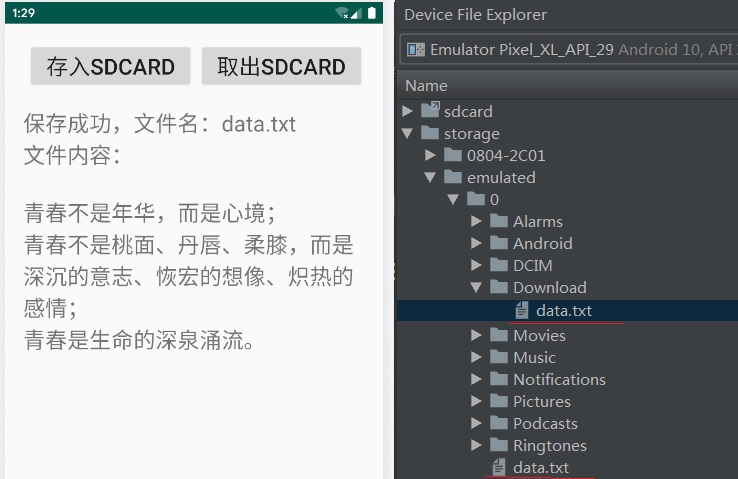
【例5-2】 从SD卡读文件和写文件示例
程序将数据文件存储到外部设备,如SD卡。外部存储的文件可被共享,被浏览、修改和删除。使用外部设备前用Environment的方法getExternalStorageState()来确认外部设备是否可用。
教学视频
布局文件 activity_sd.xml的源代码
<?xml version="1.0" encoding="utf-8"?>
<LinearLayout xmlns:android="http://schemas.android.com/apk/res/android"
xmlns:tools="http://schemas.android.com/tools"
android:id="@+id/activity_share_preference"
android:layout_width="match_parent"
android:layout_height="match_parent"
android:orientation="vertical"
android:layout_marginLeft="20dp"
android:layout_marginRight="20dp"
android:layout_marginTop="20dp"
android:weightSum="1">
<LinearLayout
android:layout_width="match_parent"
android:layout_height="wrap_content"
android:orientation="horizontal">
<Button
android:id="@+id/btn_Save"
android:layout_width="0dp"
android:layout_height="wrap_content"
android:layout_marginLeft="5dp"
android:layout_weight="1"
android:onClick ="Click"
android:text="存入sdcard"
android:textSize="24sp" />
<Button
android:id="@+id/btn_Get"
android:layout_width="0dp"
android:layout_height="wrap_content"
android:layout_marginLeft="5dp"
android:layout_weight="1"
android:onClick ="Click"
android:text="取出sdcard"
android:textSize="24sp" />
</LinearLayout>
<LinearLayout
android:layout_width="match_parent"
android:layout_height="wrap_content"
android:orientation="horizontal"
android:layout_marginTop="20dp">
</LinearLayout>
<TextView
android:id="@+id/txt"
android:layout_width="match_parent"
android:layout_height="wrap_content"
android:layout_weight="0.44"
android:textSize="24sp" />
</LinearLayout>
控制文件SdFileActivity.java源代码
package com.myapp.chap05;
import android.Manifest;
import android.app.Activity;
import android.content.Context;
import android.content.pm.PackageManager;
import android.os.Bundle;
import android.os.Environment;
import android.view.View;
import android.widget.Button;
import android.widget.TextView;
import androidx.appcompat.app.AppCompatActivity;
import androidx.core.app.ActivityCompat;
import java.io.File;
import java.io.FileInputStream;
import java.io.FileOutputStream;
import java.io.IOException;
public class SdFileActivity extends AppCompatActivity {
Button btn_Save,btn_Get;
TextView txt;
static final String filename ="data.txt";
// Storage Permissions
private static final int REQUEST_EXTERNAL_STORAGE = 1;
private static String[] PERMISSIONS_STORAGE = {
Manifest.permission.READ_EXTERNAL_STORAGE,
Manifest.permission.WRITE_EXTERNAL_STORAGE
};
public static void verifyStoragePermissions(Activity activity) {
// Check if we have write permission
int permission =
ActivityCompat.checkSelfPermission(activity, Manifest.permission.WRITE_EXTERNAL_STORAGE);
if (permission != PackageManager.PERMISSION_GRANTED) {
// We don't have permission so prompt the user
ActivityCompat.requestPermissions(
activity,
PERMISSIONS_STORAGE,
REQUEST_EXTERNAL_STORAGE
);
}
}
@Override
protected void onCreate(Bundle savedInstanceState) {
super.onCreate(savedInstanceState);
setContentView(R.layout.activity_sd);
verifyStoragePermissions(this);
btn_Save = (Button)findViewById(R.id.btn_Save);
btn_Get = (Button)findViewById(R.id.btn_Get);
txt = (TextView)findViewById(R.id.txt);
btn_Save.setOnClickListener(new mClick11());
btn_Get.setOnClickListener(new mClick12());
}
//存入file,写文件
class mClick11 implements View.OnClickListener{
@Override
public void onClick(View view) {//存入file,写文件
String str = getString(R.string.hello);
FileOutputStream f_out;
String state = Environment.getExternalStorageState();
if(state.equals(Environment.MEDIA_MOUNTED)) {
try {
//File path = Environment.getExternalStoragePublicDirectory(Environment.DIRECTORY_DOWNLOADS);//sd
File path = Environment.getExternalStorageDirectory();
File file = new File(path, filename);
f_out = new FileOutputStream(file);
//f_out=openFileOutput(filename, Context.MODE_PRIVATE);
f_out.write(str.getBytes());
f_out.close();
} catch (IOException e) {
e.printStackTrace();
}
txt.setText("写文件\n" + filename + "\n" + str);
}
}
}
//取出file,读文件
class mClick12 implements View.OnClickListener{
@Override
public void onClick(View view) {
FileInputStream fis;
String state = Environment.getExternalStorageState();
if (state.equals(Environment.MEDIA_MOUNTED)) {
try {
File path = Environment.getExternalStorageDirectory();
File file = new File(path, filename);
fis = new FileInputStream(file);
//f_in=openFileInput(filename);
//available()取得文件总字节数
byte[] buffer = new byte[fis.available()];
fis.read(buffer);
String str = new String(buffer);
txt.setText("读文件" + filename + "\n" + str);
} catch (IOException e) {
e.printStackTrace();
}
}
}
}
}
打开项目配置文件AndroidManifest.xml,添加SD卡的读写权限,修改工程要启动的Activity类名
<activity android:name=".SdFileActivity">
<intent-filter>
<action android:name="android.intent.action.MAIN" />
<category android:name="android.intent.category.LAUNCHER" />
</intent-filter>
</activity>
</application>
<uses-permission android:name="android.permission.READ_EXTERNAL_STORAGE" />
<uses-permission android:name="android.permission.WRITE_EXTERNAL_STORAGE" />
</manifest>

