
【例4-5】设计一个简单的后台音乐服务程序
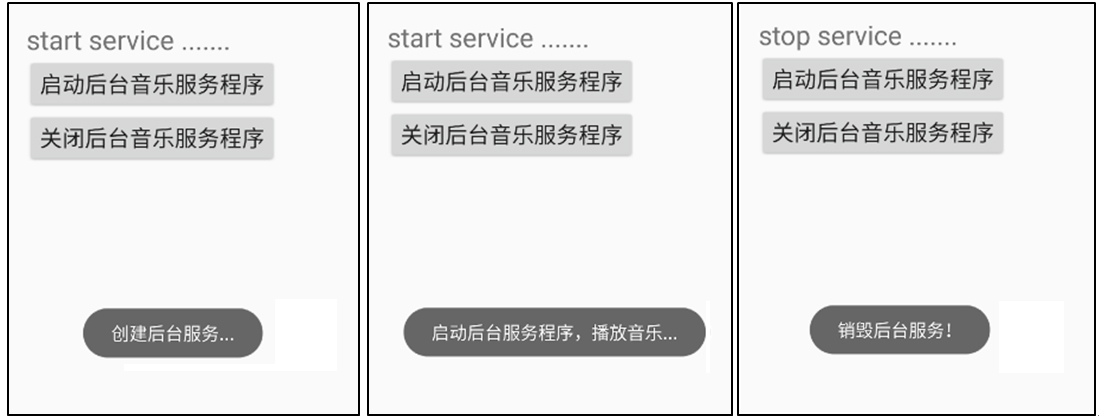
通过一个按钮启动后台服务,在服务程序中播放音乐文件,演示服务程序的创建、启动,再通过另一个按钮关闭后台服务,演示服务程序的销毁过程。
教学视频
布局文件activity_main.xml的源代码
<?xml version="1.0" encoding="utf-8"?>
<LinearLayout xmlns:android="http://schemas.android.com/apk/res/android"
android:layout_width="fill_parent"
android:layout_height="fill_parent"
android:orientation="vertical"
android:layout_marginTop="50dp"
android:layout_marginLeft="20dp"
>
<TextView
android:id="@+id/txt"
android:layout_width="fill_parent"
android:layout_height="wrap_content"
android:text=""
android:textSize="24sp"/>
<Button
android:id="@+id/btn1"
android:layout_width="wrap_content"
android:layout_height="wrap_content"
android:text="启动后台音乐服务程序"
android:textSize="20sp" />
<Button
android:id="@+id/btn2"
android:layout_width="wrap_content"
android:layout_height="wrap_content"
android:text="关闭后台音乐服务程序"
android:textSize="20sp" />
</LinearLayout>
创建服务程序MusicService.java
package com.example.chap04;
import android.app.Service;
import android.content.Intent;
import android.media.MediaPlayer;
import android.os.IBinder;
import android.widget.Toast;
public class MusicService extends Service {
MediaPlayer play;
@Override
public IBinder onBind(Intent intent)
{
return null;
}
@Override
public void onCreate()
{
super.onCreate();
//创建调用资源音乐文件对象
play= MediaPlayer.create(this, R.raw.abc);
// 设置循环播放
play.setLooping(true);
Toast.makeText(this, "创建后台服务...", Toast.LENGTH_LONG).show();
}
@Override
public int onStartCommand(Intent intent, int flags, int startId)
{
super.onStartCommand(intent, flags, startId);
play.start();//开始播放音乐
Toast.makeText(this, "启动后台服务程序,播放音乐...",Toast.LENGTH_LONG).show();
return START_STICKY; //粘性的,如果service进程被kill掉,保留service的状态为开始状态,
}
@Override
public void onDestroy()
{
play.release();
super.onDestroy();
Toast.makeText(this, "销毁后台服务!", Toast.LENGTH_LONG).show();
}
}
控制文件MainActivity.java源代码
package com.example.chap04;
import android.app.Activity;
import android.content.Intent;
import android.os.Bundle;
import android.view.View;
import android.widget.Button;
import android.widget.TextView;
public class MainActivity extends Activity
implements View.OnClickListener
{
Button startbtn,stopbtn;
static TextView txt;
Intent intent;
@Override
protected void onCreate(Bundle savedInstanceState) {
super.onCreate(savedInstanceState);
setContentView(R.layout.activity_main);
txt = (TextView) findViewById(R.id.txt);
startbtn = (Button) findViewById(R.id.btn1);
stopbtn = (Button) findViewById(R.id.btn2);
startbtn.setOnClickListener(this);
stopbtn.setOnClickListener(this);
//创建Intent对象
intent = new Intent(MainActivity.this, MusicService.class);
}
@Override
public void onClick(View v)
{
if(v == startbtn)
{
this.startService(intent);
txt.setText("启动后台服务程序");
}
else if(v == stopbtn)
{
this.stopService(intent);
txt.setText("销毁后台服务程序");
}
}
}
注册后台服务MusicService,打开项目配置文件AndroidManifest.xml,注册后台服务,配置要启动的Activity类名
<?xml version="1.0" encoding="utf-8"?>
<manifest xmlns:android="http://schemas.android.com/apk/res/android"
package="com.example.chap04">
<application
android:allowBackup="true"
android:icon="@mipmap/ic_launcher"
android:label="@string/app_name"
android:roundIcon="@mipmap/ic_launcher_round"
android:supportsRtl="true"
android:theme="@style/AppTheme">
<activity android:name=".MainActivity">
<intent-filter>
<action android:name="android.intent.action.MAIN" />
<category android:name="android.intent.category.LAUNCHER" />
</intent-filter>
</activity>
<service android:enabled="true" android:name=".MusicService" />
</application>
</manifest>

