
【例4-1】设计一个简单的消息广播程序
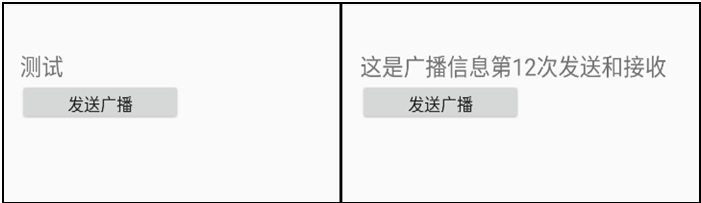
(1)设计一个消息广播的发送程序,布局如下图。(2)单击“发送广播”按钮后,程序调用sendBroadcast()方法把消息广播出去;(3)设计一个广播接收器,一旦收到消息,就显示到同一个界面。
教学视频
布局文件activity_broad.xml的源代码
<?xml version="1.0" encoding="utf-8"?>
<LinearLayout xmlns:android="http://schemas.android.com/apk/res/android"
android:layout_width="match_parent"
android:layout_height="match_parent"
android:orientation="vertical"
android:layout_marginTop="50dp"
android:layout_marginLeft="20dp">
<TextView
android:id="@+id/txt"
android:layout_width="wrap_content"
android:layout_height="wrap_content"
android:text="测试"
android:textSize="24sp"/>
<Button
android:id="@+id/send"
android:layout_width="178dp"
android:layout_height="40dp"
android:text="发送广播"
android:textSize="18sp" />
</LinearLayout>
广播自定义意图,控制文件 BroadActivity.java 源代码
package com.example.chap04;
import android.app.Activity;
import android.content.Intent;
import android.os.Bundle;
import android.util.Log;
import android.view.View;
import android.widget.Button;
import android.widget.TextView;
//【例4-1】设计一个简单的消息广播程序。
public class BroadActivity extends Activity
implements View.OnClickListener
{
static TextView txt;
Button btn;
int num;
@Override
public void onCreate(Bundle savedInstanceState)
{
super.onCreate(savedInstanceState);
setContentView(R.layout.activity_broad);
txt = (TextView)findViewById(R.id.txt);
btn=(Button)findViewById(R.id.send);
btn.setOnClickListener(this);
}
@Override
public void onClick(View v)
{
num++;
String msg="这是广播信息第"+Integer.toString(num)+"次发送";
Log.i("info",msg);
Intent intent = new Intent(this, TestReceiver.class);
//使用Bundle设置消息
Bundle bundle = new Bundle();
bundle.putString("count",msg);
intent.putExtras(bundle);
sendBroadcast(intent); //发送广播消息
}
}
创建广播接收器,广播接收器TestReceiver.java的源代码如下
package com.example.chap04;
import android.content.BroadcastReceiver;
import android.content.Context;
import android.content.Intent;
import android.util.Log;
//定义广播接收器
public class TestReceiver extends BroadcastReceiver
{
@Override
public void onReceive(Context context, Intent intent)
{
//取出接收的数据
String str = intent.getExtras().getString("count");
//BroadActivity.txt.setText(str+"和接收"); //显示接收到的数据
Toast.makeText(context, str+"和接收", Toast.LENGTH_LONG).show(); //显示接收到的数据
}
}
注册广播接收器,打开项目配置文件AndroidManifest.xml,注册广播接收器,配置要启动的Activity类名
<?xml version="1.0" encoding="utf-8"?>
<manifest xmlns:android="http://schemas.android.com/apk/res/android"
package="com.example.chap04">
<application
android:allowBackup="true"
android:icon="@mipmap/ic_launcher"
android:label="@string/app_name"
android:roundIcon="@mipmap/ic_launcher_round"
android:supportsRtl="true"
android:theme="@style/AppTheme">
<activity android:name=".BroadActivity">
<intent-filter>
<action android:name="android.intent.action.MAIN" />
<category android:name="android.intent.category.LAUNCHER" />
</intent-filter>
</activity>
<!-- 注册对应的广播接收类 -->
<receiver android:name=".TestReceiver"/>
</application>
</manifest>

