
【例3-3】应用MediaPlayer设计视频播放器
准备好视频文件sample.3gp,并将其复制到模拟器的SD卡中。
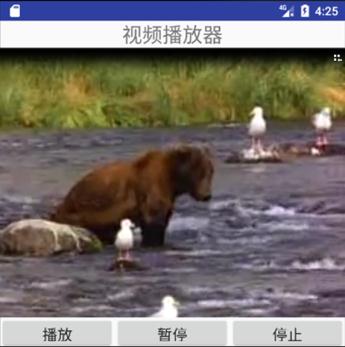
教学视频
布局文件activity_3gp.xml的源代码
<?xml version="1.0" encoding="utf-8"?>
<LinearLayout xmlns:android="http://schemas.android.com/apk/res/android"
android:layout_width="fill_parent"
android:layout_height="fill_parent"
android:orientation="vertical" >
<TextView
android:id="@+id/TextView01"
android:layout_width="wrap_content"
android:layout_height="wrap_content"
android:layout_gravity="center_horizontal"
android:text="视频播放器"
android:textSize="24sp" />
<SurfaceView
android:id="@+id/surfaceView1"
android:layout_width="match_parent"
android:layout_height="320dp"
android:layout_gravity="center" />
<LinearLayout
android:layout_width="match_parent"
android:layout_height="match_parent"
android:orientation="horizontal">
<Button
android:id="@+id/play"
android:layout_width="80dp"
android:layout_height="40dp"
android:layout_weight="1"
android:text="播放"
android:textSize="18sp" />
<Button
android:id="@+id/pause"
android:layout_width="80dp"
android:layout_height="40dp"
android:layout_weight="1"
android:text="暂停"
android:textSize="18sp" />
<Button
android:id="@+id/stop"
android:layout_width="80dp"
android:layout_height="40dp"
android:layout_weight="1"
android:text="停止"
android:textSize="18sp" />
</LinearLayout>
</LinearLayout>
控制文件SangpActivity.java源代码
package com.example.chap03;
import androidx.appcompat.app.AppCompatActivity;
import androidx.core.app.ActivityCompat;
import android.Manifest;
import android.app.Activity;
import android.content.pm.PackageManager;
import android.media.MediaPlayer;
import android.os.Bundle;
import android.os.Environment;
import android.util.Log;
import android.view.SurfaceHolder;
import android.view.SurfaceView;
import android.view.View;
import android.widget.Button;
public class SangpActivity extends AppCompatActivity {
MediaPlayer mMediaPlayer;
SurfaceView mSurfaceView;
Button playBtn,pauseBtn,stopBtn;
String path;
SurfaceHolder sh;
// sdcard访问权限
private static final int REQUEST_EXTERNAL_STORAGE = 1;
private static String[] PERMISSIONS_STORAGE = {
Manifest.permission.READ_EXTERNAL_STORAGE,
Manifest.permission.WRITE_EXTERNAL_STORAGE
};
public static void verifyStoragePermissions(Activity activity) {
// 检查是否已经有权限
int permission =
ActivityCompat.checkSelfPermission(activity, Manifest.permission.WRITE_EXTERNAL_STORAGE);
if (permission != PackageManager.PERMISSION_GRANTED) {
// 如果还没有取得权限,就弹出对话框向用户申请
ActivityCompat.requestPermissions(
activity,
PERMISSIONS_STORAGE,
REQUEST_EXTERNAL_STORAGE
);
}
}
@Override
public void onCreate(Bundle savedInstanceState)
{
super.onCreate(savedInstanceState);
setContentView(R.layout.activity_3gp);
verifyStoragePermissions(this); //访问授权
mSurfaceView = (SurfaceView)findViewById(R.id.surfaceView1);
playBtn=(Button)findViewById(R.id.play);
pauseBtn=(Button)findViewById(R.id.pause);
stopBtn=(Button)findViewById(R.id.stop);
path =
Environment.getExternalStoragePublicDirectory(Environment.DIRECTORY_DOWNLOADS) +"/sample.3gp";
mMediaPlayer = new MediaPlayer();
playBtn.setOnClickListener(new mClick());
pauseBtn.setOnClickListener(new mPause());
stopBtn.setOnClickListener(new mStop());
}
class mClick implements View.OnClickListener
{
@Override
public void onClick(View v)
{
try {
mMediaPlayer.reset();
//为播放器对象设置用于显示视频内容、代表屏幕描绘的控制器
mMediaPlayer.setDataSource(path);//设置数据源
sh=mSurfaceView.getHolder();
mMediaPlayer.setDisplay(sh);
mMediaPlayer.prepare();
mMediaPlayer.start();
playBtn.setEnabled(false);
}catch (Exception e){ Log.i("MediaPlay err", "MediaPlay err");}
}
}
class mPause implements View.OnClickListener
{
@Override
public void onClick(View v)
{
try {
if(!mMediaPlayer.isPlaying()){
/*暂停按钮事件*/
mMediaPlayer.start();
pauseBtn.setText("暂停");
}
else {
/*播放按钮事件*/
mMediaPlayer.pause();
pauseBtn.setText("播放");
}
}catch(Exception e){e.printStackTrace();}
//mMediaPlayer.stop();
}
}
class mStop implements View.OnClickListener
{
@Override
public void onClick(View v)
{
mMediaPlayer.stop();
playBtn.setEnabled(true);
}
}
}
打开项目配置文件AndroidManifest.xml,配置要启动的Activity类名
<?xml version="1.0" encoding="utf-8"?>
<manifest xmlns:android="http://schemas.android.com/apk/res/android"
package="com.example.chap03">
<application
android:allowBackup="true"
android:icon="@mipmap/ic_launcher"
android:label="@string/app_name"
android:roundIcon="@mipmap/ic_launcher_round"
android:supportsRtl="true"
android:theme="@style/AppTheme">
<activity android:name=".SangpActivity">
<intent-filter>
<action android:name="android.intent.action.MAIN" />
<category android:name="android.intent.category.LAUNCHER" />
</intent-filter>
</activity>
</application>
<uses-permission android:name="android.permission.WRITE_EXTERNAL_STORAGE" />
<uses-permission android:name="android.permission.READ_EXTERNAL_STORAGE" />
</manifest>

