
【例3-1】音乐播放器, 播放项目资源中的音乐
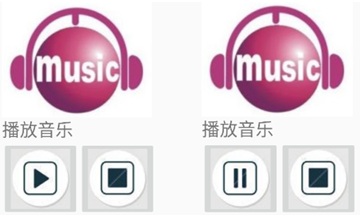
设计一个音乐播放器, 播放项目资源中的音乐,将测试用的音频文件abc.mp3复制到新建的res/raw资源目录下。
教学视频
布局文件activity_localmp3.xml的源代码
<?xml version="1.0" encoding="utf-8"?>
<LinearLayout xmlns:android="http://schemas.android.com/apk/res/android"
android:layout_width="wrap_content"
android:layout_height="wrap_content"
android:orientation="vertical"
android:layout_marginTop="20dp"
android:layout_marginLeft="80dp">
<ImageView
android:id="@+id/imageView2"
android:layout_width="wrap_content"
android:layout_height="wrap_content"
android:src="@drawable/tt" />
<TextView
android:id="@+id/txt"
android:layout_width="wrap_content"
android:layout_height="wrap_content"
android:text="播放音乐"
android:textSize="24sp" />
<LinearLayout
android:layout_width="wrap_content"
android:layout_height="wrap_content"
android:orientation="horizontal">
<ImageButton
android:id="@+id/Start"
android:layout_width="wrap_content"
android:layout_height="wrap_content"
android:src="@drawable/music_play" />
<ImageButton
android:id="@+id/Stop"
android:layout_width="wrap_content"
android:layout_height="wrap_content"
android:src="@drawable/music_stop" />
</LinearLayout>
</LinearLayout>
控制文件Localmp3Activity.java源代码(注意红字部分是教材没有的)
package com.example.chap03;
import androidx.appcompat.app.AppCompatActivity;
import android.media.MediaPlayer;
import android.os.Bundle;
import android.view.View;
import android.widget.ImageButton;
import android.widget.Toast;
public class Localmp3Activity extends AppCompatActivity {
ImageButton Start,Stop;
MediaPlayer mp;//媒体播放器对象
@Override
protected void onCreate(Bundle savedInstanceState) {
super.onCreate(savedInstanceState);
setContentView(R.layout.activity_localmp3);
Start=(ImageButton)findViewById(R.id.Start);
Stop=(ImageButton)findViewById(R.id.Stop);
Start.setOnClickListener(new mStart());
Stop.setOnClickListener(new mStop());
try {
//项目自带的MP3
mp= MediaPlayer.create(this, R.raw.abc);
mp.setLooping(true);
}catch(Exception e){
Toast.makeText(this,"play error", Toast.LENGTH_LONG).show();
}
}
class mStart implements View.OnClickListener{
@Override
public void onClick(View v) {
try {
if(!mp.isPlaying()){
/*播放按钮事件*/
mp.start();
Start.setImageResource(R.drawable.music_pause);
}
else {
/*暂停按钮事件*/
mp.pause();
Start.setImageResource(R.drawable.music_play);
}
}catch(Exception e){e.printStackTrace();}
}
}
class mStop implements View.OnClickListener{
@Override
public void onClick(View v) {
/*停止按钮事件,停止播放音乐,不是退出或释放资源*/
mp.reset();
try {
mp = MediaPlayer.create(Localmp3Activity.this, R.raw.abc);
mp.setLooping(true);
}catch(Exception e){e.printStackTrace();}
Start.setImageResource(R.drawable.music_play);
}
}
}
打开项目配置文件AndroidManifest.xml,检查工程要启动的Activity类名
<activity android:name=".Localmp3Activity">
<intent-filter>
<action android:name="android.intent.action.MAIN" />
<category android:name="android.intent.category.LAUNCHER" />
</intent-filter>
</activity>

