
【例1-12】ListActivity示例
使用ListActivity类改写【例1-11】 的程序。
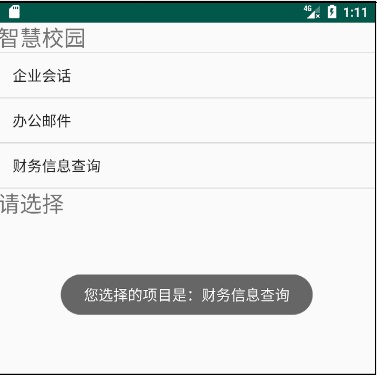
教学视频
布局文件listview2.xml的源代码
<?xml version="1.0" encoding="utf-8"?>
<!--【例1-12】使用ListActivity类改写例1-11中的程序。-->
<LinearLayout xmlns:android="http://schemas.android.com/apk/res/android"
android:layout_width="fill_parent"
android:layout_height="fill_parent"
android:orientation="vertical" >
<ListView
android:id="@android:id/list"
android:layout_height="wrap_content"
android:layout_width="fill_parent" />
</LinearLayout>
控制文件ListView2Activity.java源代码
package com.example.chap01;
import android.app.ListActivity;
import android.os.Bundle;
import android.view.View;
import android.widget.AdapterView;
import android.widget.ArrayAdapter;
import android.widget.ListView;
import android.widget.TextView;
import android.widget.Toast;
//【例1-12】使用ListActivity 改写例1-11中的程序。
public class ListView2Activity extends ListActivity implements AdapterView.OnItemClickListener
{
@Override
public void onCreate(Bundle savedInstanceState)
{
super.onCreate(savedInstanceState);
setContentView(R.layout.listview2);
//定义数组
String[] data ={
"企业会话",
"办公邮件",
"财务信息查询",
};
//获取列表项
ListView list=getListView();
//设置列表项的头部
TextView header=new TextView(this);
header.setText("智慧校园");
header.setTextSize(24);
list.addHeaderView(header);
//设置列表项的底部
TextView foot=new TextView(this);
foot.setText("请选择");
foot.setTextSize(24);
list.addFooterView(foot);
setListAdapter(new ArrayAdapter<String>(this,
android.R.layout.simple_list_item_1, data));
list.setOnItemClickListener(this);
}
//定义列表选项监听器
@Override
public void onItemClick(AdapterView<?> parent, View view,int position, long id)
{
Toast.makeText(getApplicationContext(),
"您选择的项目是:"+((TextView)view).getText(),
Toast.LENGTH_SHORT).show();
}
}
打开项目配置文件AndroidManifest.xml,查看Activity的配置。
<?xml version="1.0" encoding="utf-8"?>
<manifest xmlns:android="http://schemas.android.com/apk/res/android"
package="com.example.chap01">
<application
android:allowBackup="true"
android:icon="@mipmap/ic_launcher"
android:label="@string/app_name"
android:roundIcon="@mipmap/ic_launcher_round"
android:supportsRtl="true"
android:theme="@style/Theme.Chap01">
<activity android:name=".MainActivity">
<intent-filter>
<action android:name="android.intent.action.MAIN" />
<category android:name="android.intent.category.LAUNCHER" />
</intent-filter>
</activity>
<activity android:name=".LoginActivity">
<intent-filter>
<action android:name="android.intent.action.MAIN" />
<category android:name="android.intent.category.LAUNCHER" />
</intent-filter>
</activity>
<activity android:name=".ListView1Activity">
<intent-filter>
<action android:name="android.intent.action.MAIN" />
<category android:name="android.intent.category.LAUNCHER" />
</intent-filter>
</activity>
<activity android:name=".ListView2Activity">
<intent-filter>
<action android:name="android.intent.action.MAIN" />
<category android:name="android.intent.category.LAUNCHER" />
</intent-filter>
</activity>
</application>
</manifest>

