
【例1-9】进度条ProgressBar应用示例
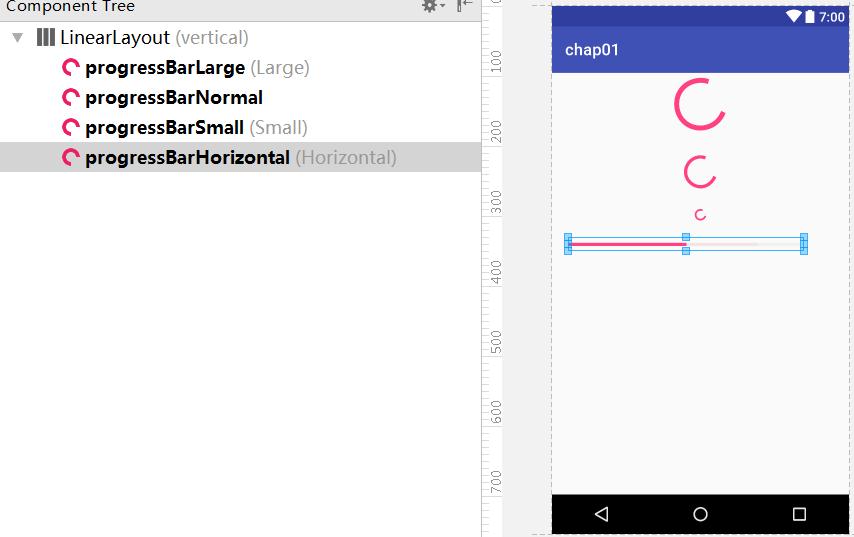
在线性布局中加入进度条组件。
教学视频
布局文件progressbar.xml的源代码
<?xml version="1.0" encoding="utf-8"?>
<!--【例1-9】进度条应用示例 -->
<LinearLayout
xmlns:android="http://schemas.android.com/apk/res/android"
android:layout_width="match_parent"
android:layout_height="match_parent"
android:orientation="vertical" >
<ProgressBar
android:id="@+id/progressBarLarge"
style="?android:attr/progressBarStyleLarge"
android:layout_width="match_parent"
android:layout_height="wrap_content"/>
<ProgressBar
android:id="@+id/progressBarNormal"
android:layout_width="match_parent"
android:layout_height="wrap_content"
android:layout_marginTop="20dp"/>
<ProgressBar
android:id="@+id/progressBarSmall"
style="?android:attr/progressBarStyleSmall"
android:layout_width="match_parent"
android:layout_height="wrap_content"
android:layout_marginTop="20dp"/>
<ProgressBar
android:id="@+id/progressBarHorizontal"
style="?android:attr/progressBarStyleHorizontal"
android:layout_width="286dp"
android:layout_height="wrap_content"
android:layout_marginTop="20dp"
android:layout_marginLeft="20dp"
android:max="100"
android:progress="50"
android:secondaryProgress="80" />
<!--注:max指最大进度值
progress指第一进度值,如:播放进度
secondProgress指第二进度值,如:缓冲进度 -->
</LinearLayout>
控制文件MainActivity.java的源代码
package com.example.chap01;
import androidx.appcompat.app.AppCompatActivity;
import android.os.Bundle;
public class MainActivity extends AppCompatActivity
{
@Override
public void onCreate(Bundle savedInstanceState)
{
super.onCreate(savedInstanceState);
setContentView(R.layout.progressbar); //【例1-9】
}
}

