A data type is a set of values and a set of operations defined on those values. The primitive data types that you have been using are supplemented in Java by extensive libraries of reference types that are tailored for a large variety of applications. In this section, we consider reference types for string processing and image processing.
Strings.
You have already been using a data type that is not primitive—the String data type, whose values are sequences of characters. We specify the behavior of a data type in an application programming interface (API). Here is a partial API for Java’s String data type:
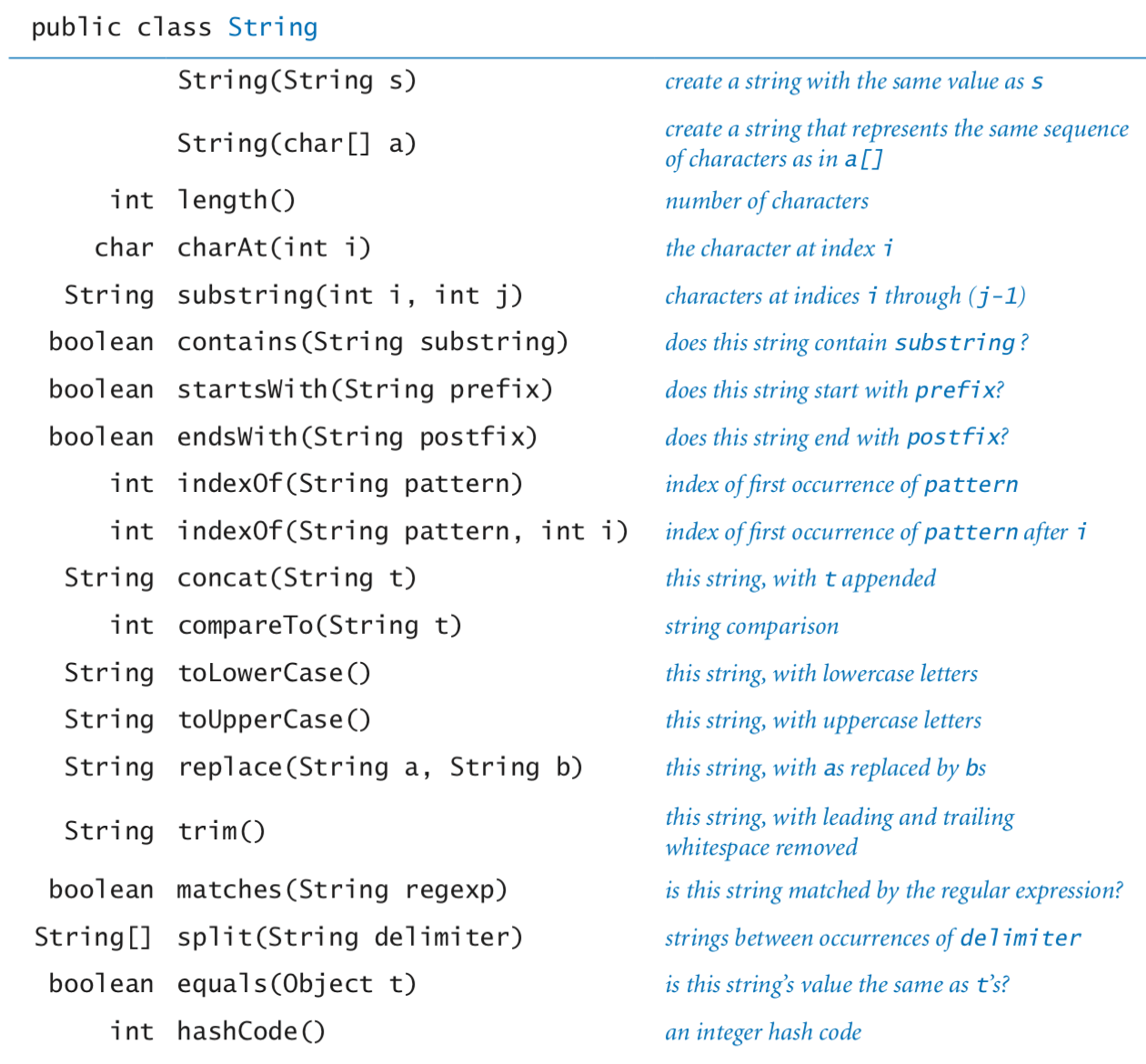
The first entry, with the same name as the class and no return type, defines a special method known as a constructor. The other entries define instance methods that can take arguments and return values.
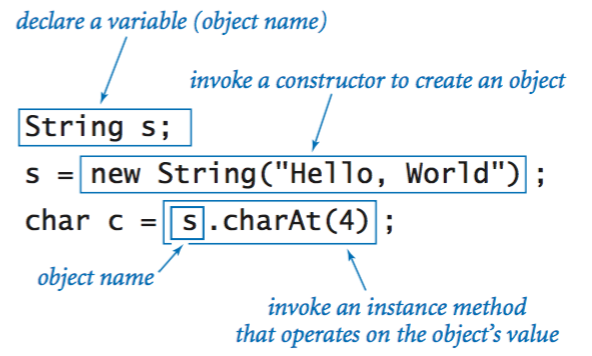
Declaring variables. You declare variables of a reference type in precisely the same way that you declare variables of a primitive type. A declaration statement does not create anything; it just says that we will use the variable name s to refer to a String object.
Creating objects. Each data-type value is stored in an object. When a client invokes a constructor, the Java system creates (or instantiates) an individual object (or instance). To invoke a constructor, use the keyword new; followed by the class name; followed by the constructor’s arguments, enclosed in parentheses and separated by commas.
Invoking instance methods. The most important difference between a variable of a reference type and a variable of a primitive type is that you can use reference-type variables to invoke the instance methods that implement data-type operations (in contrast to the built-in syntax involving operators such as +* that we used with primitive types).
Now, we consider various string-processing examples.
Data-type operations. The following examples illustrate various operations for the String data type.
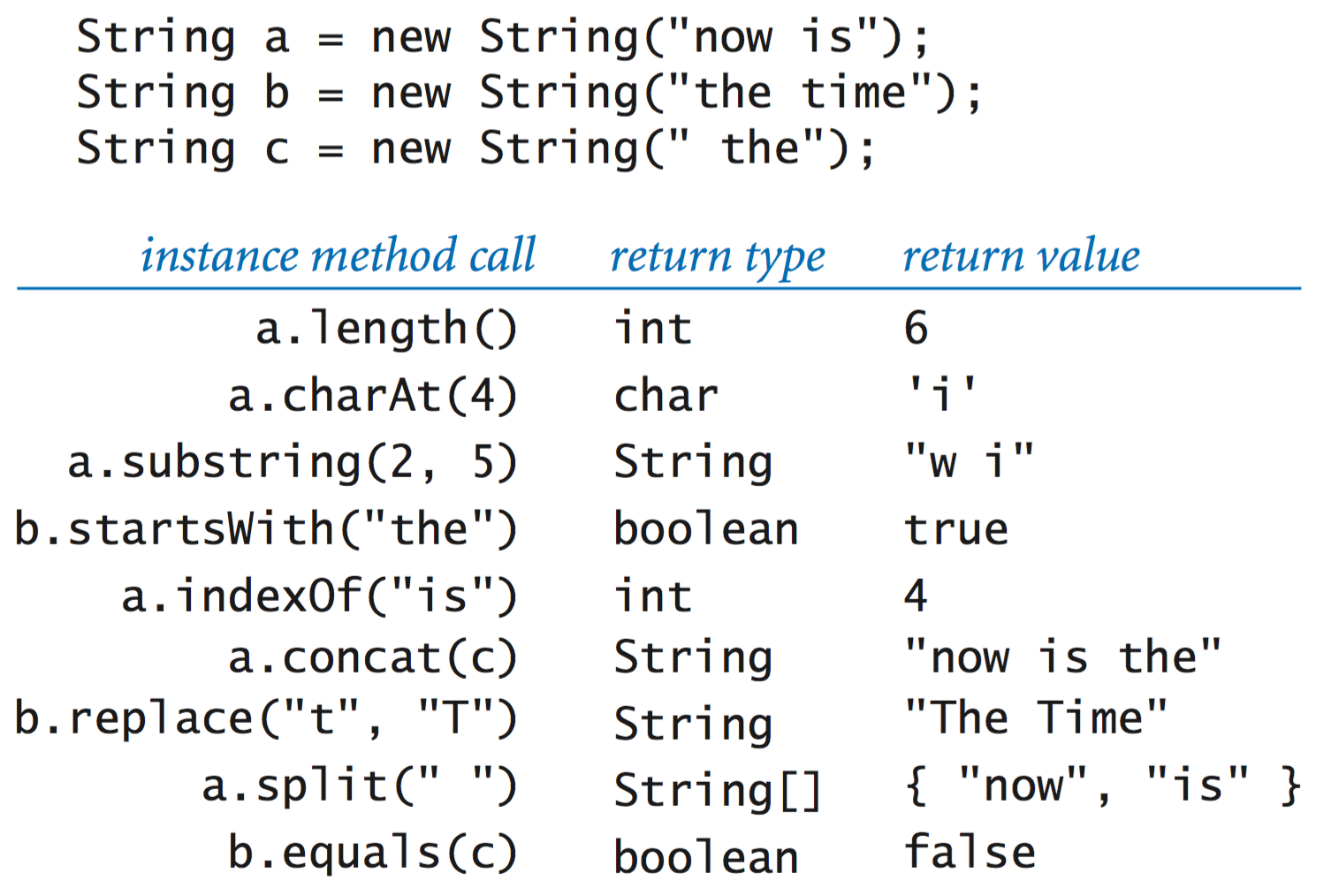
Code fragments. The following code fragments illustrate the use of various string-processing methods.
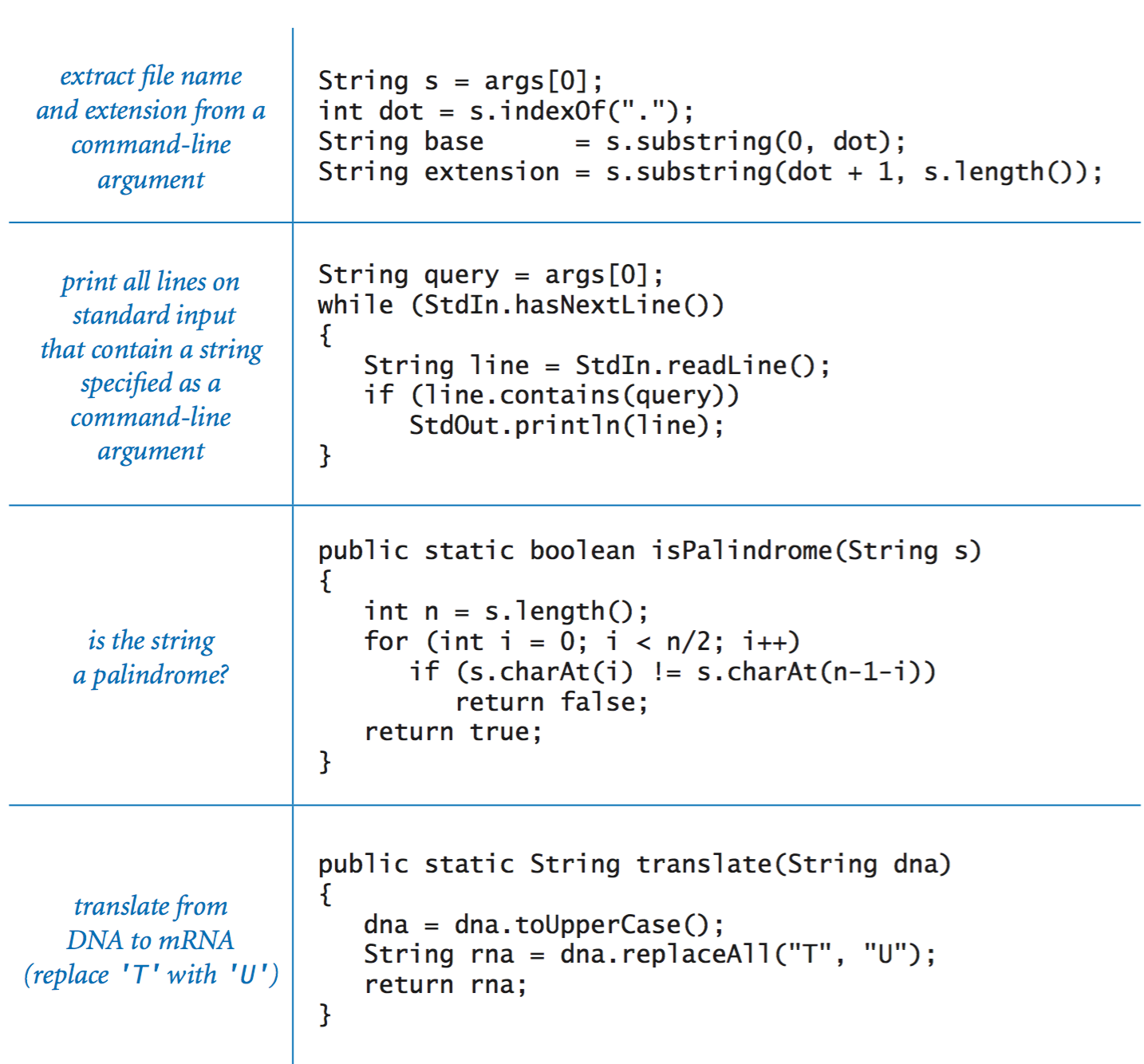
Genomics. Biologists use a simple model to represent the building blocks of life, in which the letters A, C, G, and T represent the four bases in the DNA of living organisms. A gene is a substring that represents a functional unit of critical importance in understanding life processes.PotentialGene.java takes a DNA string as an argument and determines whether it corresponds to a potential gene based on the following criteria:
It begins with the start codon ATG.
Its length is a multiple of 3.
It ends with one of the stop codons TAG, TAA, or TGA.
It has no intervening stop codons.
Color.
Java's Color data type represents color values using the RGB color model where a color is defined by three integers (each between 0 and 255) that represent the intensity of the red, green, and blue components of the color. Other color values are obtained by mixing the red, blue and green components.
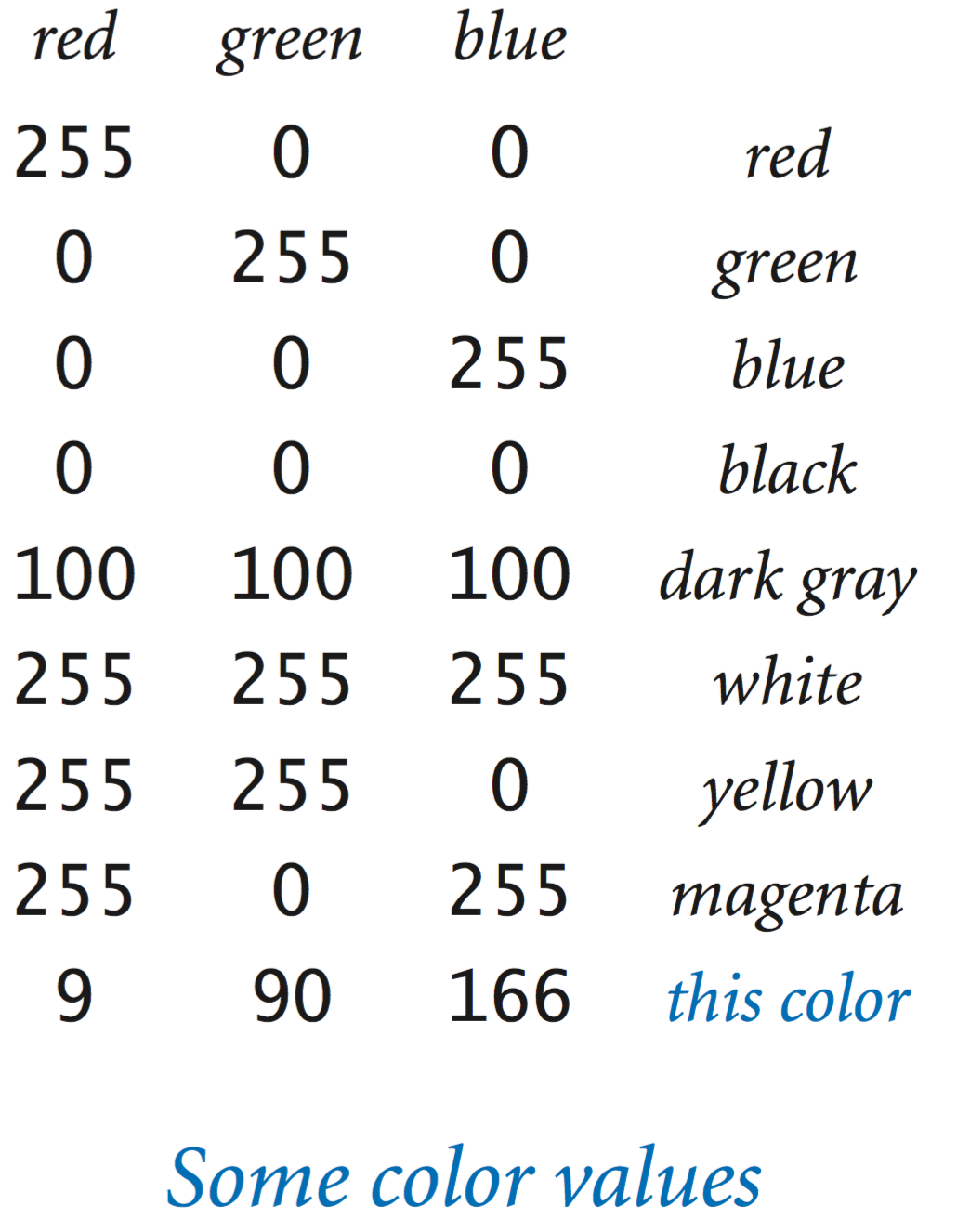
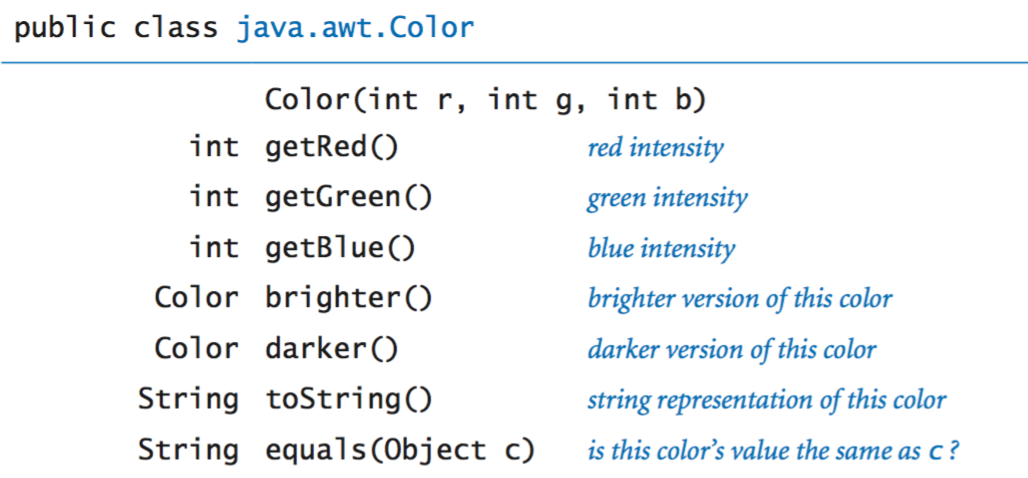
The Color data type has a constructor that takes three integer arguments. For example, you can write
to create objects whose values represent pure red and the blue used to print this book. The following table summarizes the methods in the ColorAPI that we use in this book:
Here are some example clients that use the Color data type.
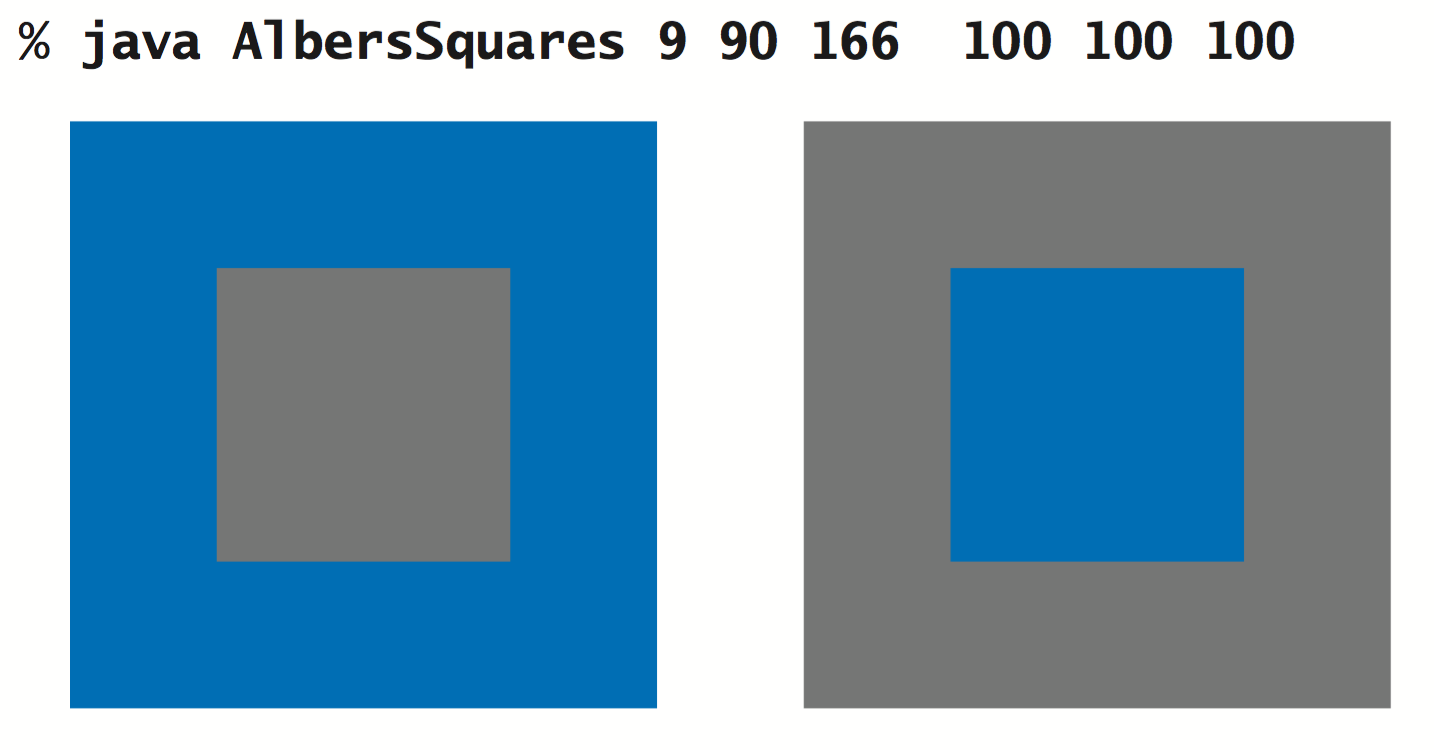
Albers squares. AlbersSquares.java displays the two colors entered in RGB representation on the command line in the format developed in the 1960s by Josef Albers that revolutionized the way that people think about color.
Luminance. The quality of the images on modern displays such as LCD monitors, plasma TVs, and cell-phone screens depends on an understanding of a color property known as monochrome luminance, or effective brightness. It is a linear combination of the three intensities: if a color's red, green and blue values are r, g, and b, respectively then its luminance is defined by the equation
Grayscale. The RGB color model has the property that when all three color intensities are the same, the resulting color is on a grayscale that ranges from black (all 0s) to white (all 255s). A simple way to convert a color to grayscale is to replace the color with a new one whose red, green, and blue values equal its luminance.
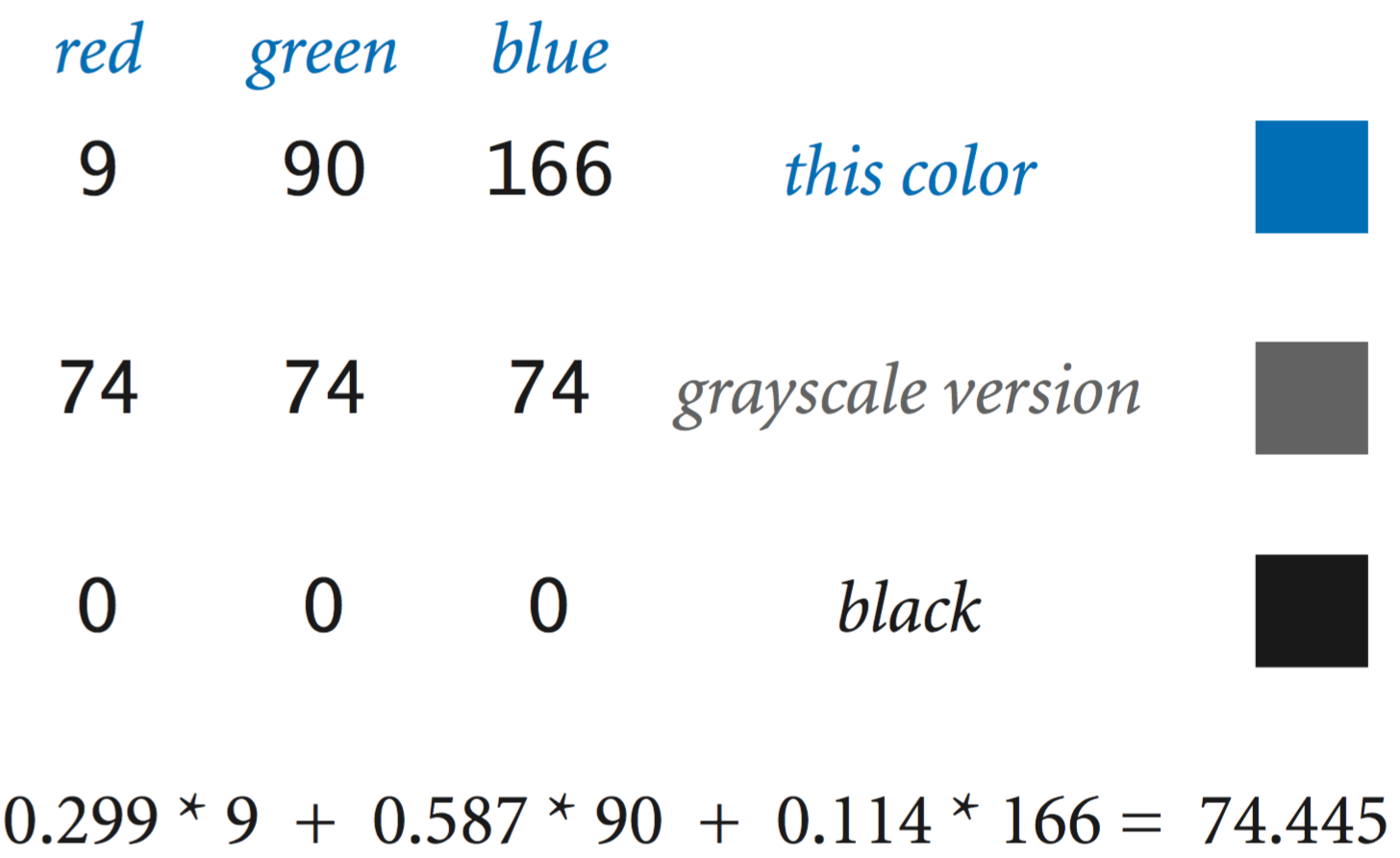
Color compatibility. The luminance value is also crucial in determining whether two colors are compatible, in the sense that printing text in one of the colors on a background in the other color will be readable. A widely used rule of thumb is that the difference between the luminance of the foreground and background colors should be at least 128.
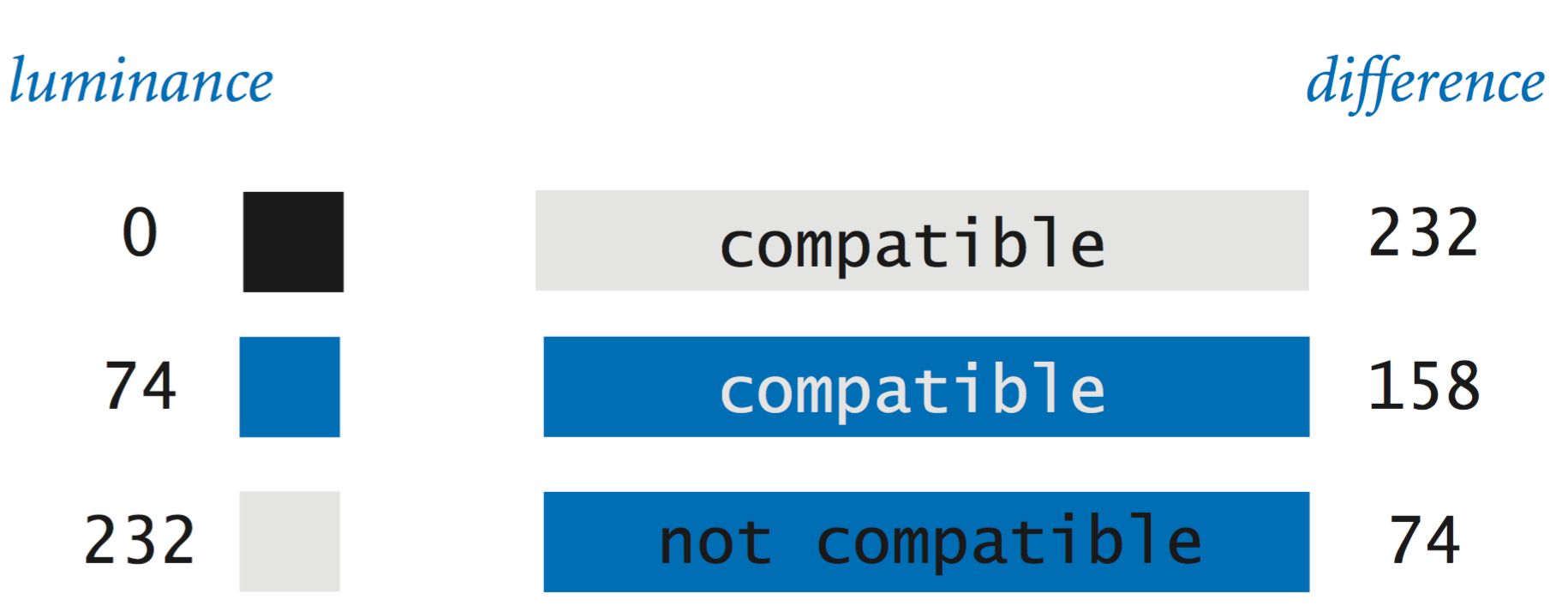
Luminance.java is a static method library that we can use to convert to grayscale and test whether two colors are compatible.
Image processing.
A digital image is a rectangular grid of pixels (picture elements), where the color of each pixel is individually defined. Digital images are sometimes referred to as raster or bitmapped images. In contrast, the types of images that we produce with StdDraw (which involved geometric objects) are referred to as vector images.
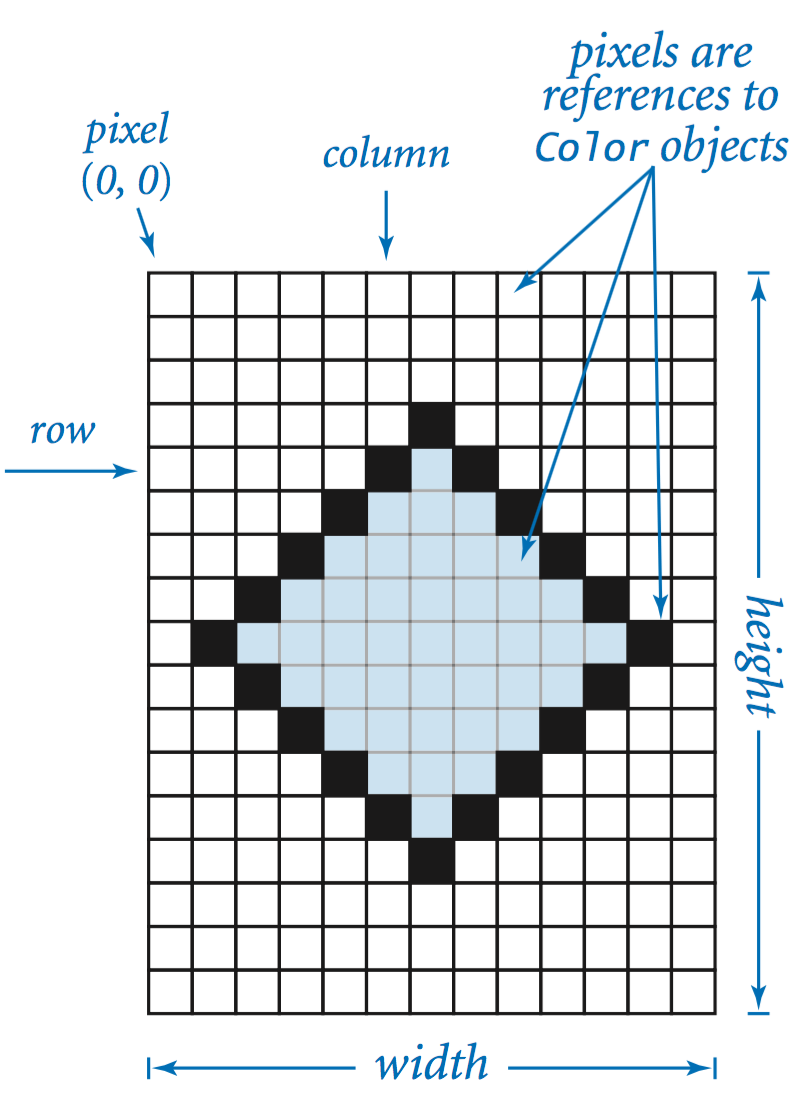
The Picture data type allows you to manipulate digital images. The set of values is a two-dimensional matrix of Color values, and the operations are what you might expect: create an image (either blank or from a file), set the value of a pixel to a given color, and extract the color of a given pixel. The following API summarizes the available operations:
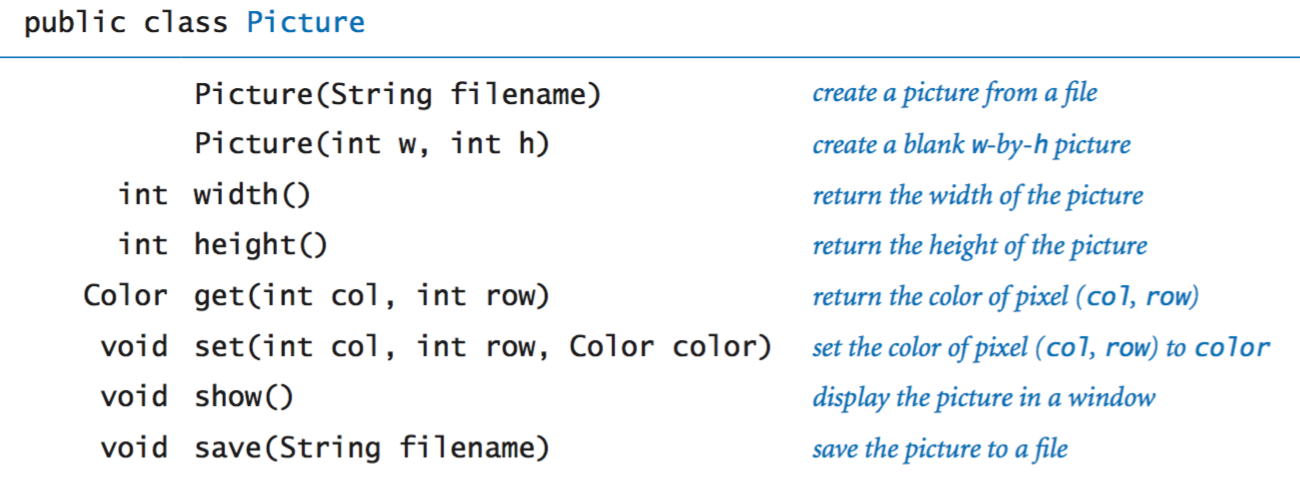
Most image-processing programs are filters that scan through all of the pixels in a source image and then perform some computation to determine the color of each pixel in a target image.
Grayscale. Grayscale.java converts an image from color to grayscale.


Scale. Scale.java takes the name of an image file and two integers (width w and height h) as command-line arguments, scales the picture to w-by-h, and displays both images.
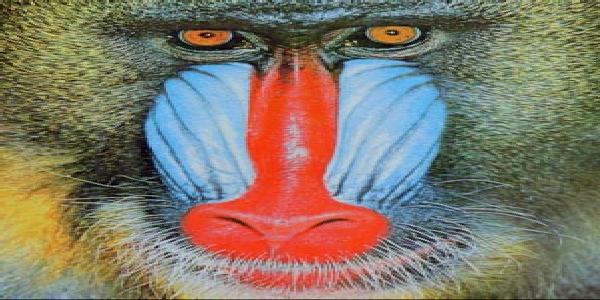
600-by-300
200-by-400
Fade effect. Fade.java takes an integer n and the names of the source and target images as command-line arguments and fades from the source image to the target image in n steps. It uses a linear interpolation strategy, where each pixel in image i is a weighted average of the corresponding pixels in the source and target images.
Input and output revisited.
In Section 1.5 you learned how to read and write numbers and text using standard input, output, and drawing. These restrict us to working with just one input file, one output file, and one drawing for any given program. With object-oriented programming, we consider data types that allow us to work with multiple input streams, output streams, and drawings within one program.
Input stream data type. In is an object-oriented version of StdIn that supports reading numbers and text from data from files and websites as well as the standard input stream.

Output stream data type. Out is an object-oriented version of StdOut that supports printing text to a variety of output streams, including files and standard output.
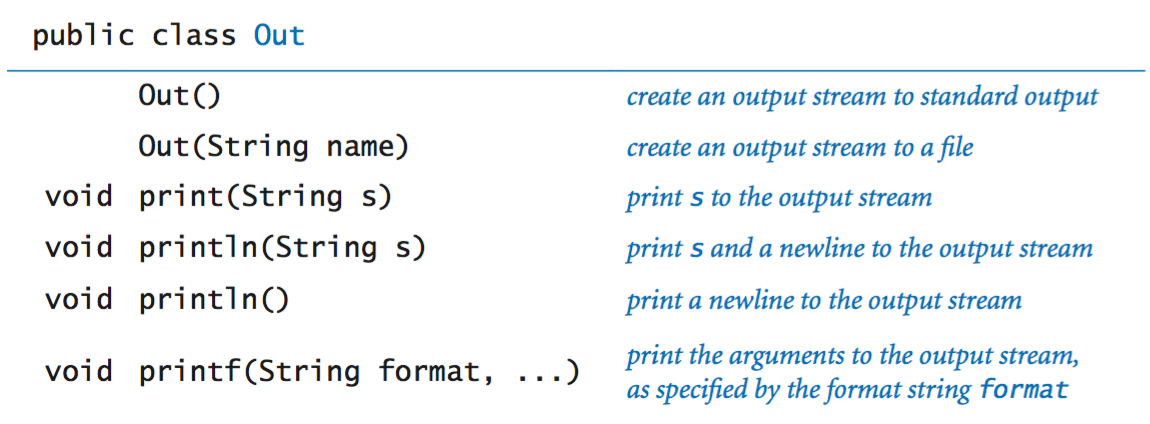
File concatenation. Cat.java reads several files specified as command-line arguments, concatenates them, and prints the result to a file.
Screen scraping. StockQuote.java takes the the symbol of New York Stock Exchange stock as a command-line argument and prints its current trading price. It uses a technique known as screen scraping, in which the goal is to extract some information from a web page with a program. To report the current stock price of Google (NYSE symbol = GOOG), it reads the Web page http://finance.yahoo.com/quote/GOOG. Then, it identifies the relevant information using indexOf() and substring().
Extracting data. Split.java uses multiple output streams to split a CSV file into separate files, one for each comma-delimited field.
Drawing data type. Draw is an object-oriented version of StdDraw that supporting drawing to more than one canvas in the same program.
Properties of reference types.
We summarize some of the essential properties of reference types.
Aliasing. An assignment statement with a reference type creates a second copy of the reference. The assignment statement does not create a new object, just another reference to an existing object. This situation is known as aliasing: both variables refer to the same object. As an example, consider the following code fragment:
Picture a = new Picture("mandrill.jpg");
Picture b = a;
a.set(col, row, color1);   // a updated
b.set(col, row, color2);   // a updated again
After the second assignment statement, variables a and b refer to the same Picture object.
Pass by value. When you call a method with arguments, the effect in Java is as if each argument were to appear on the right-hand side of an assignment statement with the corresponding argument name on the left-hand side. That is, Java passes a copy of the argument value from the caller to the method. If the argument value is a primitive type, Java passes a copy of that value; if the argument value is an object reference, Java passes a copy of the object reference. This arrangement is known as pass by value.
Arrays are objects. In Java, arrays are objects. As with strings, special language support is provided for certain operations on arrays: declarations, initialization, and indexing. As with any other object, when we pass an array to a method or use an array variable on the right-hand side of an assignment statement, we are making a copy of the array reference, not a copy of the array.
Arrays of objects. When we create an array of objects, we do so in two steps:
For example, the following code creates an array of two Color objects:
Color[] a = new Color[2];
a[0] = new Color(255, 255, 0);
a[1] = new Color(160, 82, 45);
Create the array by using new and the square bracket syntax for array creation.
Create each object in the array, by using new to call a constructor.
Safe pointers. In Java, there is only one way to create a reference (with new) and only one way to manipulate that reference (with an assignment statement). Java references are known as safe pointers, because Java can guarantee that each reference points to an object of the specified type (and not to an arbitrary memory address).
Orphaned objects. The ability to assign different objects to a reference variable creates the possibility that a program may have created an object that it can no longer reference. Such an object is said to be orphaned. As an example, consider the following code fragment:
Color a, b;
a = new Color(160, 82, 45);  // sienna
b = new Color(255, 255, 0);  // yellow
b = a;
After the final assignment statement, not only do a and b refer to the same Color object (sienna), but also there is no longer a reference to the Color object that was created and usedto initialize b (yellow).
Garbage collection. One of Java’s most significant features is its ability to automatically manage memory. The idea is to free the programmer from the responsibility of managing memory by keeping track of orphaned objects and returning the memory they use to a pool of free memory. Reclaiming memory in this way is known as garbage collection, and Java’s safe pointer policy enables it to do this efficiently.

