In this section we extend the set of simple abstractions (command-line input and standard output) that we have been using as the interface between our Java programs and the outside world to include standard input, standard drawing, and standard audio. Standard input makes it convenient for us to write programs that process arbitrary amounts of input and to interact with our programs; standard draw makes it possible for us to work with graphics; and standard audio adds sound.
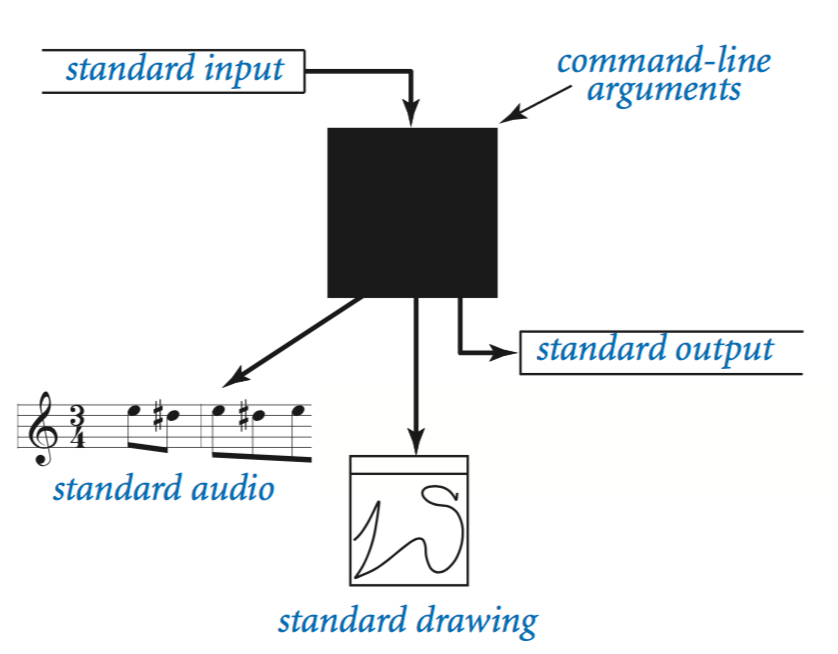
Bird's-eye view.
A Java program takes input values from the command line and prints a string of characters as output. By default, both command-line arguments and standard output are associated with an application that takes commands, which we refer to as the terminal window.
Command-line arguments. All of our classes have a main() method that takes a String array args[] as argument. That array is the sequence of command-line arguments that we type. If we intend for an argument to be a number, we must use a method such as Integer.parseInt() to convert it from String to the appropriate type.
Standard output. To print output values in our programs, we have been using System.out.println(). Java sends the results to an abstract stream of characters known as standard output. By default, the operating system connects standard output to the terminal window. All of the output in our programs so far has been appearing in the terminal window.(操作系统负责将输入到stdout的内容显示到终端)
RandomSeq.java uses this model: It takes a command-line argument n and prints to standard output a sequence of n random numbers between 0 and 1.
To complete our programming model, we add the following libraries:
Standard input. Read numbers and strings from the user.
Standard drawing. Plot graphics.
Standard audio. Create sound.
Standard output.
Java's System.out.print() and System.out.println() methods implement the basic standard output abstraction that we need. Nevertheless, to treat standard input and standard output in a uniform manner (and to provide a few technical improvements), we use similar methods that are defined in our StdOut library:(仿照标准的输出函数实现StdOut类)
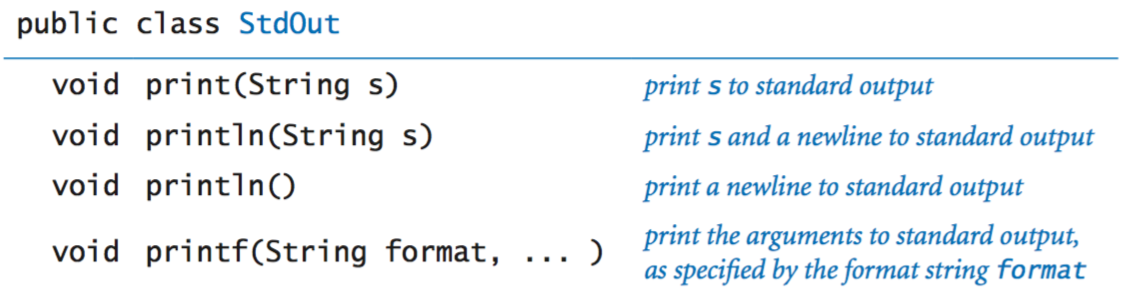
Java's print() and println() methods are the ones that you have been using. The printf() method gives us more control over the appearance of the output.
Formatted printing basics. In its simplest form, printf() takes two arguments. The first argument is called the format string. It contains a conversion specification that describes how the second argument is to be converted to a string for output.
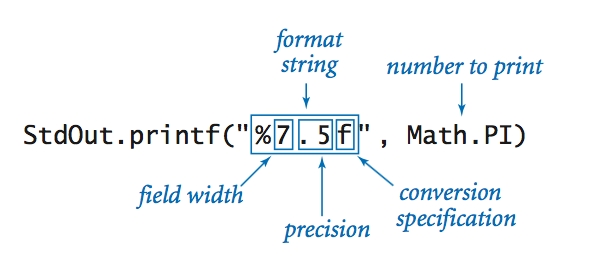
Format strings begin with % and end with a one-letter conversion code. The following table summarizes the most frequently used codes:(格式化字符串)
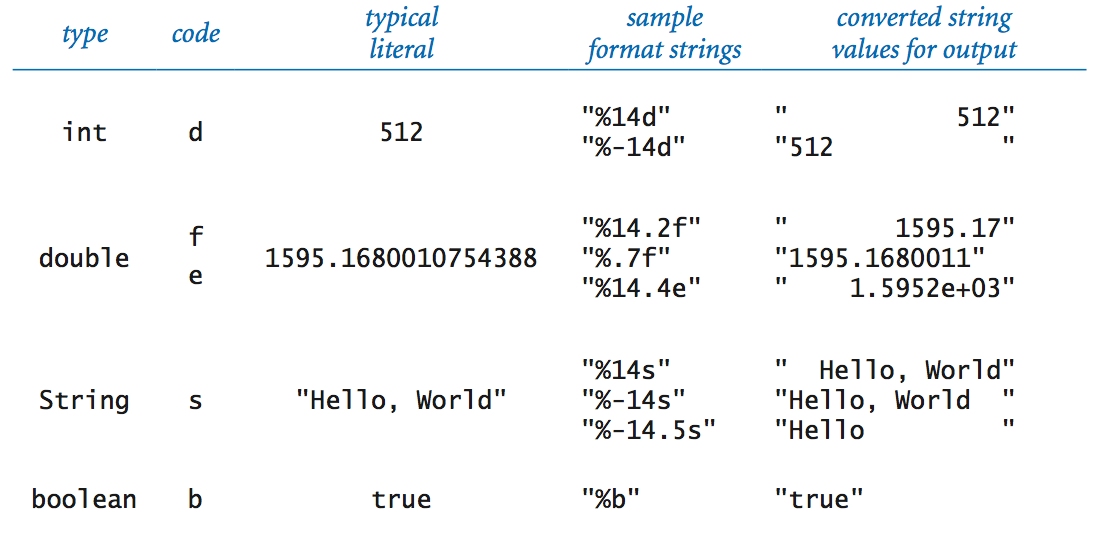
Format string. The format string can contain characters in addition to those for the conversion specification. The conversion specification is replaced by the argument value (converted to a string as specified) and all remaining characters are passed through to the output.
Multiple arguments. The printf() function can take more than two arguments. In this case, the format string will have an additional conversion specification for each additional argument.(多个参数的格式化)
Here is more documentation on printf format string syntax.
Standard input.
Our StdIn library takes data from a standard input stream that contains a sequence of values separated by whitespace. Each value is a string or a value from one of Java's primitive types. One of the key features of the standard input stream is that your program consumes values when it reads them. Once your program has read a value, it cannot back up and read it again. (不能后退,也不能再次读已读入的数据:consume) The library is defined by the following API:
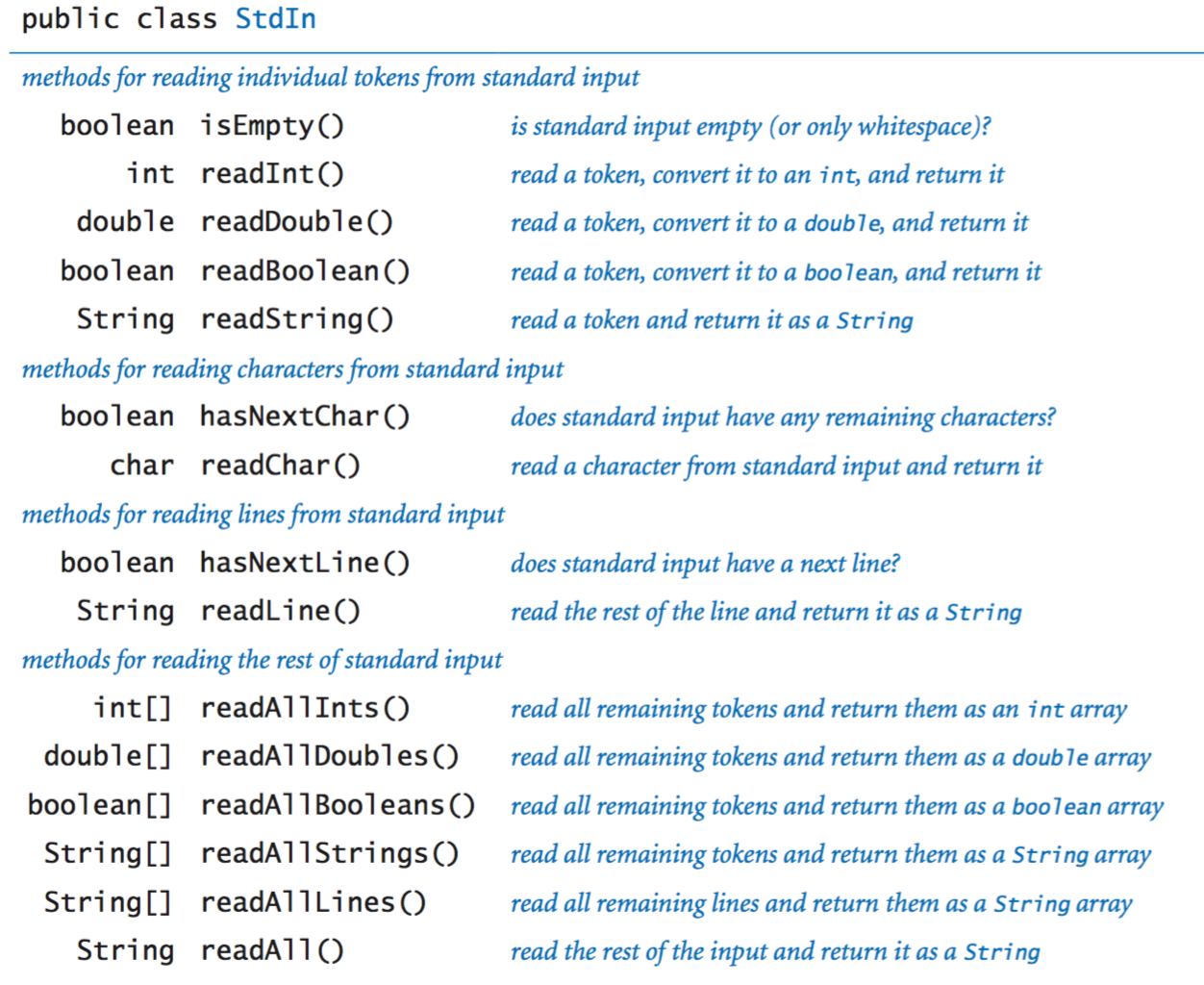
We now consider several examples in detail.
Typing input. When you use the java command to invoke a Java program from the command line, you actually are doing three things: (1) issuing a command to start executing your program, (2) specifying the values of the command-line arguments, and (3) beginning to define the standard input stream. The string of characters that you type in the terminal window after the command line is the standard input stream. For example, AddInts.java takes a command-line argument n, then reads n numbers from standard input and adds them, and prints the result to standard output:
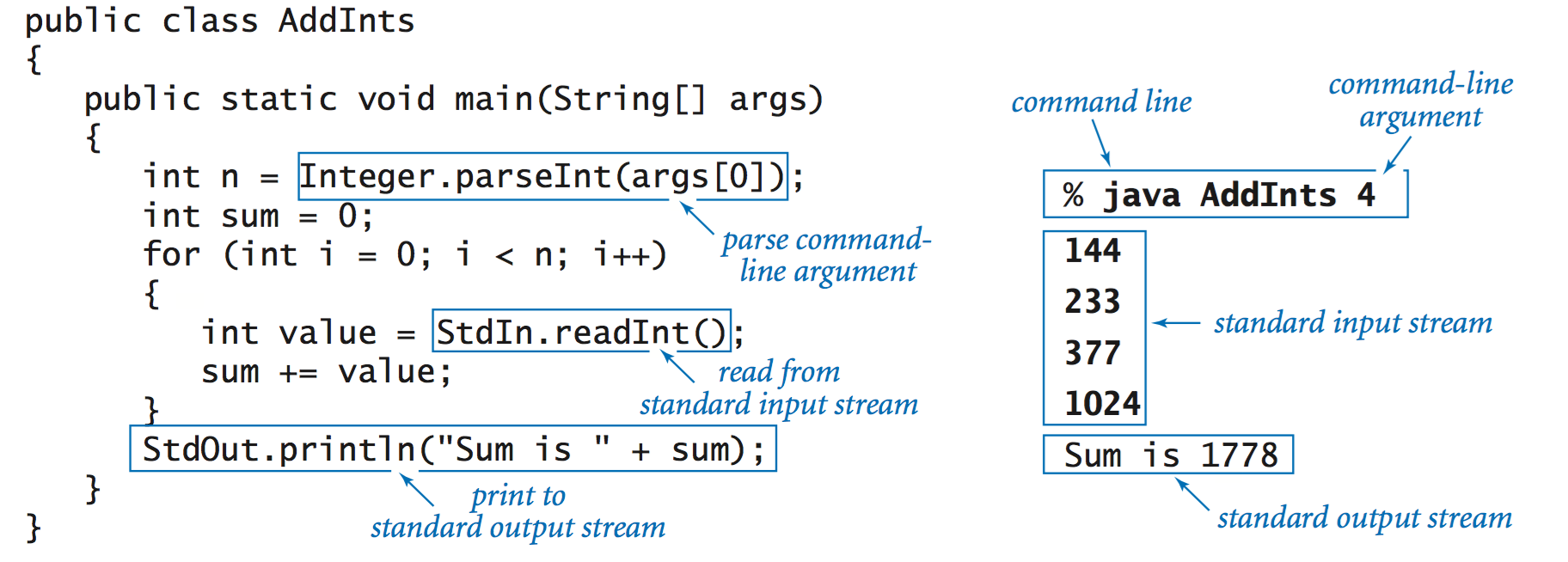
Input format. If you type abc or 12.2 or true when StdIn.readInt() is expecting an int, then it will respond with an InputMismatchException. StdIn treats strings of consecutive(连续的) whitespace characters as identical to one space and allows you to delimit(限定) your numbers with such strings.
Interactive user input. TwentyQuestions.java is a simple example of a program that interacts with its user. The program generates a random integer and then gives clues to a user trying to guess the number. The fundamental difference between this program and others that we have written is that the user has the ability to change the control flow while the program is executing.
Processing an arbitrary-size input stream. Typically, input streams are finite: your program marches through the input stream, consuming values until the stream is empty. But there is no restriction of the size of the input stream. Average.java reads in a sequence of real numbers from standard input and prints their average. (ctrl+z停止输入)
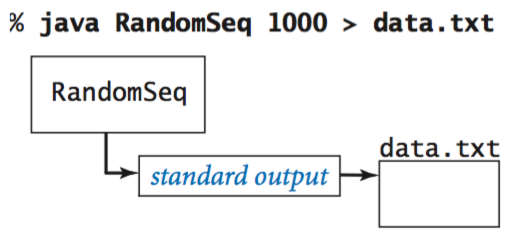
Redirecting standard output to a file. By adding a simple directive to the command that invokes a program, we can redirect its standard output to a file, either for permanent storage or for input to some other program at a later time. For example, the command specifies that the standard output stream is not to be printed in the terminal window, but instead is to be written to a text file named data.txt. Each call to StdOut.print() or StdOut.println() appends text at the end of that file. In this example, the end result is a file that contains 1,000 random values.
Redirection and piping.
For many applications, typing input data as a standard input stream from the terminal window is untenable(不现实的) because doing so limits our program's processing power by the amount of data that we can type. Similarly, we often want to save the information printed on the standard output stream for later use. We can use operating system mechanisms to address both issues.(重定向与管道:保存程序的输出到文件)
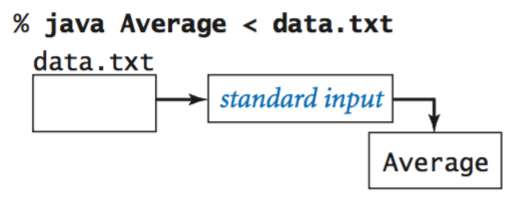
Redirecting standard input from a file. Similarly, we can redirect standard input so that StdIn reads data from a file instead of the terminal window. For example, the command reads a sequence of numbers from the file data.txt and computes their average value. Specifically, the < symbol is a directive to implement the standard input stream by reading from the file data.txt instead of by waiting for the user to type something into the terminal window. When the program calls StdIn.read Double(), the operating system reads the value from the file. This facility to redirect standard input from a file enables us to process huge amounts of data from any source with our programs, limited only by the size of the files that we can store.
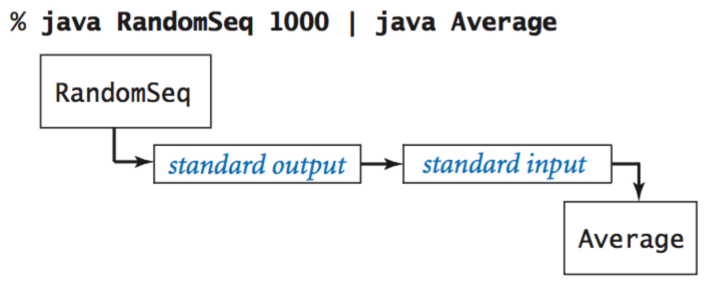
Connecting two programs. The most flexible way to implement the standard input and standard output abstractions is to specify that they are implemented by our own programs! This mechanism is called piping. For example, the following command specifies that the standard output for RandomSeq and the standard input stream for Average are the same stream. (PS:验证random的随机性)
Filters. For many common tasks, it is convenient to think of each program as a filter that converts a standard input stream to a standard output stream in some way, RangeFilter.java takes two command-line arguments and prints on standard output those numbers from standard input that fall within the specified range. (类似于过滤器)
Your operating system also provides a number of filters. For example, the sort filter puts the lines on standard input in sorted order: (排序)
% java RandomSeq 5 | sort
0.035813305516568916
0.14306638757584322
0.348292877655532103
0.5761644592016527
0.9795908813988247
Another useful filter is more, which reads data from standard input and displays it in your terminal window one screenful at a time. For example, if you type (分屏)
% java RandomSeq 1000 | more
you will see as many numbers as fit in your terminal window, but more will wait for you to hit the space bar before displaying each succeeding screenful.
Basic drawing commands. We first consider the drawing commands:
Control commands. The default canvas size is 512-by-512 pixels and the default coordinate system is the unit square(单位平方形), but we often want to draw plots at different scales. Also, we often want to draw line segments of different thickness or points of different size from the standard. To accommodate these needs, StdDraw has the following methods:
Outline and filled shapes. StdDraw also includes methods to draw circles, rectangles, and arbitrary polygons(多边形). Each shape defines an outline. When the method name is just the shape name, that outline is traced by the drawing pen. When the method name begins with filled, the named shape is instead filled solid, not traced.(fill实心填充)
Text and color. To annotate or highlight various elements in your drawings, StdDraw includes methods for drawing text, setting the font, and setting the the ink in the pen.
Standard drawing.
Now we introduce a simple abstraction for producing drawings as output. We imagine an abstract drawing device capable of drawing lines and points on a two-dimensional canvas. The device is capable of responding to the commands that our programs issue in the form of calls to static methods in StdDraw. The primary interface consists of two kinds of methods: drawing commands that cause the device to take an action (such as drawing a line or drawing a point) and control commands that set parameters such as the pen size or the coordinate scales.

These methods are nearly self-documenting: StdDraw.line(x0, y0, x1, y1) draws a straight line segment connecting the point (x0, y0) with the point (x1, y1). StdDraw.point(x, y) draws a spot centered on the point (x, y). The default coordinate scale is the unit square (all x- and y-coordinates between 0 and 1). The standard implementation displays the canvas in a window on your computer's screen, with black lines and points on a white background.
Your first drawing. The HelloWorld for graphics programming with StdDraw is to draw a triangle with a point inside. Triangle.javaaccomplishes this with three calls to StdDraw.line() and one call to StdDraw.point(). (坐标取值范围是0到1)
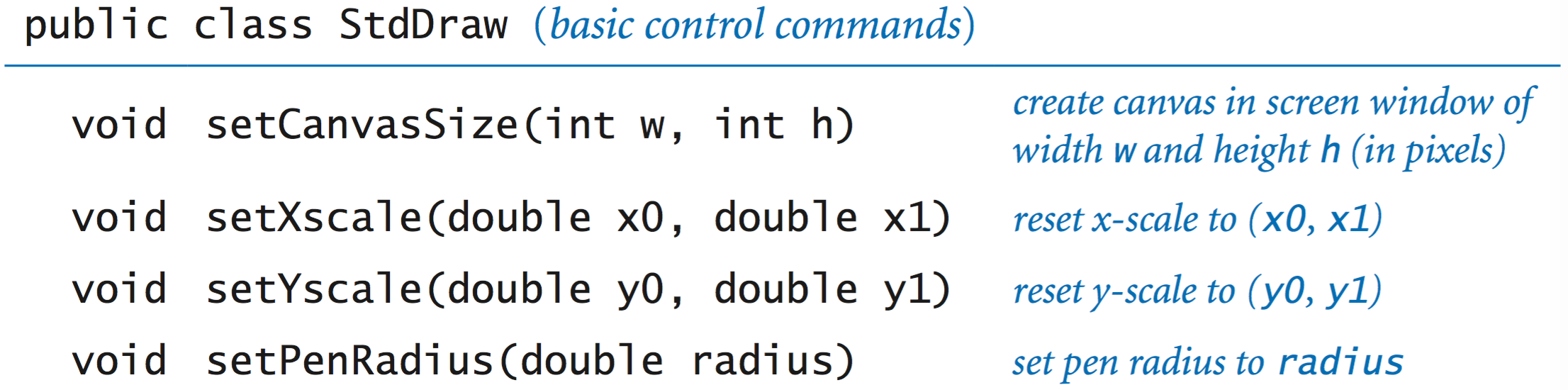
For example, the two-call sequence
StdDraw.setXscale(x0, x1);
StdDraw.setYscale(y0, y1);
sets the drawing coordinates to be within a bounding box whose lower-left corner is at (x0, y0) and whose upper-right corner is at (x1, y1).
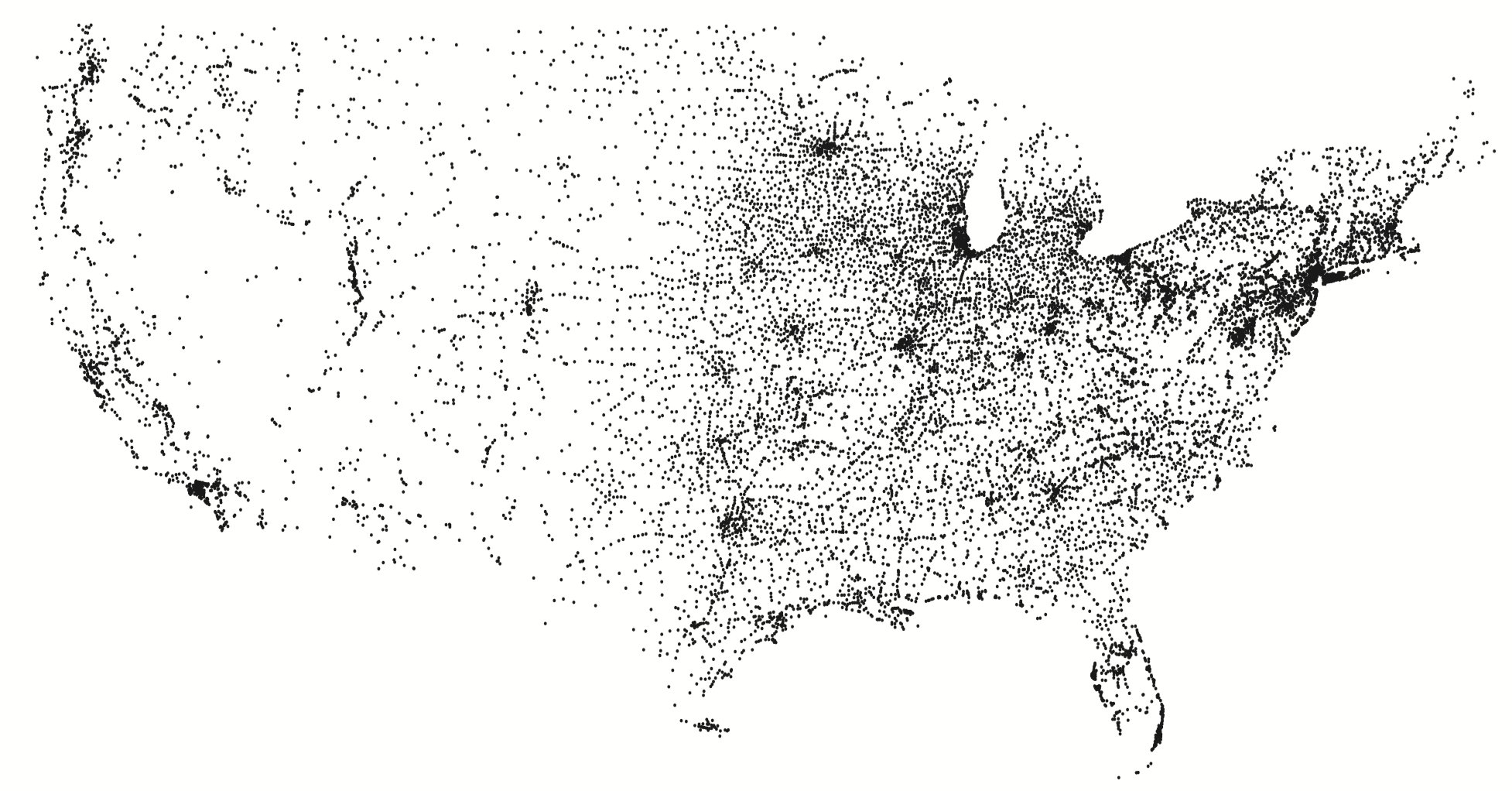
Filtering data to a standard drawing. PlotFilter.java reads a sequence of points defined by (x, y) coordinates from standard input and draws a spot at each point. It adopts the convention(约定) that the first four numbers on standard input specify the bounding box, so that it can scale the plot.
% java PlotFilter < USA.txt
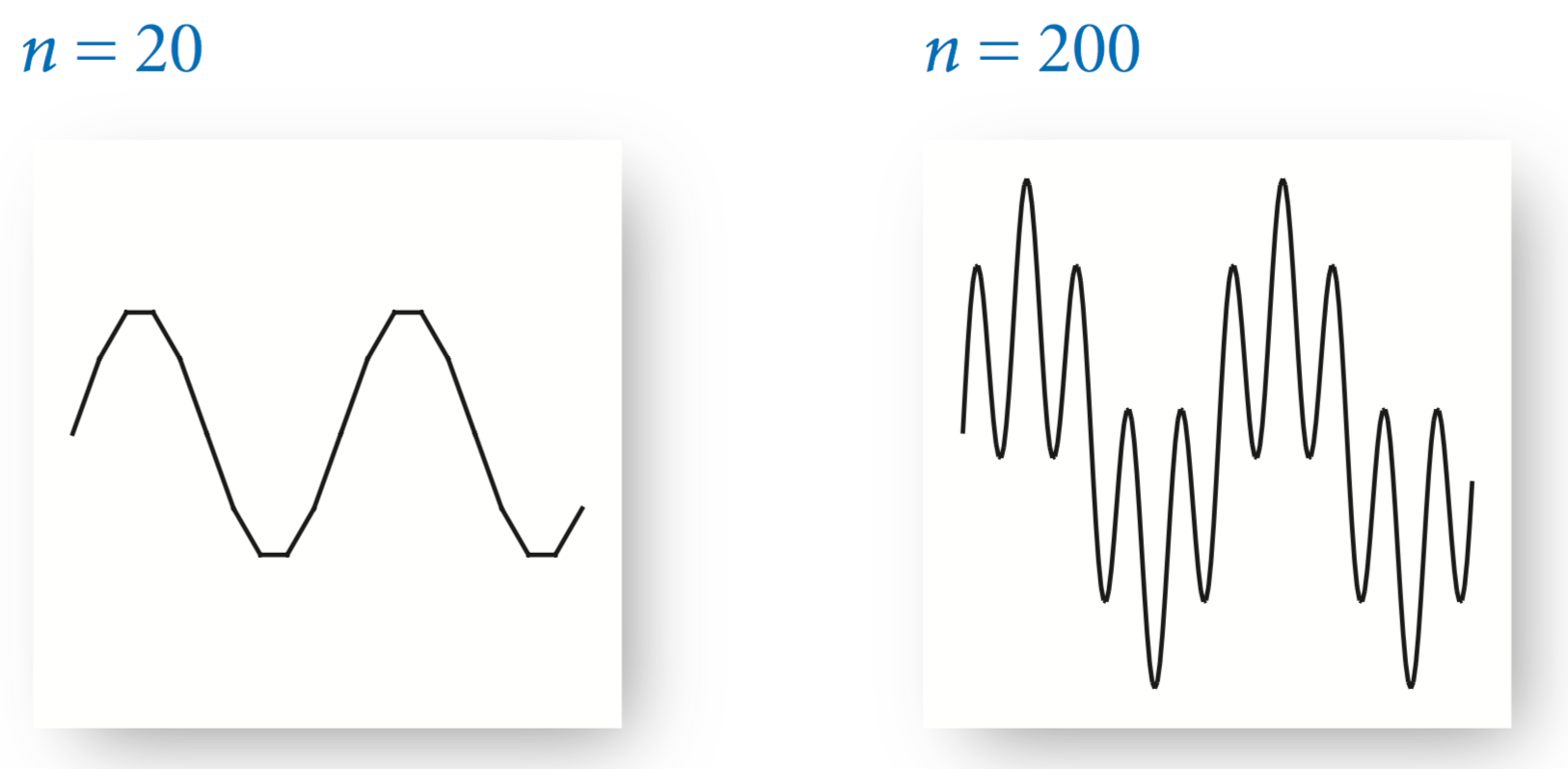
Plotting a function graph. FunctionGraph.java plots the function y = sin(4x) + sin(20x) in the interval (0, π). There are an infinite number of points in the interval, so we have to make do with evaluating(评估) the function at a finite number of points within the interval. We sample the function by choosing a set of x-values, then computing y-values by evaluating the function at each x-value. Plotting the function by connecting successive points with lines produces what is known as a piecewise(分段) linear approximation.
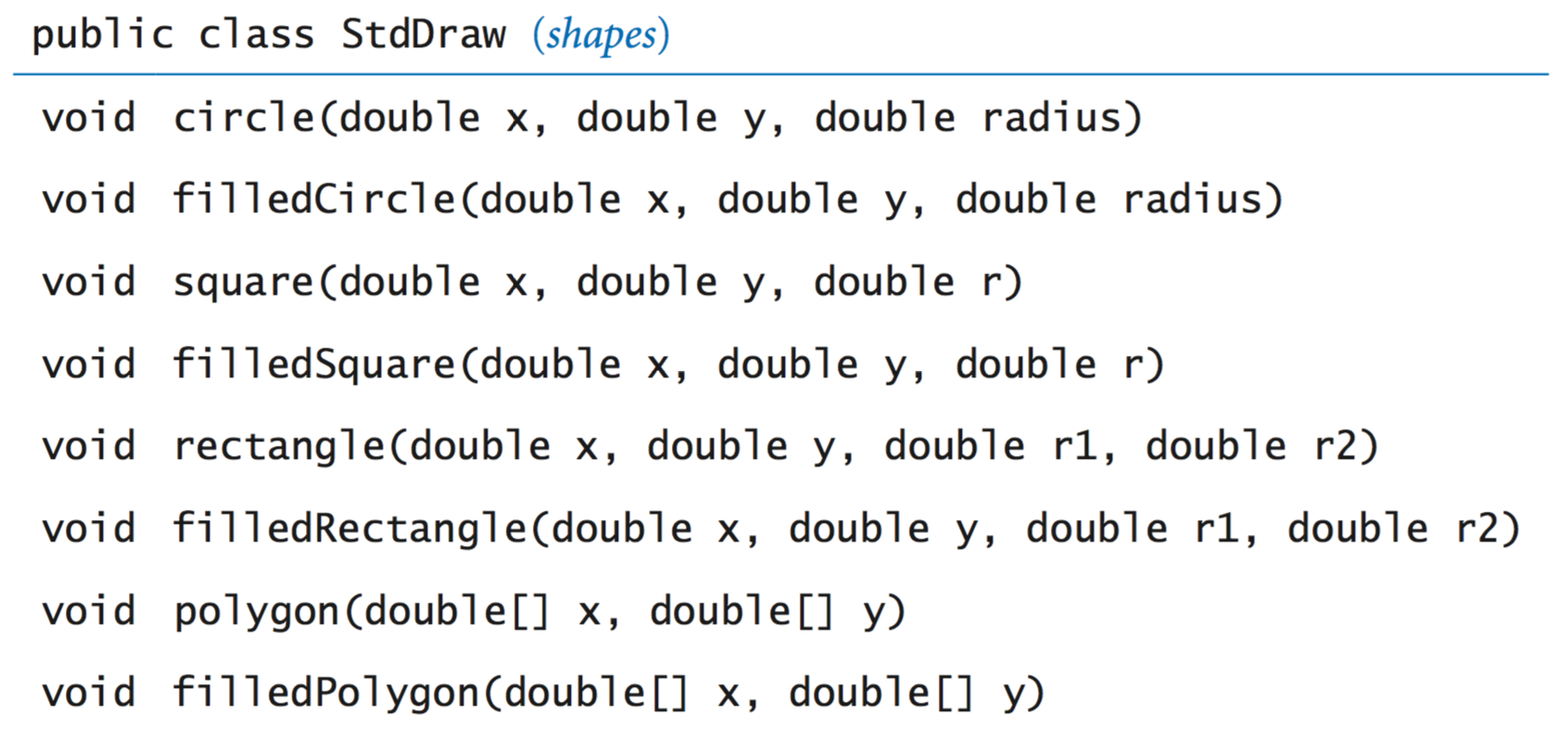
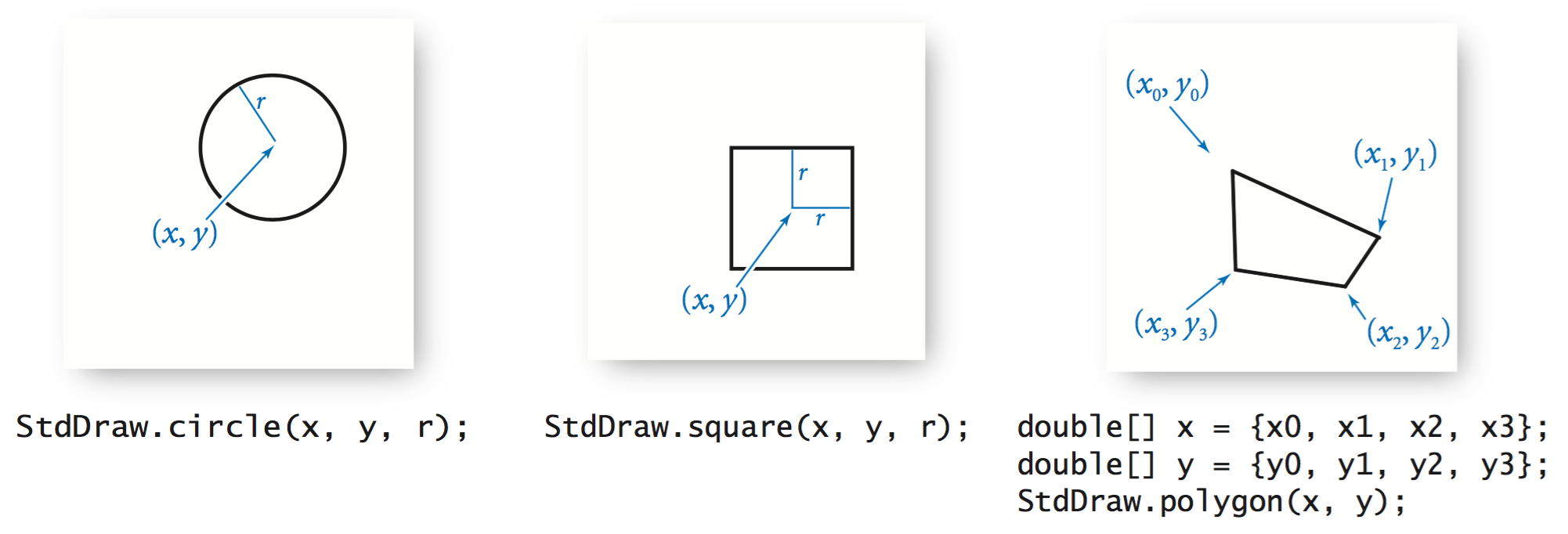
The arguments for circle() define a circle of radius r; the arguments for square() define a square of side length 2r centered on the given point; and the arguments for polygon() define a sequence of points that we connect by lines, including one from the last point to the first point.
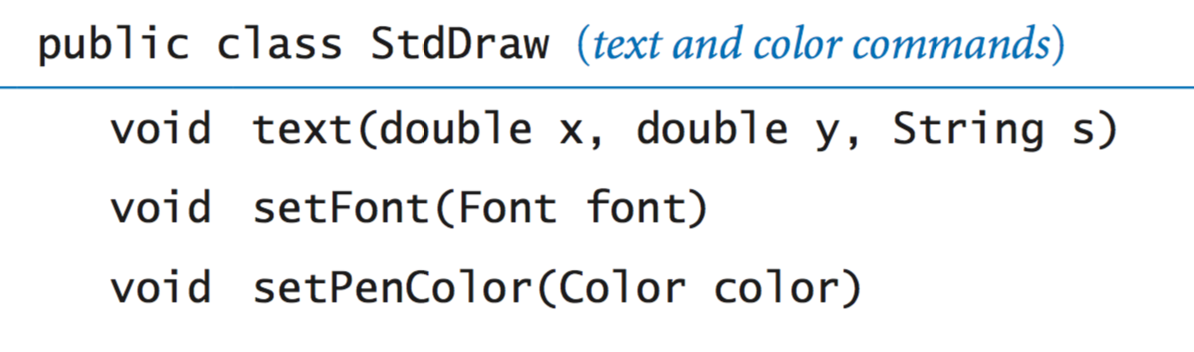
In this code, java.awt.Font and java.awt.Color are abstractions that are implemented with non-primitive types that you will learn about in Section 3.1. Until then, we leave the details to StdDraw. The default ink color is black; the default font is a 16-point plain Serif font.
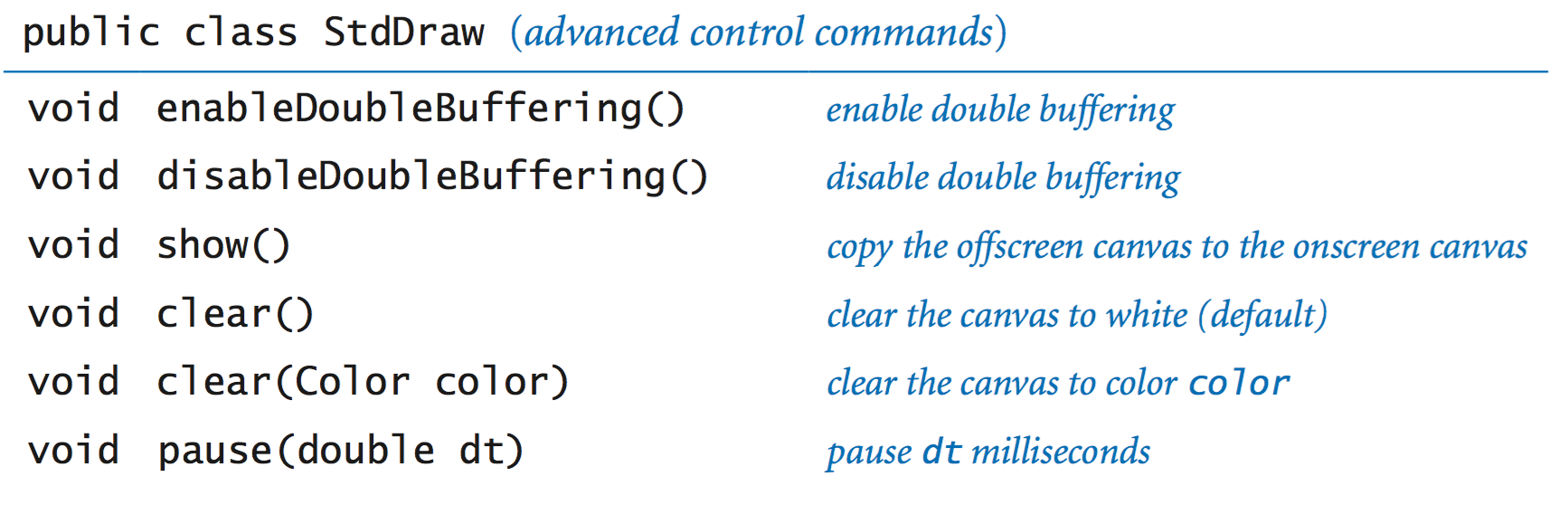
Double buffering. StdDraw supports a powerful computer graphics feature known as double buffering. When double buffering is enabled by calling enableDoubleBuffering(), all drawing takes place on the offscreen canvas. The offscreen canvas is not displayed; it exists only in computer memory. Only when you call show() does your drawing get copied from the offscreen canvas to the onscreen canvas, where it is displayed in the standard drawing window. You can think of double buffering as collecting all of the lines, points, shapes, and text that you tell it to draw, and then drawing them all simultaneously, upon request. One reason to use double buffering is for efficiency when performing a large number of drawing commands.(绘图与显示分开)
Computer animations. Our most important use of double buffering is to produce computer animations, where we create the illusion of motion by rapidly displaying static drawings. We can produce animations by repeating the following four steps: (动画)
1. Clear the offscreen canvas.
2. Draw objects on the offscreen
3. Copy the offscreen canvas to the onscreen canvas.
4. Wait for a short while.
In support of these steps, the StdDraw has several methods:
Images. Our standard draw library supports drawing pictures as well as geometric shapes. The command StdDraw.picture(x, y, filename) plots the image in the given filename (either JPEG, GIF, or PNG format) on the canvas, centered on (x, y).BouncingBallDeluxe.java illustrates an example where the bouncing ball is replaced by an image of a tennis ball.
User interaction. Our standard draw library also includes methods so that the user can interact with the window using the mouse.
double mouseX()          return x-coordinate of mouse
double mouseY()          return y-coordinate of mouse
boolean mousePressed()   is the mouse currently being pressed?
A first example. MouseFollower.java is the HelloWorld of mouse interaction. It draws a blue ball, centered on the location of the mouse. When the user holds down the mouse button, the ball changes color from blue to cyan.
A simple attractor. OneSimpleAttractor.java simulates the motion of a blue ball that is attracted to the mouse. It also accounts for a drag force(强拽).
Many simple attractors. SimpleAttractors.java simulates the motion of 20 blue balls that are attracted to the mouse. It also accounts for a drag force. When the user clicks, the balls disperse randomly.
Springs. Springs.java implements a spring(弹力) system.
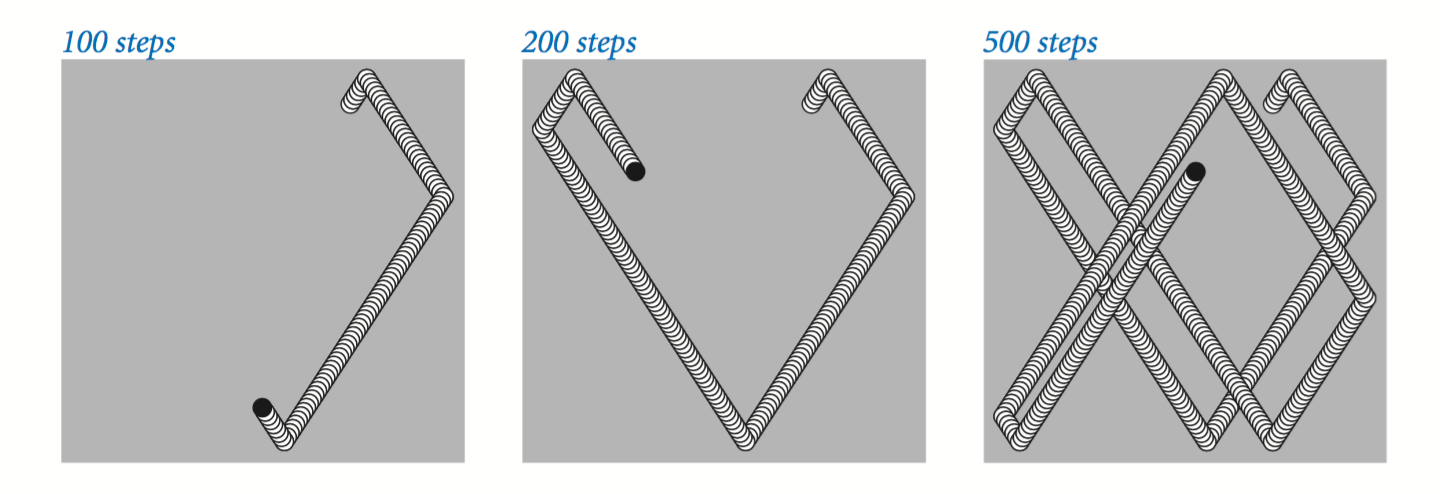
The "Hello, World" program for animation is to produce a black ball that appears to move around on the canvas, bouncing off the boundary according to the laws of elastic collision(弹性碰撞). Suppose that the ball is at position (x, y) and we want to create the impression of having it move to a new position, say (x + 0.01, y + 0.02). We do so in four steps:
1. Clear the offscreen canvas to white.
2. Draw a black ball at the new position on the offscreen canvas.
3. Copy the offscreen canvas to the onscreen canvas.
4. Wait for a short while.
To create the illusion(错觉) of movement, BouncingBall.java iterates these steps for a whole sequence of positions of the ball.
Concert A. Concert(音乐会) A is a sine wave, scaled to oscillate(振动) at a frequency of 440 times per second. The function sin(t) repeats itself once every 2π units on the x-axis, so if we measure t in seconds and plot the function sin(2πt × 440) we get a curve that oscillates 440 times per second. The amplitude (y-value振幅) corresponds to the volume. We assume it is scaled to be between −1 and +1.
Other notes. A simple mathematical formula characterizes the other notes on the chromatic(有色的) scale. They are divided equally on a logarithmic (base 2) scale: there are twelve notes on the chromatic scale, and we get the i th note above a given note by multiplying its frequency by the (i/12)th power of 2.
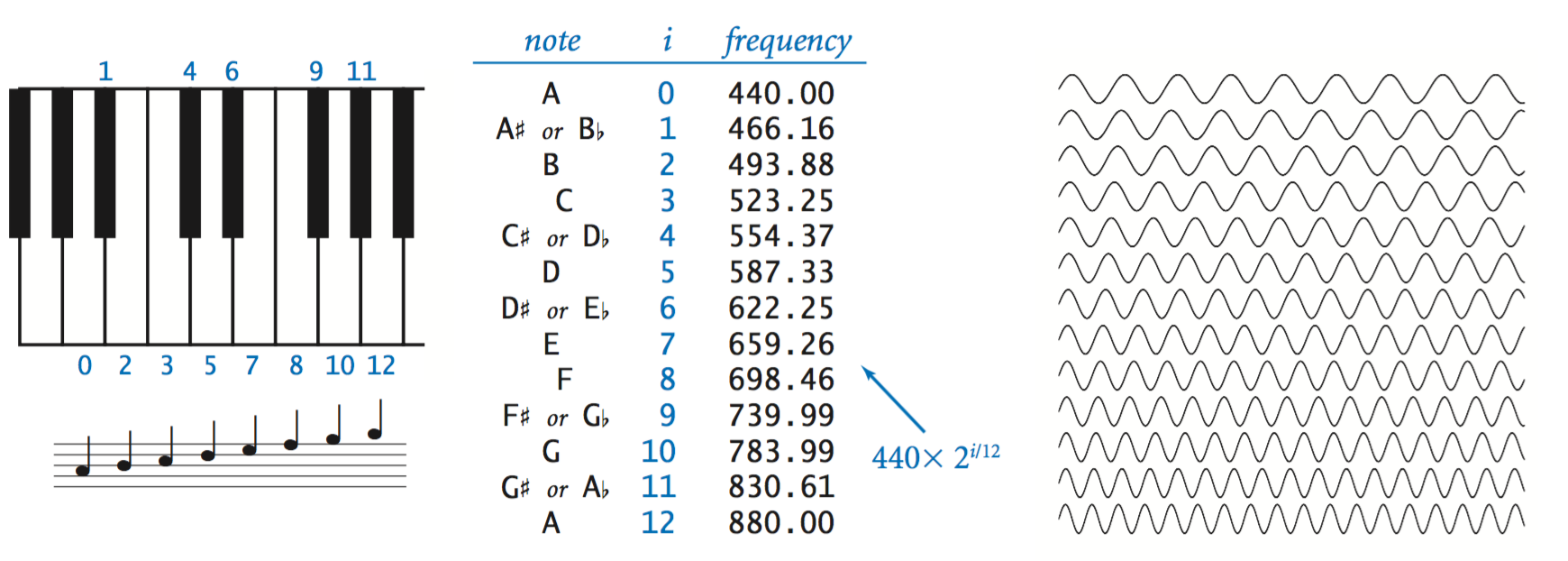
When you double or halve(减半) the frequency, you move up or down an octave(八度音阶) on the scale. For example 880 hertz is one octave above concert A and 110 hertz is two octaves below concert A.
Standard audio. (自学)
StdAudio is a library that you can use to play and manipulate sound files. It allows you to play, manipulate and synthesize(合成) sound.
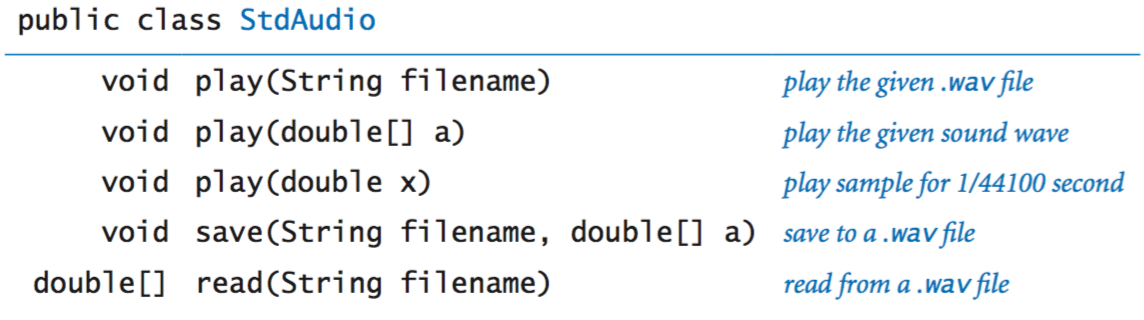
We introduce some basic concepts behind one of the oldest and most important areas of computer science and scientific computing: digital signal processing.
Sampling. For digital sound, we represent a curve by sampling it at regular intervals, in precisely the same manner as when we plot function graphs. We sample sufficiently often that we have an accurate representation of the curve—a widely used sampling rate is 44,100 samples per second. It is that simple: we represent sound as an array of numbers (real numbers that are between −1 and +1).
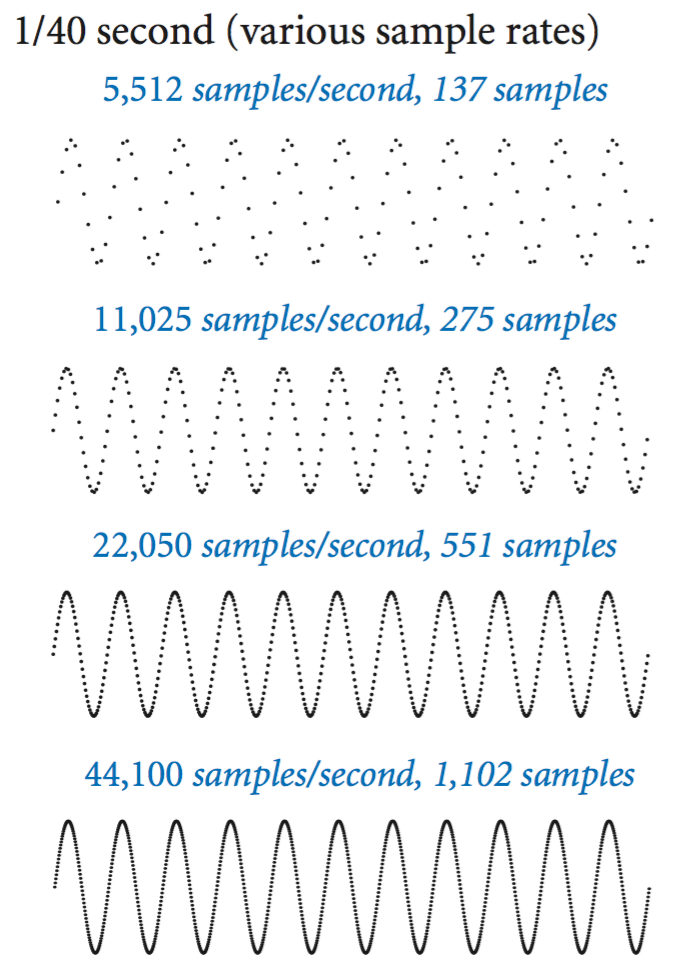
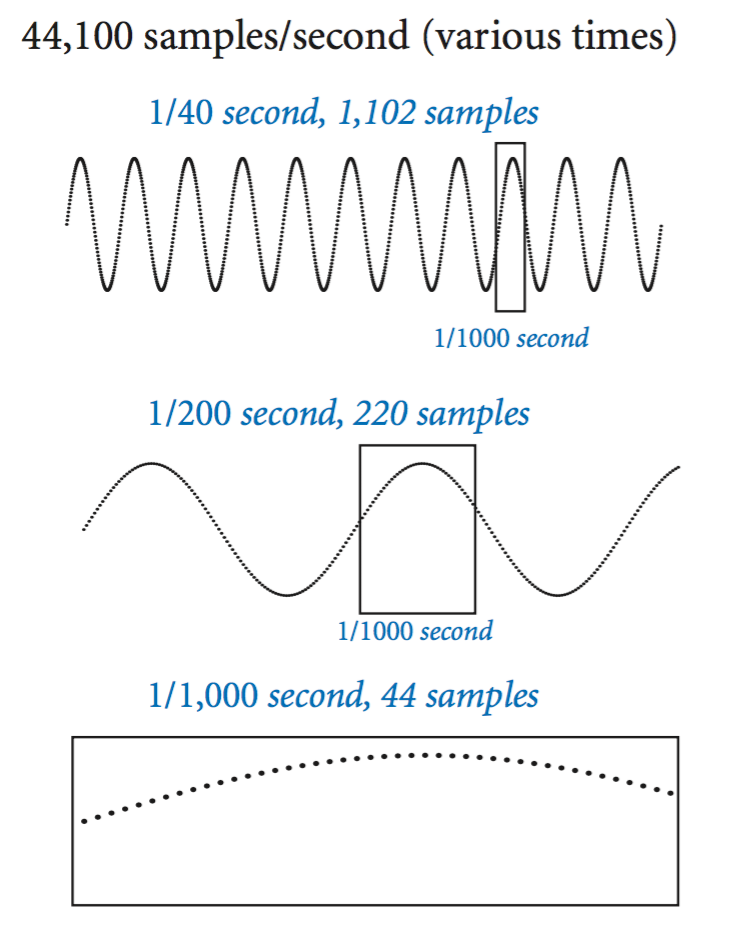
For example, the following code fragment plays concert A for 10 seconds.
int SAMPLING_RATE = 44100;
double hz = 440.0;
double duration = 10.0;
int n = (int) (SAMPLING_RATE * duration);
double[] a = new double[n+1];
for (int i = 0; i <= n; i++) {
   a[i] = Math.sin(2 * Math.PI * i * hz / SAMPLING_RATE);
}
StdAudio.play(a);
Play that tune. PlayThatTune.java is an example that shows how easily we can create music with StdAudio. It takes notes from standard input, indexed on the chromatic scale from concert A, and plays them on standard audio.

