In this section, our plan is to lead you into the world of Java programming by taking you through the three basic steps required to get a simple program running. As with any application, you need to be sure that Java is properly installed on your computer. You also need an editor and a terminal application. Here are system specific instructions for three popular home operating systems. [ Mac OS X · Windows · Linux ](三种不同的操作系统中,java开发环境的配置步骤。主要步骤包括安装JDK和安装编译器。针对windows或Mac,百度可以查询到很多的案例教程。)
java初学者Win 10下eclipse的安装教程(超级详细,推荐)
https://blog.csdn.net/weixin_39381833/article/details/78078783
特别说明:win10家庭中文版,请不要下载安装Eclipse IDE for Enterprise Java Developers版本,可能无法安装。请下载Eclipse IDE for Java Developers版本。
Windows10平台eclipse+JDK12配置过程(JDK最新版本,推荐)
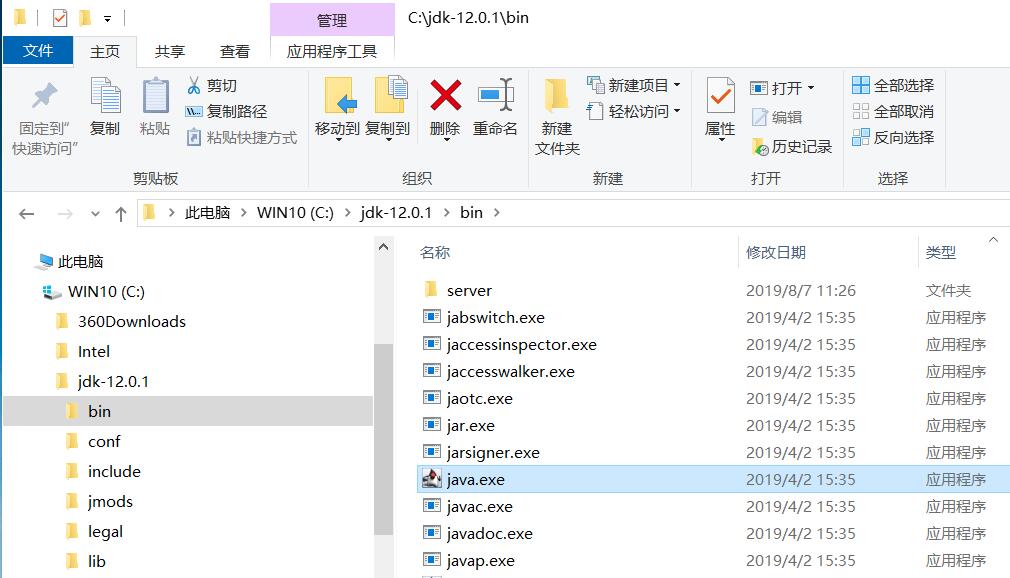
1.将openjdk-12.0.1_windows-x64_bin.zip解压,然后拷贝到C盘或D盘根目录。(安装包见QQ群或网络教学平台的资料目录)
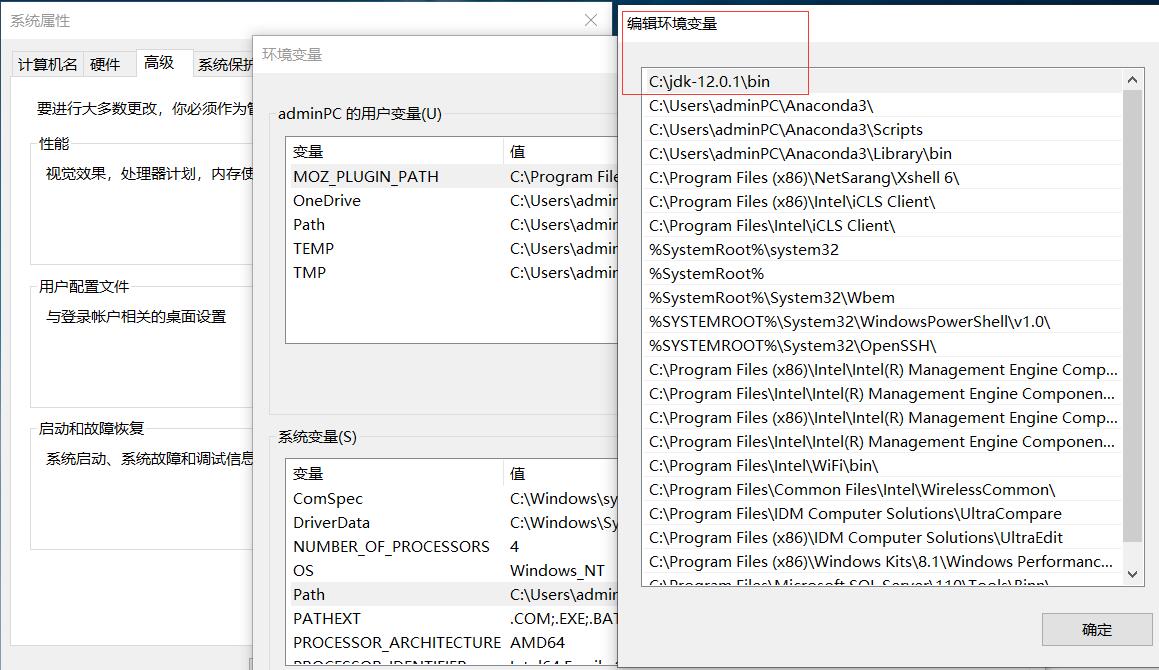
2.编辑系统环境变量,添加C:\jdk-12.0.1\bin到Path变量中。
具体操作步骤见:http://www.xitongzhijia.net/xtjc/20180320/122705.html
https://jingyan.baidu.com/article/b24f6c82cba6dc86bfe5da9f.html
3.检查环境变量是否正确配置。
在运行对话框输入cmd命令回车,输入javac或java命令,看是否有命令行提示出现。
4.运行eclipse的安装程序eclipse-inst-win64.exe
java VM和installation Folder设置为默认即可。Accept确认licence声明。
certificates页面select all,accept selected
select a directory as workspace,browse选择D盘的某个目录作为保存代码的目录
eclipse中更改JDK目录
https://blog.csdn.net/clj198606061111/article/details/11881575
JDK解压目录:
WIN10环境变量设置:
补充:eclipse导入外部jar包(本教程后续提供的stdlib包等)
https://jingyan.baidu.com/article/ca41422fc76c4a1eae99ed9f.html
Eclipse输入命令行参数
https://www.cnblogs.com/wenjiang/archive/2013/01/12/2857765.html
Windows7/10平台eclipse+JDK8配置过程(版本较旧,不推荐)
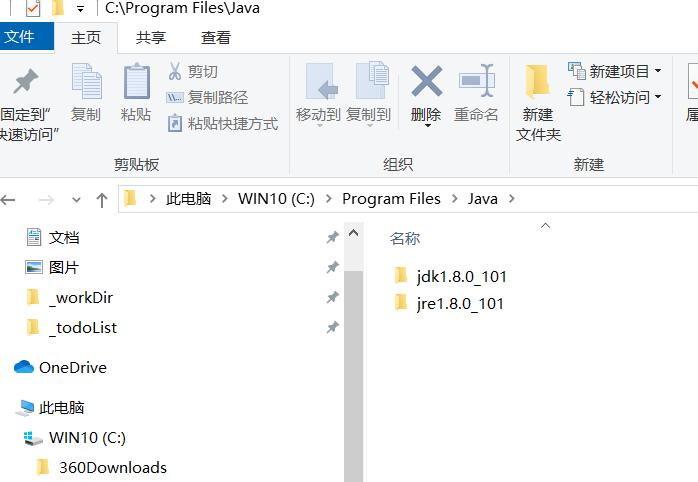
1.将网络教学平台共享的jdk-8u101-windows-x64.exe下载并安装到windows系统中。路径都用默认的,不需要修改。(安装包见QQ群或网络教学平台的资料目录)
2.编辑系统环境变量,添加C:\Program Files\Java\jdk1.8.0_101\bin到Path变量中。
具体操作步骤见:http://www.xitongzhijia.net/xtjc/20180320/122705.html
https://jingyan.baidu.com/article/b24f6c82cba6dc86bfe5da9f.html
3.检查环境变量是否正确配置。
在运行对话框输入cmd命令回车,输入javac或java命令,看是否有命令行提示出现。
4.运行eclipse的安装程序eclipse-inst-win64.exe
java VM和installation Folder设置为默认即可。Accept确认licence声明。
certificates页面select all,accept selected
select a directory as workspace,browse选择D盘的某个目录作为保存代码的目录
Programming in Java.
We break the process of programming in Java into three steps:
(总体来说,包含以下三步)
Create the program by typing it into a text editor and saving it to a file named, say, MyProgram.java. (用记事本也可以创建)
Compile it by typing "javac MyProgram.java" in the terminal window. (命令行)
Execute (or run) it by typing "java MyProgram" in the terminal window. (命令行)
The first step creates the program; the second translates it into a language more suitable for machine execution (and puts the result in a file named MyProgram.class); the third actually runs the program.
(上述三个步骤,详细介绍如下)
Creating a Java program. A program is nothing more than a sequence of characters, like a sentence, a paragraph, or a poem. To create one, we need only define that sequence characters using a text editor in the same way as we do for email. HelloWorld.java is an example program. Type these character into your text editor (记事本或文本编辑器) and save it into a file named HelloWorld.java.
public class HelloWorld {
   public static void main(String[] args) {
      // Prints "Hello, World" in the terminal window.
      System.out.println("Hello, World");
   }
}
Compiling a Java program. A compiler is an application that translates programs from the Java language to a language more suitable for executing on the computer. It takes a text file with the .java extension as input (your program) and produces a file with a .class extension (the computer-language version). To compile HelloWorld.java type the text below at the terminal. (We use the % symbol to denote the command prompt, but it may appear different depending on your system.)
% javac HelloWorld.java
If you typed in the program correctly, you should see no error messages. Otherwise, go back and make sure you typed in the program exactly as it appears above. (如果提示javac不是内部或外部命令,可能是因为JDK没有安装,或者是PATH环境变量没有设置好。ps百度解决。如果提示找不到HelloWorld.java,可能是因为该文件不在cmd的当前目录下。)
Executing (or running) a Java program. Once you compile your program, you can execute it. This is the exciting part, where the computer follows your instructions. To run the HelloWorld program, type the following in the terminal window:
% java HelloWorld
If all goes well, you should see the following response
Hello, World
Understanding a Java program. The key line with System.out.println() prints the text "Hello, World" in the terminal window. When we begin to write more complicated programs, we will discuss the meaning of public, class, main, String[], args, System.out, and so on. (学编程,从HelloWorld开始,迅速了解基本的语法格式。)
Creating your own Java program. For the time being(目前), all of our programs will be just like HelloWorld.java, except with a different sequence of statements in main(). (main函数之内的语句根据需要编写,但是第一行和第二行具有严格的格式要求). The easiest way to write such a program is to:
Copy HelloWorld.java into a new file whose name is the program name followed by .java.
Replace HelloWorld with the program name everywhere.
Replace the print statement by a sequence of statements.
编程的三重境界:看懂代码、看懂并修改代码、从零开始编写代码。
Errors.
Most errors are easily fixed by carefully examining the program as we create it, in just the same way as we fix spelling and grammatical errors when we type an e-mail message.
Compile-time errors. These errors are caught by the system when we compile the program, because they prevent the compiler from doing the translation (so it issues an error message that tries to explain why). (编译错误,一般为语法错误,编译器会给出提示。能不能看懂就看英文水平和调试能力了。)
Run-time errors. These errors are caught by the system when we execute the program, because the program tries to perform an invalid operation (e.g., division by zero). (运行错误,由操作系统给出,常见的如被零除。)
Logical errors. These errors are (hopefully) caught by the programmer when we execute the program and it produces the wrong answer. Bugs are the bane(祸根,痛苦之源) of a programmer's existence. They can be subtle(微妙的狡猾的) and very hard to find. (逻辑错误,代码可以编译,程序可以运行,但是结果不对!最常见,也最难定位。囧)
One of the very first skills that you will learn is to identify errors; (这句没有问题:首先要对编译错误能够看懂并修改。) one of the next will be to be sufficiently careful when coding to avoid many of them. (这句不可能:无论你多么细心,都可能出错。解决方案:用编译器的调试功能,定位和修改错误。)
单步调试:每个程序员应该掌握的生存技能。
Input and output.
Typically, we want to provide input to our programs: data that they can process to produce a result. The simplest way to provide input data is illustrated in UseArgument.java. Whenever this program is executed, it reads the command-line argument that you type after the program name and prints it back out to the terminal as part of the message. (如同C语言的main函数带参数,java也支持。该功能非常重要,可以使得代码不重新编译,但能处理不同的输入。)
% javac UseArgument.java
% java UseArgument Alice
Hi, Alice. How are you?
% java UseArgument Bob
Hi, Bob. How are you?

