
Introduction to Collections
}Java API provides several predefined data structures, called collections, used to store groups of related objects.
§Each provides efficient methods that organize, store and retrieve your data without requiring knowledge of how the data is being stored.
§Reduce application-development time.
}Arrays do not automatically change their size at execution time to accommodate additional elements.
}ArrayList<T>(package java.util) can dynamically change its size to accommodate more elements.
§T is a placeholder for the type of elementstored in the collection.
§This is similar to specifying the type when declaring an array, except that only non primitive types can be used with these collection classes.
}Classes with this kind of placeholder that can be used with any type are called generic classes.
Interface Collection and Class Collections
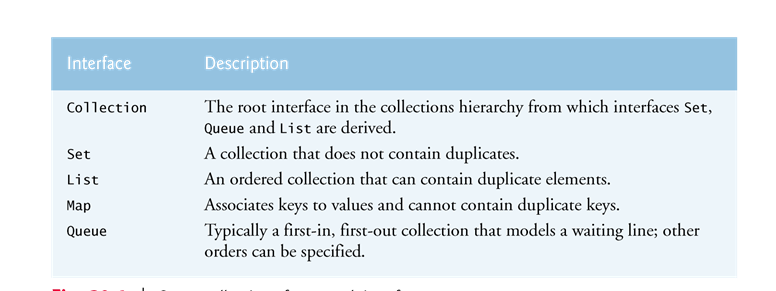
}Interface Collection is the root interface from which interfaces Set, Queue and List are derived.
}Interface Set defines a collection that does not contain duplicates.
}Interface Queue defines a collection that represents a waiting line.
}Interface Collection contains bulk operations for adding, clearing and comparing objects in a collection.
}A Collection can be converted to an array.
}Interface Collection provides a method that returns an Iterator object, which allows a program to walk through the collection and remove elements from the collection during the iteration.
}Class Collections provides static methods that search, sort and perform other operations on collections.
Class ArrayList
}An ArrayList’s capacity indicates how many items it can hold without growing.
}When the ArrayList grows, it must create a larger internal array and copy each element to the new array.
§This is a time-consuming operation. It would be inefficient for the ArrayList to grow each time an element is added.
§An ArrayList grows only when an element is added and the number of elements is equal to the capacity—i.e., there is no space for the new element.
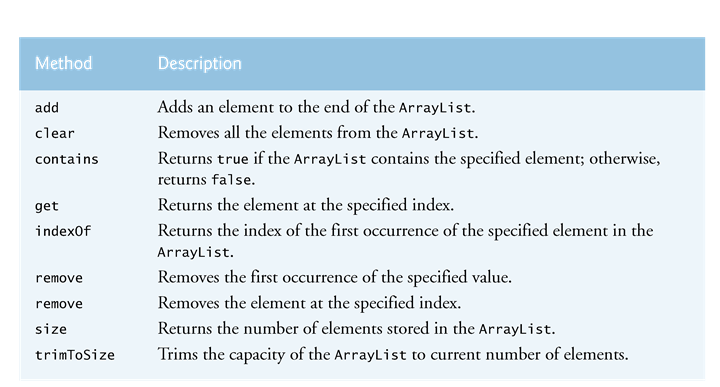
}Method add adds elements to the ArrayList
§One-argument version appends its argument to the end of the ArrayList.
§Two-argumentversion inserts a new element at the specified position.
§Collection indices start at zero.
}Method size returns the number of elements in the ArrayList.
}Method get obtains the element at a specified index.
}Method remove deletes an element with a specificvalue.
§An overloaded version of the method removes the element at the specified index.
}Method contains determines if an item is in the ArrayList.

