
目录

  • 1 Introduction
    • 1.1 Introduction
    • 1.2 Machine Lang, Assembly lang and High-level lang
    • 1.3 History of Java
    • 1.4 Characteristics of Java
    • 1.5 Typical Java Development Environment
    • 1.6 Introduction to Java Application
  • 2 Classes and Objects
    • 2.1 Primitive Types vs. Reference Types
    • 2.2 Classes and Objects
      • 2.2.1 Declaring a Class
      • 2.2.2 Local and Instance Variables
      • 2.2.3 Methods: A Deeper Look
      • 2.2.4 Constructors
  • 3 Control Statements
    • 3.1 Control Structures
    • 3.2 if Selection
    • 3.3 while Repetition
    • 3.4 for Repetition
    • 3.5 do…while repetition
    • 3.6 switch multiple-selection
  • 4 Arrays and Collections
    • 4.1 Arrays
    • 4.2 ArrayList
    • 4.3 Set
    • 4.4 Generic Programming
  • 5 Object-Oriented Programming: Inheritance
    • 5.1 Inheritance
    • 5.2 Superclasses and Subclasses
    • 5.3 Constructors in Subclasses
  • 6 Object-Oriented Programming: Polymorphism
    • 6.1 Polymorphism
    • 6.2 Polymorphic Behavior
    • 6.3 Enable and Disable Polymorphism
  • 7 Exception Handling
    • 7.1 Exceptions
    • 7.2 Error-Handling
  • 8 Java I/O
    • 8.1 Java I/O Streams
    • 8.2 Decorator Design Pattern
  • 9 GUI Components
    • 9.1 AWT and SWING
    • 9.2 Event Model
  • 10 Multithreading
    • 10.1 Life Cycle of a Thread
    • 10.2 Thread Synchronization
    • 10.3 Producer/Consumer
Introduction to Java Application


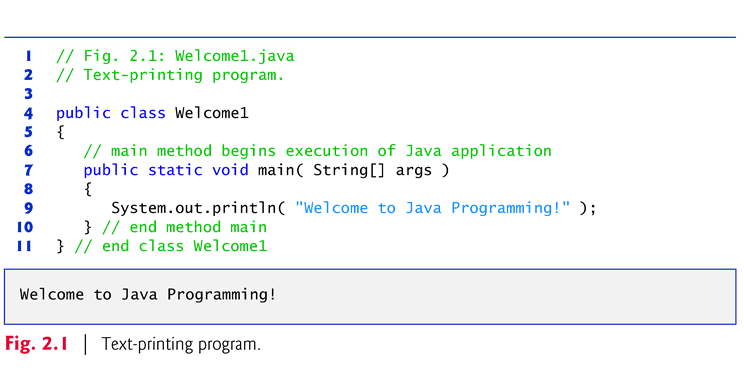
}Declaring the main Method

  public static void main(String[] args)

§Startingpoint of every Java application. 

§Parentheses after the identifier mainindicate that it’s a program building block called a method.

§Javaclass declarations normally contain one or more methods. 

§main must be defined as shown; otherwise, theJVM will not execute the application. 

§Methodsperform tasks and can return information when they complete their tasks. 

§Keywordvoid indicates that this method will notreturn any information. 


}Body of the method declaration

§Enclosedin left and right braces.}Statement

  System.out.println("Welcometo Java Programming!");

§Instructsthe computer to perform an action

  –Print the string of characters contained between thedouble quotation marks. 

§Astring is sometimes called a characterstring or a string literal

§White-spacecharacters in strings are not ignored by the compiler. 

§Stringscannot span multiple lines of code.


}System.out object

  §Standard output object

  §Allows Java applications to display strings in the command window from which the Java application executes. 

}System.out.println method 

  §Displays (or prints) a line of textin the command window. 

  §The string in the parentheses the argument to the method. 

  §Positions the output cursor at the beginning of the next line in the command window.

}Most statements end with a semicolon.