
A graphical user interface (GUI) presents a user-friendly mechanism for interacting with an application.
◦ Pronounced “GOO-ee”
◦ Gives an application a distinctive “look” and “feel.”
◦ Consistent, intuitive user-interface components give users a
sense of familiarity
◦ Learn new applications more quickly and use them more
productively.
User interacts via the mouse, the keyboard or another form of input, such as voice recognition.
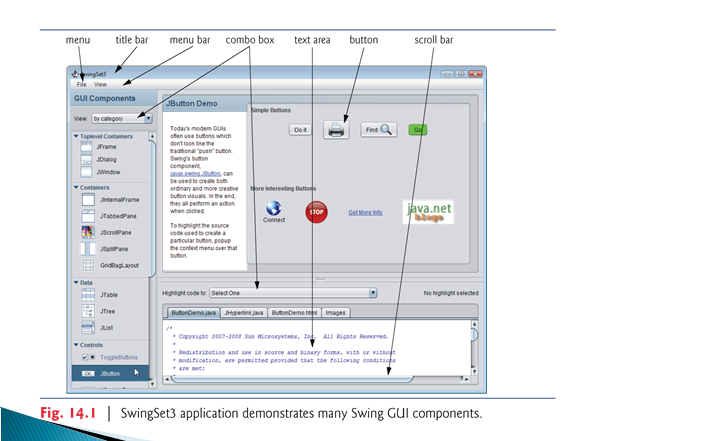
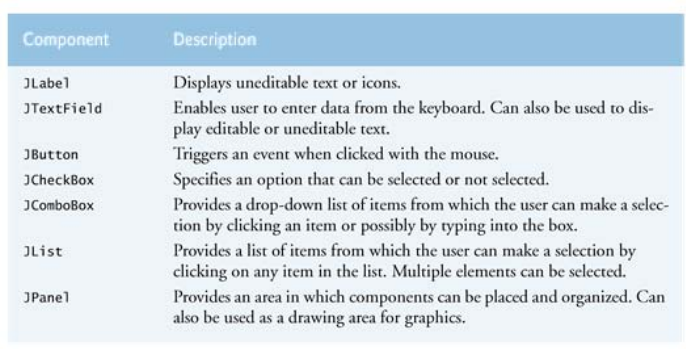
Abstract Window Toolkit (AWT) in package java.awt is another set of GUI components in Java.
◦ When a Java application with an AWT GUI executes on different Java platforms, the application’s GUI components display differently on each platform.
Together, the appearance and the way in which the user interacts with the application are known as that application’s look-and-feel.
Swing GUI components allow you to specify a uniform look-and-feel for your application across all platforms or to use each platform’s custom look-and-feel.
Most Swing components are not tied to actual GUI components of the underlying platform.
◦ Known as lightweight components.
AWT components are tied to the local platform and are
called heavyweight components, because they rely on the
local platform’s windowing system to determine their
functionality and their look-and-feel.
Several Swing components are heavyweight components.
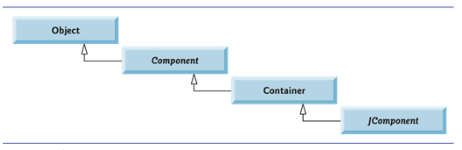
Class Component (package java.awt) declares many of the attributes and behaviors common to the GUI components in packages java.awt and javax.swing.
Most GUI components extend class Component directly or indirectly.

