
Decorator pattern allows a user to add new functionality to an existing object without altering its structure. This type of design pattern comes under structural pattern as this pattern acts as a wrapper to existing class.
This pattern creates a decorator class which wraps the original class and provides additional functionality keeping class methods signature intact.
We are demonstrating the use of decorator pattern via following example in which we will decorate a shape with some color without alter shape class.
Implementation
We're going to create a Shape interface and concrete classes implementing the Shape interface. We will then create an abstract decorator class ShapeDecorator implementing the Shape interface and having Shape object as its instance variable.
RedShapeDecorator is concrete class implementing ShapeDecorator.
DecoratorPatternDemo, our demo class will use RedShapeDecorator to decorate Shape objects.
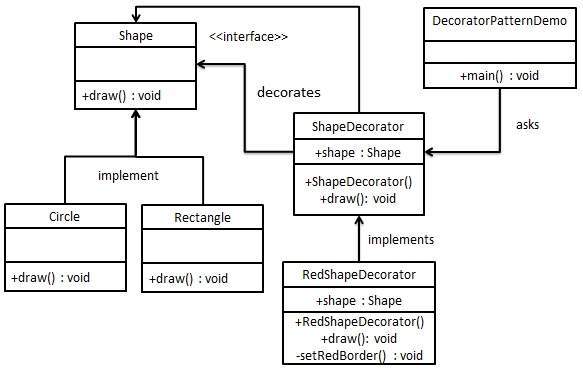
Step 1
Create an interface.
Shape.java
public interface Shape {
   void draw();
}
Step 2
Create concrete classes implementing the same interface.
Rectangle.java
public class Rectangle implements Shape {

   @Override
   public void draw() {
      System.out.println("Shape: Rectangle");
   }
}
Circle.java
public class Circle implements Shape {

   @Override
   public void draw() {
      System.out.println("Shape: Circle");
   }
}
Step 3
Create abstract decorator class implementing the Shape interface.
ShapeDecorator.java
public abstract class ShapeDecorator implements Shape {
   protected Shape decoratedShape;

   public ShapeDecorator(Shape decoratedShape){
      this.decoratedShape = decoratedShape;
   }

   public void draw(){
      decoratedShape.draw();
   }
}
Step 4
Create concrete decorator class extending the ShapeDecorator class.
RedShapeDecorator.java
public class RedShapeDecorator extends ShapeDecorator {

   public RedShapeDecorator(Shape decoratedShape) {
      super(decoratedShape);
   }

   @Override
   public void draw() {
      decoratedShape.draw();
      setRedBorder(decoratedShape);
   }

   private void setRedBorder(Shape decoratedShape){
      System.out.println("Border Color: Red");
   }
}
Step 5
Use the RedShapeDecorator to decorate Shape objects.
DecoratorPatternDemo.java
public class DecoratorPatternDemo {
   public static void main(String[] args) {

      Shape circle = new Circle();

      Shape redCircle = new RedShapeDecorator(new Circle());

      Shape redRectangle = new RedShapeDecorator(new Rectangle());
      System.out.println("Circle with normal border");
      circle.draw();

      System.out.println("\nCircle of red border");
      redCircle.draw();

      System.out.println("\nRectangle of red border");
      redRectangle.draw();
   }
}
Step 6
Verify the output.
Circle with normal border
Shape: Circle

Circle of red border
Shape: Circle
Border Color: Red

Rectangle of red border
Shape: Rectangle
Border Color: Red

