
【例1-14】没有数据的列表
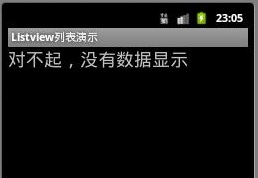
布局文件vlist4.xml的源代码
<?xml version="1.0" encoding="utf-8"?>
<!--【例1-14】没有数据的ListView -->
<LinearLayout xmlns:android="http://schemas.android.com/apk/res/android"
android:layout_width="wrap_content"
android:layout_height="wrap_content"
android:orientation="horizontal">
<ListView
android:id="@android:id/list"
android:layout_width="fill_parent"
android:layout_height="fill_parent" />
<!--与教材的 android:id="@id/android:empty" 不同-->
<TextView
android:id="@android:id/empty"
android:layout_width="wrap_content"
android:layout_height="wrap_content"
android:text="对不起,没有数据显示"
android:textSize="24sp" />
</LinearLayout>
控制文件ListView4Activity.java源代码
package com.example.chap01;
import android.app.ListActivity;
import android.os.Bundle;
import android.view.View;
import android.widget.ArrayAdapter;
import android.widget.ListView;
//【例1-14】没有数据的ListView
public class ListView4Activity extends ListActivity
{
private String[] data={};
public void onCreate(Bundle savedInstanceState) {
super.onCreate(savedInstanceState);
//data = new String[]{"测试数据1", "测试数据2", "测试数据3", "测试数据4", "测试数据5"};
setContentView(R.layout.vlist4);
setListAdapter(new ArrayAdapter<String>(this,
android.R.layout.simple_list_item_1, data));
}
protected void onListItemClick(ListView listView, View v, int position, long id) {
super.onListItemClick(listView, v, position, id);
//与教材的setTitle(listView.getItemAtPosition(position).toString()); 不同
String s= listView.getItemAtPosition(position).toString();
Toast.makeText(this,s,Toast.LENGTH_SHORT).show();
}
}
打开项目配置文件AndroidManifest.xml,修改Activity的类名
<?xml version="1.0" encoding="utf-8"?>
<manifest xmlns:android="http://schemas.android.com/apk/res/android"
xmlns:dist="http://schemas.android.com/apk/distribution"
package="com.example.chap01">
<dist:module dist:instant="true" />
<application
android:allowBackup="true"
android:icon="@mipmap/ic_launcher"
android:label="@string/app_name"
android:roundIcon="@mipmap/ic_launcher_round"
android:supportsRtl="true"
android:theme="@style/AppTheme">
<activity android:name=".ListView4Activity">
<intent-filter>
<action android:name="android.intent.action.MAIN" />
<category android:name="android.intent.category.LAUNCHER" />
</intent-filter>
</activity>
</application>
</manifest>

