
一、MG动画
MG动画,英文全称为:Motion Graphics,直接翻译为动态图形或者图形动画。通常指的是视频设计、多媒体CG设计、电视包装等等。 动态图形指的是“随时间流动而改变形态的图形”,简单的来说动态图形可以解释为会动的图形设计,是影像艺术的一种。 动态图形融合了平面设计、动画设计和电影语言,它的表现形式丰富多样,具有极强的包容性,总能和各种表现形式以及艺术风格混搭。 动态图形的主要应用领域集中于节目频道包装、电影电视片头、商业广告、MV、现场舞台屏幕、互动装置等等。
1960年,美国著名动画师约翰·惠特尼(John Whitney)创立了一家名为Motion Graphics的公司,是首次使用术语“Motion Graphics”。并使用机械模拟计算机技术制作电影电视片头及广告。他最著名的作品之一是在1958年和著名设计师索尔·巴斯(Saul Bass)一起合作为希区柯克电影《迷魂记》(Vertigo)制作的片头。
二、弹性动画
AE中拥有大量功能强大的外部插件和脚本,用户无需了解脚本插件的制作方法及代码编写,只要会用用好就行,而弹性动画效果是MG动画中最常见的效果之一,其实现方法并不难,常用方法如下所示:
实现方法一:
选择要添加弹性效果的对象层的某个属性;
制作关键帧动画;
利用外部运动插件中的弹性功能组件实现弹性效果。
* 注意弹性动画的效果跟动画发生的时间关系挺大,因此做关键帧动画时若想看到弹性动画效果,则运动时长不能太长,比如一个小对象从舞台外掉入舞台中央,之间的时长控制在5帧左右合适,按影片帧速25帧/秒计算
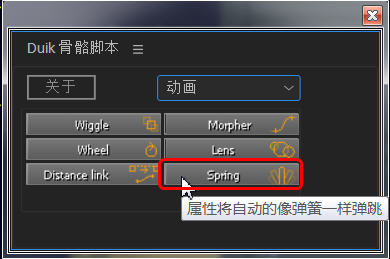
实现方法二:
选择要添加弹性效果的对象层的某个属性,
按Alt单击该属性前的秒表按钮激活表达式;
在表达式中粘贴以下弹性表达式脚本
弹性脚本1:
n = 0;
if (numKeys > 0){
n = nearestKey(time).index;
if (key(n).time > time){
n--;
}
}
if (n == 0){
t = 0;
}else{
t = time - key(n).time;
}
if (n > 0){
v = velocityAtTime(key(n).time - thisComp.frameDuration/10);
amp =0.2;
freq = 3;
decay = 5.0;
value + v*amp*Math.sin(freq*t*2*Math.PI)/Math.exp(decay*t);
}else{
value;
}
弹性脚本2:
amp = .3; elasticity = 6;
damping = 6;
bounce = 0;
if (numKeys>1 && elasticity != 0) {
if (nearestKey(time).index == 1) { value; } else { if (length(velocity) == 0) {
timeKeyProx = nearestKey(time).time;
if (timeKeyProx<=time) {
start = timeKeyProx; } else {
start = key(nearestKey(time).index-1).time;
}
duration = time-start;
spring = velocityAtTime(start-thisComp.frameDuration)*(amp/elasticity*Math.sin(elasticity*duration*2*Math.PI)/Math.exp(duration*damping));
if (bounce == 0) { valueAtTime(start)+spring;
} else if (bounce == 1) {
if (valueAtTime(start-thisComp.frameDuration)>valueAtTime(start)) {
valueAtTime(start)+Math.abs(spring);
} else if (valueAtTime(start-thisComp.frameDuration)<valueAtTime(start))
{ valueAtTime(start)-Math.abs(spring);
}
}
} else { value; } } } else { value; }
脚本1注释:
amp =0.2;//幅度
freq = 3;//频率
decay = 5.0;//衰减
脚本2注释:
amp = .3; elasticity = 6;//频率
damping = 6;//衰减
bounce = 0;//模式 0:双向弹簧 1:单向
if (numKeys>1 && elasticity != 0) { if (nearestKey(time).index == 1) { value; } else { if (length(velocity) == 0) {
//速率为0时;即在无数值变化时启用弹性
timeKeyProx = nearestKey(time).time;
//起始时间=最近一帧时间 if (timeKeyProx<=time) {
//如果最近帧在时间线前
start = timeKeyProx; } else {
//如果最近帧在时间线后
start = key(nearestKey(time).index-1).time;
}
//保证取得时间线之前那帧的时间
duration = time-start;
//绝对时间
spring = velocityAtTime(start-thisComp.frameDuration)*(amp/elasticity*Math.sin(elasticity*duration*2*Math.PI)/Math.exp(duration*damping));
if (bounce == 0) { valueAtTime(start)+spring;//0则使用普通弹性表达式
} else if (bounce == 1) {
if (valueAtTime(start-thisComp.frameDuration)>valueAtTime(start)) {
valueAtTime(start)+Math.abs(spring);
} else if (valueAtTime(start-thisComp.frameDuration)<valueAtTime(start))
{ valueAtTime(start)-Math.abs(spring);
} //1则单向弹性
}
} else { value; } } } else { value; }