Java语言

王晓蒙

目录

  • 1 Introduction to Java
    • 1.1 Programming Languages
    • 1.2 Java Introduction
    • 1.3 JDK Installation
    • 1.4 A Simple Program
    • 1.5 Programming Style and Documentation
    • 1.6 Programming Error
    • 1.7 Programming Using Eclipse
    • 1.8 Review Questions
  • 2 Elementary Programming
    • 2.1 Identifiers, Variables and Constants
    • 2.2 Input By Console
    • 2.3 Numeric Data Type and Literals
    • 2.4 Augmented Numeric Operators
    • 2.5 Numeric Type Conversions
    • 2.6 Mathematical Methods
    • 2.7 Character Data Type
    • 2.8 Using String Type
    • 2.9 Console Formatting Output
  • 3 Selections
    • 3.1 Boolean and Relational Operators
    • 3.2 if-else
    • 3.3 Logical Operators
    • 3.4 switch
  • 4 Loops
    • 4.1 while
    • 4.2 Case: Guessing Numbers
    • 4.3 do-while
    • 4.4 for
    • 4.5 Nested Loops
    • 4.6 break and continue
    • 4.7 Case: Checking Palindromes
  • 5 Methods
    • 5.1 Defining and Calling a Method
    • 5.2 Passing Arguments By Values
    • 5.3 Modularizing Code
    • 5.4 Overloading Methods
    • 5.5 Variables Scope
  • 6 Arrays
    • 6.1 Array Basics
    • 6.2 Case: Analyzing Numbers
    • 6.3 Copying Arrays
    • 6.4 Passing Arrays to Methods
    • 6.5 Variable-Length Arguments List
    • 6.6 The Arrays Class
    • 6.7 Two-Dimensional Arrays Basics
    • 6.8 Two-Dimensional Arrays Processing
    • 6.9 Multidimensional Arrays
  • 7 Objects and Classes
    • 7.1 Introduction to OOP
    • 7.2 Defining Classes and Creating Objects
    • 7.3 Constructors
    • 7.4 Reference Variables and Reference Types
    • 7.5 Using Java Library
    • 7.6 Static Members
    • 7.7 Visibility Modifers
    • 7.8 Passing Objects to Methods
    • 7.9 This Keyword
    • 7.10 Wrapper Class
    • 7.11 Immutable and Interned Strings
  • 8 Inheritance and Polymorphism
    • 8.1 Super-classes and Sub-classes
    • 8.2 super Keyword and Constructor Chaining
    • 8.3 Overriding
    • 8.4 Polymorphism
    • 8.5 Objects Casting
    • 8.6 The method equals
    • 8.7 The protected Members
  • 9 Abstract Classes and Interfaces
    • 9.1 Abstract Classes
    • 9.2 Interfaces
    • 9.3 Comparable Interface
  • 10 Exception Handling
    • 10.1 Introduction
    • 10.2 Exception Declaring and Throwing
    • 10.3 Exception Catching and Handling
    • 10.4 finally
  • 11 I/O Operation
    • 11.1 I/O Introduction
    • 11.2 Binary Input
    • 11.3 Binary Output
    • 11.4 Text Input
    • 11.5 Text Output
  • 12 JavaFX Basics
    • 12.1 A Basic JavaFX Program
    • 12.2 Node Types
    • 12.3 Property Binding
    • 12.4 Node Style
    • 12.5 Layout
    • 12.6 JavaFX and Eclipse
  • 13 Event-Driven Programming
    • 13.1 Event-Source, Event and Event-Handler
    • 13.2 Defining Event-Handler Using Inner-Class
    • 13.3 Event Handling Using Lambda Expression
  • 14 Others
I/O Introduction

How is I/O Handled in Java?

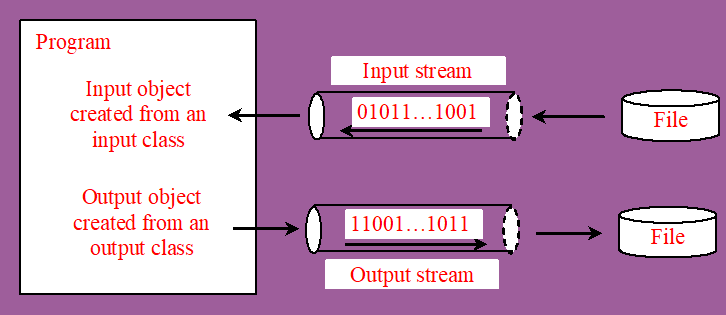
A File object encapsulates the properties of a file or a path, but does not contain the methods for reading/writing data from/to a file. In order to perform I/O, you need to create objects using appropriate Java I/O classes. 在Java中将外部数据读入内存或将内存数据保存到外部文件, 需要创建专门的I/O操作对象,最核心的类为输入输出流(InputStreamOutputStream),可以看做在内存和外部存储间建立了一个管道,将数据一个byte一个byte的输入或输出到目标位置。

Text and Binary Files

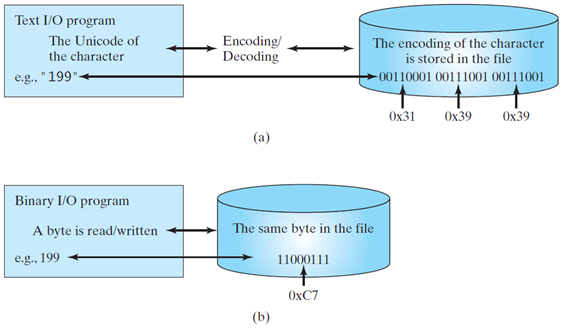
Files can be classified as either text or binary. A file that can be processed (read, created, or modified) using a text editor such as Notepad on Windows or vi on UNIX is called a text file. All the other files are called binary files. You cannot read binary files using a text editor—they are designed to be read by programs. For example, Java source programs are text files and can be read by a text editor, but Java class files are binary files and are read by the JVM. 文件分为文本文件和二进制文件两种类型,文本文件能被文本编辑器读写,其中又涉及到编码和解码,二进制文件则直接以byte为单位存储。例如Java的源代码文件就是一种文本文件,可以用编辑器打开编辑,而编译后的字节码文件则是一种二进制文件,不能直接由人或文本编辑器读写,需要由专门的计算机程序读写,例如Java虚拟机JVM。

Text I/O and Binary I/O

Text I/O requires encoding and decoding. The JVM converts a Unicode to a file specific encoding when writing a character and coverts a file specific encoding to a Unicode when reading a character. Binary I/O does not require conversions. When you write a byte to a file, the original byte is copied into the file. When you read a byte from a file, the exact byte in the file is returned.