
Java语言

王晓蒙

目录

  • 1 Introduction to Java
    • 1.1 Programming Languages
    • 1.2 Java Introduction
    • 1.3 JDK Installation
    • 1.4 A Simple Program
    • 1.5 Programming Style and Documentation
    • 1.6 Programming Error
    • 1.7 Programming Using Eclipse
    • 1.8 Review Questions
  • 2 Elementary Programming
    • 2.1 Identifiers, Variables and Constants
    • 2.2 Input By Console
    • 2.3 Numeric Data Type and Literals
    • 2.4 Augmented Numeric Operators
    • 2.5 Numeric Type Conversions
    • 2.6 Mathematical Methods
    • 2.7 Character Data Type
    • 2.8 Using String Type
    • 2.9 Console Formatting Output
  • 3 Selections
    • 3.1 Boolean and Relational Operators
    • 3.2 if-else
    • 3.3 Logical Operators
    • 3.4 switch
  • 4 Loops
    • 4.1 while
    • 4.2 Case: Guessing Numbers
    • 4.3 do-while
    • 4.4 for
    • 4.5 Nested Loops
    • 4.6 break and continue
    • 4.7 Case: Checking Palindromes
  • 5 Methods
    • 5.1 Defining and Calling a Method
    • 5.2 Passing Arguments By Values
    • 5.3 Modularizing Code
    • 5.4 Overloading Methods
    • 5.5 Variables Scope
  • 6 Arrays
    • 6.1 Array Basics
    • 6.2 Case: Analyzing Numbers
    • 6.3 Copying Arrays
    • 6.4 Passing Arrays to Methods
    • 6.5 Variable-Length Arguments List
    • 6.6 The Arrays Class
    • 6.7 Two-Dimensional Arrays Basics
    • 6.8 Two-Dimensional Arrays Processing
    • 6.9 Multidimensional Arrays
  • 7 Objects and Classes
    • 7.1 Introduction to OOP
    • 7.2 Defining Classes and Creating Objects
    • 7.3 Constructors
    • 7.4 Reference Variables and Reference Types
    • 7.5 Using Java Library
    • 7.6 Static Members
    • 7.7 Visibility Modifers
    • 7.8 Passing Objects to Methods
    • 7.9 This Keyword
    • 7.10 Wrapper Class
    • 7.11 Immutable and Interned Strings
  • 8 Inheritance and Polymorphism
    • 8.1 Super-classes and Sub-classes
    • 8.2 super Keyword and Constructor Chaining
    • 8.3 Overriding
    • 8.4 Polymorphism
    • 8.5 Objects Casting
    • 8.6 The method equals
    • 8.7 The protected Members
  • 9 Abstract Classes and Interfaces
    • 9.1 Abstract Classes
    • 9.2 Interfaces
    • 9.3 Comparable Interface
  • 10 Exception Handling
    • 10.1 Introduction
    • 10.2 Exception Declaring and Throwing
    • 10.3 Exception Catching and Handling
    • 10.4 finally
  • 11 I/O Operation
    • 11.1 I/O Introduction
    • 11.2 Binary Input
    • 11.3 Binary Output
    • 11.4 Text Input
    • 11.5 Text Output
  • 12 JavaFX Basics
    • 12.1 A Basic JavaFX Program
    • 12.2 Node Types
    • 12.3 Property Binding
    • 12.4 Node Style
    • 12.5 Layout
    • 12.6 JavaFX and Eclipse
  • 13 Event-Driven Programming
    • 13.1 Event-Source, Event and Event-Handler
    • 13.2 Defining Event-Handler Using Inner-Class
    • 13.3 Event Handling Using Lambda Expression
  • 14 Others
Node Types


Node Types

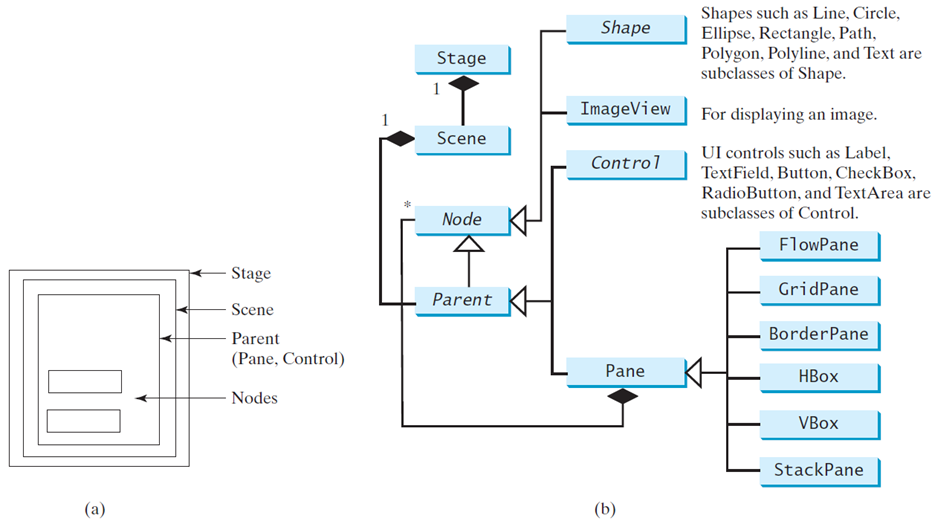
Scene中的元素以节点(Node)的形式组织,节点分为三种:Shape、ImageView和Parent,Parent类型的节点又分为控件(Control)和面板(Pane)两种类型。Control提供了图形界面主要的交互功能,例如按钮、文本框、复选框等;Pane提供了图形界面主要的排版(Layout)功能。从上图还能看到一些组合关系,Scene和Parent之间有个1对1的组合关系,Scene必须制定一个根节点,这个根节点必须是Parent类型的;Pane和Node之间存在1对多的组合关系,就是说一个面板上可以放置任何数量任何类型的节点,包括面板节点,我们可以利用面板节点之间的组合和嵌套关系来设计复杂的界面。

创建一个面板并添加一个按钮对象:

VBox pane1 = new VBox();

pane1.getChildren().add(new Button("Button1"));


创建场景并设置根节点:

Scene scene1 = new Scene(pane1, 300, 100);


创建一个ImageView对象,并放在面板上(Image对象不是节点是不能直接放在面板上的):

Image img = new Image("cat.png");

ImageView imgV = new ImageView();

imgV.setImage(img);

Pane pane2 = new Pane();

pane2.getChildren().add(imgV);


创建一个几何对象,并放在面板上:

Circle circle = new Circle();

circle.setCenterX(100);

circle.setCenterY(100);

circle.setRadius(50);

circle.setStroke(Color.RED);

circle.setFill(Color.BLUE);

Pane pane3 = new Pane();

pane3.getChildren().add(circle);