
Java语言

王晓蒙

目录

  • 1 Introduction to Java
    • 1.1 Programming Languages
    • 1.2 Java Introduction
    • 1.3 JDK Installation
    • 1.4 A Simple Program
    • 1.5 Programming Style and Documentation
    • 1.6 Programming Error
    • 1.7 Programming Using Eclipse
    • 1.8 Review Questions
  • 2 Elementary Programming
    • 2.1 Identifiers, Variables and Constants
    • 2.2 Input By Console
    • 2.3 Numeric Data Type and Literals
    • 2.4 Augmented Numeric Operators
    • 2.5 Numeric Type Conversions
    • 2.6 Mathematical Methods
    • 2.7 Character Data Type
    • 2.8 Using String Type
    • 2.9 Console Formatting Output
  • 3 Selections
    • 3.1 Boolean and Relational Operators
    • 3.2 if-else
    • 3.3 Logical Operators
    • 3.4 switch
  • 4 Loops
    • 4.1 while
    • 4.2 Case: Guessing Numbers
    • 4.3 do-while
    • 4.4 for
    • 4.5 Nested Loops
    • 4.6 break and continue
    • 4.7 Case: Checking Palindromes
  • 5 Methods
    • 5.1 Defining and Calling a Method
    • 5.2 Passing Arguments By Values
    • 5.3 Modularizing Code
    • 5.4 Overloading Methods
    • 5.5 Variables Scope
  • 6 Arrays
    • 6.1 Array Basics
    • 6.2 Case: Analyzing Numbers
    • 6.3 Copying Arrays
    • 6.4 Passing Arrays to Methods
    • 6.5 Variable-Length Arguments List
    • 6.6 The Arrays Class
    • 6.7 Two-Dimensional Arrays Basics
    • 6.8 Two-Dimensional Arrays Processing
    • 6.9 Multidimensional Arrays
  • 7 Objects and Classes
    • 7.1 Introduction to OOP
    • 7.2 Defining Classes and Creating Objects
    • 7.3 Constructors
    • 7.4 Reference Variables and Reference Types
    • 7.5 Using Java Library
    • 7.6 Static Members
    • 7.7 Visibility Modifers
    • 7.8 Passing Objects to Methods
    • 7.9 This Keyword
    • 7.10 Wrapper Class
    • 7.11 Immutable and Interned Strings
  • 8 Inheritance and Polymorphism
    • 8.1 Super-classes and Sub-classes
    • 8.2 super Keyword and Constructor Chaining
    • 8.3 Overriding
    • 8.4 Polymorphism
    • 8.5 Objects Casting
    • 8.6 The method equals
    • 8.7 The protected Members
  • 9 Abstract Classes and Interfaces
    • 9.1 Abstract Classes
    • 9.2 Interfaces
    • 9.3 Comparable Interface
  • 10 Exception Handling
    • 10.1 Introduction
    • 10.2 Exception Declaring and Throwing
    • 10.3 Exception Catching and Handling
    • 10.4 finally
  • 11 I/O Operation
    • 11.1 I/O Introduction
    • 11.2 Binary Input
    • 11.3 Binary Output
    • 11.4 Text Input
    • 11.5 Text Output
  • 12 JavaFX Basics
    • 12.1 A Basic JavaFX Program
    • 12.2 Node Types
    • 12.3 Property Binding
    • 12.4 Node Style
    • 12.5 Layout
    • 12.6 JavaFX and Eclipse
  • 13 Event-Driven Programming
    • 13.1 Event-Source, Event and Event-Handler
    • 13.2 Defining Event-Handler Using Inner-Class
    • 13.3 Event Handling Using Lambda Expression
  • 14 Others
A Basic JavaFX Program


JavaFX vs Swing and AWT

Swing and AWT are replaced by the JavaFX platform for developing rich Internet applications. When Java was introduced, the GUI classes were bundled in a library known as the Abstract Windows Toolkit (AWT). AWT is fine for developing simple graphical user interfaces, but not for developing comprehensive GUI projects. In addition, AWT is prone to platform-specific bugs. The AWT user-interface components were replaced by a more robust, versatile, and flexible library known as Swing components. Swing components are painted directly on canvases using Java code. Swing components depend less on the target platform and use less of the native GUI resource. With the release of Java 8, Swing is replaced by a completely new GUI platform known as JavaFX. Java的图形用户界面程序的开发方式历经了AWT、Swing和JavaFX三个阶段。

A JavaFX Application

一个JavaFX程序的基本结构如下,其主类必须继承于Application抽象类,并重写实现该类的start抽象方法,start方法执行图形用户界面的初始化操作。main函数对于由命令行启动的JavaFX程序不是必须的,若由IDE启动,则需要完善main函数,并在其中调用Application的静态方法launch(args)

public class MyGUIApp extends Application{

    @Override

    public void start(Stage primaryStage){

        //Interface initialization

    }

    public static void main(String[] args){

        Application.launch(args);

    }

}

An Example
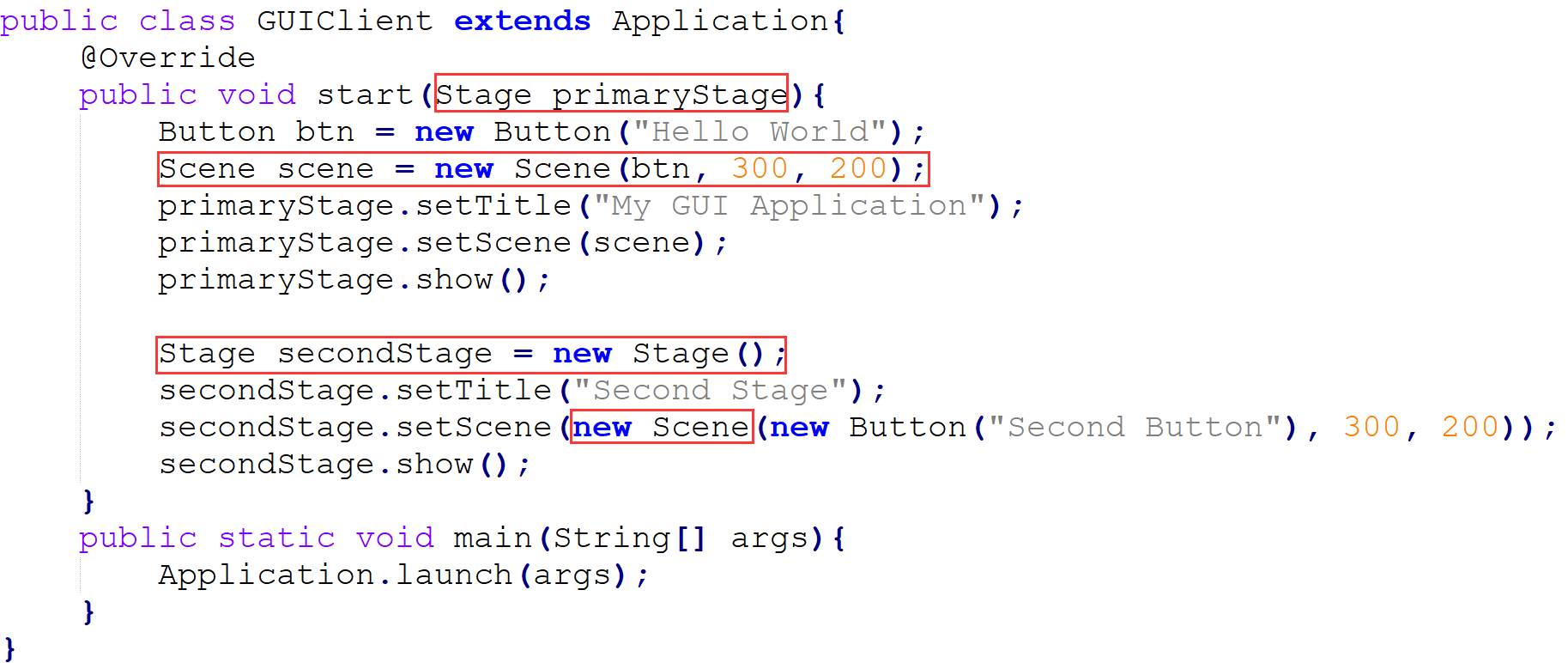
在GUIClient程序中,可以观察到三个图形界面要素:StageSceneButton。可以将JavaFX的图形界面构造和话剧舞台进行类比,Stage是图形界面的窗口(window)对应于话剧的舞台,Scene类似于话剧中的场景,场景中具体摆放了各种道具,例如上面的例子中Scene上面摆放了一个Button。一个应用程序可以同时打开多个窗口,即创建多个Stage。

Application Life-cycle

1. Constructs an instance of the specified Application class

2. Calls the init() method

3. Calls the start(javafx.stage.Stage) method

4. Waits for the application to finish, which happens when either of the following occur:

the application calls Platform.exit()

the last window has been closed and the implicitExit attribute on Platform is true

5. Calls the stop() method