
案例 应用升级
一、案例描述
1、考核知识点
Handler消息机制原理
AsyncTask
HttpClient
文件下载
2、练习目标
掌握Hanlder的使用
掌握如何向服务器请求数据
掌握从服务器下载文件
3、需求分析
应用软件都有一个必需的功能:软件升级。当出现新版本时应用会提示升级并下载最新版本替换当前版本。在Android中这个过程可以通过HttpClient、AsyncTask和Handler结合实现。
4、设计思路(实现原理)
1) 通过在AsyncTask访问服务器,得到最新版本号;
2) 通过HttpClient连接服务器从服务器下载最新版本的apk;
3) 通过Handler将下载的进度显示在界面上;
4) 下载完成后安装应用,如果已经下载完成再次点击下载时则直接安装。
二、案例实现
(1)创建第一个界面
创建一个名为“应用升级”的程序并创建第一个界面MainActivity,该Activity用于进行下载、展示下载框的逻辑,界面没有过多逻辑,只有一个TextView显示当前版本号。程序主界面如图所示。

MainActivity界面对应的布局文件(activity_main.xml)如下所示:
1 <RelativeLayoutxmlns:android="http://schemas.android.com/apk/res/android"
2 xmlns:tools="http://schemas.android.com/tools"
3 android:layout_width="match_parent"
4 android:layout_height="match_parent"
5 tools:context=".MainActivity">
6
7 <TextView
8 android:id="@+id/tv_hint"
9 android:layout_width="wrap_content"
10 android:layout_height="wrap_content"
11 android:layout_centerHorizontal="true"
12 android:layout_centerVertical="true"
13 android:text="当前版本号:1.0" />
14 </RelativeLayout>
(2)创建AsyncTask向服务器请求数据
创建VersionUpdateTask.java类,服务器数据为文本文件,想服务器请求得到数据之后,解析出最新的版本号与应用当前版本号对比,如果服务器版本号大于本地版本号则提示升级,否则不进行操作。
1 public class VersionUpdateTaskextends AsyncTask<Void, Void, String> {
2 private final UpgradeAction action;
3 private Context context;
4 private String versionUrlAddress;
5 private String versionData;
6 public static String newVersionName;
7 public VersionUpdateTask(UpgradeAction action, String url,Context context) {
8 super();
9 this.versionUrlAddress = url;
10 this.action = action;
11 this.context = context;
12 }
13 @Override
14 protected String doInBackground(Void... params) {
15 try {
16 HttpGet httpGet = new HttpGet(versionUrlAddress);
17 HttpClient client = new DefaultHttpClient();
18 HttpResponse response = client.execute(httpGet);
19 client.getParams().setParameter(
20 CoreConnectionPNames.CONNECTION_TIMEOUT, 800);
21 client.getParams().setParameter(CoreConnectionPNames.SO_TIMEOUT,
22 800);
23 if (response.getStatusLine().getStatusCode() ==HttpStatus.SC_OK) {
24 versionData =EntityUtils.toString(response.getEntity(), "GBK");
25 return versionData;
26 }
27 } catch (Exception e) {
28 }
29 return null;
30 }
31
32 @Override
33 protected void onPostExecute(String jo) {
34 if (!Utils.isNetworkConnected(context)) {
35 return;
36 }
37 String[] split = jo.split(",");
38 newVersionName = split[0];
39 String replace = split[1].replace(";","\n");
40 String clientVersionName = Utils.getAppVersionCode(context);
41
42 float netFloat = Float.parseFloat(newVersionName);
43 float parseFloata = Float.parseFloat(clientVersionName);
44
45
46 System.out.println("netInt = "+netFloat);
47 System.out.println("parseInt = "+parseFloata);
48
49 if (netFloat > parseFloata) {
50 final VersionUpdateHintDialog ad = newVersionUpdateHintDialog(
51 context);
52 ad.setTitle("是否下载新版本?");
53 ad.setMessage(replace);
54 ad.setPositiveButton("", new OnClickListener(){
55 @Override
56 public void onClick(View v) {
57 action.download();
58 ad.dismiss();
59 }
60 });
61 ad.setNegativeButton("", new OnClickListener(){
62
63 @Override
64 public void onClick(View v) {
65 action.cancel();
66 ad.dismiss();
67 }
68 });
69 } else {
70 File downLoadApk = new File(
71 Environment.getExternalStorageDirectory(),Utils.APKNAME
72 + VersionUpdateTask.newVersionName +".apk");
73 if (downLoadApk.exists()) {
74 downLoadApk.delete();
75 }
76 }
77 }
78 }
(3)创建下载提示对话框VersionUpdateHintDialog.java
在AsyncTask逻辑中如果需要下载则要弹出下载提示对话框:
1 public classVersionUpdateHintDialog {
2 Context context;
3 android.app.AlertDialog alertDialog;
4 TextView tv_title, tv_title_msg;
5 TextView messageView;
6 LinearLayout ll_button;
7 private Button btn_confirm, btn_cancel;
8 public VersionUpdateHintDialog(Context context) {
9 this.context = context;
10 alertDialog = newandroid.app.AlertDialog.Builder(context).create();
11 alertDialog.setCancelable(false);
12 alertDialog.show();
13 Window window = alertDialog.getWindow();
14 window.setContentView(R.layout.alertdialog);
15 tv_title = (TextView) window.findViewById(R.id.tv_title);
16 messageView = (TextView)window.findViewById(R.id.tv_message);
17 ll_button = (LinearLayout) window.findViewById(R.id.ll_buttonLayout);
18 btn_confirm = (Button) window.findViewById(R.id.btn_confirm);
19 btn_cancel = (Button) window.findViewById(R.id.btn_cancel);
20 tv_title_msg = (TextView)window.findViewById(R.id.tv_title_msg);
21 }
22 public void setTitle(int resId) {
23 tv_title.setText(resId);
24 }
25 public void setTitle(String title) {
26 tv_title.setText(title);
27 }
28 public void setMessage(int resId) {
29 messageView.setText(resId);
30 }
31 public void setMessage(String message) {
32 messageView.setText(message);
33 }
34 public void setPositiveButton(String text,
35 final View.OnClickListener listener) {
36 LinearLayout.LayoutParams params = new LayoutParams(
37 LayoutParams.WRAP_CONTENT,LayoutParams.WRAP_CONTENT);
38 btn_confirm.setLayoutParams(params);
39 btn_confirm.setOnClickListener(listener);
40 }
41 public void setNegativeButton(String text,
42 final View.OnClickListener listener) {
43 LinearLayout.LayoutParams params = new LayoutParams(
44 LayoutParams.WRAP_CONTENT,LayoutParams.WRAP_CONTENT);
45 btn_cancel.setLayoutParams(params);
46 btn_cancel.setOnClickListener(listener);
47 if (ll_button.getChildCount() > 0) {
48 params.setMargins(20, 0, 0, 0);
49 btn_cancel.setLayoutParams(params);
50 } else {
51 btn_cancel.setLayoutParams(params);
52 }
53 }
54 public void dismiss() {
55 alertDialog.dismiss();
56 }
57 }
(4)下载提示对话框所对应的布局文件alertdialog.xml
1 <?xmlversion="1.0" encoding="utf-8"?>
2 <LinearLayoutxmlns:android="http://schemas.android.com/apk/res/android"
3 android:layout_width="match_parent"
4 android:layout_height="match_parent"
5 android:orientation="vertical">
6 <LinearLayout
7 android:layout_width="280dp"
8 android:layout_height="wrap_content"
9 android:layout_gravity="center"
10 android:background="@drawable/set_yuanjiao"
11 android:orientation="vertical">
12 <RelativeLayout
13 android:layout_width="wrap_content"
14 android:layout_height="wrap_content"
15 android:layout_marginTop="10dp"
16 android:layout_marginBottom="10dp">
17 <ImageView
18 android:id="@+id/iv_hint"
19 android:layout_width="wrap_content"
20 android:layout_height="wrap_content"
21 android:layout_marginLeft="20dp"
22 android:layout_marginTop="5dp"
23 android:src="@drawable/xh_gantanhao"/>
24 <TextView
25 android:id="@+id/tv_title"
26 android:layout_width="fill_parent"
27 android:layout_height="wrap_content"
28 android:layout_alignParentRight="true"
29 android:layout_centerVertical="true"
30 android:layout_toRightOf="@+id/iv_hint"
31 android:layout_marginLeft="10dp"
32 android:text="更新"
33 android:textColor="#249ef6"/>
34 </RelativeLayout>
35 <View
36 android:id="@+id/view_hx"
37 android:layout_width="fill_parent"
38 android:layout_height="1dp"
39 android:layout_marginLeft="10dp"
40 android:layout_marginRight="10dp"
41 android:layout_marginTop="5dp"
42 android:background="#249ef6"/>
43 <TextView
44 android:id="@+id/tv_title_msg"
45 android:layout_width="wrap_content"
46 android:layout_height="wrap_content"
47 android:layout_marginLeft="20dp"
48 android:layout_marginTop="10dp"
49 android:text="新版本特性:"
50 android:textColor="#666666"/>
51 <TextView
52 android:id="@+id/tv_message"
53 android:layout_width="fill_parent"
54 android:layout_height="wrap_content"
55 android:layout_marginBottom="10dp"
56 android:layout_marginLeft="20dp"
57 android:layout_marginRight="10dp"
58 android:layout_marginTop="10dp"
59 android:text="内容"
60 android:textSize="20dp"
61 android:textColor="#666666"/>
62 <!-- 在LinearLayout中加按钮-->
63 <LinearLayout
64 android:id="@+id/ll_buttonLayout"
65 android:layout_width="fill_parent"
66 android:layout_height="fill_parent"
67 android:layout_gravity="center"
68 android:layout_marginBottom="15dp"
69 android:gravity="center"
70 android:orientation="horizontal">
71 <Button
72 android:id="@+id/btn_confirm"
73 android:layout_width="wrap_content"
74 android:layout_height="wrap_content"
75 android:background="@drawable/button_queren"
76 android:text="立即更新"
77 android:textColor="#ffffff"/>
78 <Button
79 android:id="@+id/btn_cancel"
80 android:layout_width="wrap_content"
81 android:layout_height="wrap_content"
82 android:background="@drawable/xh_button_quxiao"
83 android:text="稍后再说"
84 android:textColor="#000000"/>
85 </LinearLayout>
86 </LinearLayout>
87 </LinearLayout>
(5)创建监听按钮点击的接口UpgradeAction.java
在下载提示对话框中自定义了两个按钮,创建一个接口监听这两个按钮的点击事件,在主界面中处理逻辑:
1 public interface UpgradeAction{
2 public Context getContext();
3 public void download();
4 public void cancel();
5 }
(6)主界面逻辑
在MainActivity中开启AsyncTask进行网络连接,并在UpgradeAction接口中处理应用的下载或者取消操作,如果下载,则显示下载应用对话框。
6 public class MainActivityextends Activity implements UpgradeAction {
7 /** 新版本保存在SD卡的名称 */
8 private String appName;
9 /** 新版本下载对话框 */
10 private AppDownLoadDiaLog downBar;
11 /** 新版本APK总大小 */
12 private int fileLength;
13 /** 新版本下载进度 */
14 private int DownedFileLength = 0;
15 protected static final int DOWNFNEWVERSION = 101;
16 private Thread thread;
17 private boolean stopThreadFlag;
18 private TextView tv_hint;
19 @Override
20 protected void onCreate(Bundle savedInstanceState) {
21 super.onCreate(savedInstanceState);
22 setContentView(R.layout.activity_main);
23 new VersionUpdateTask(this, Utils.SERVICEADDRESS,this).execute();
24 tv_hint = (TextView) findViewById(R.id.tv_hint);
25 }
26 @Override
27 protected void onResume() {
28 super.onResume();
29 tv_hint.setText("当前版本 : " + Utils.getAppVersionCode(this));
30 }
31 protected void downAppFile(final String url) {
32 thread = new Thread() {
33 public void run() {
34 HttpClient client = new DefaultHttpClient();
35 HttpGet get = new HttpGet(url);
36 HttpResponse response;
37 try {
38 response = client.execute(get);
39 HttpEntity entity = response.getEntity();
40 InputStream is = entity.getContent();
41 fileLength = (int) entity.getContentLength();
42 FileOutputStream fileOutputStream = null;
43 if (is == null) {
44 throw new RuntimeException("isStream isnull");
45 }
46 File file = new File(
47 Environment.getExternalStorageDirectory(),appName);
48 fileOutputStream = new FileOutputStream(file);
49 byte[] buf = new byte[1024];
50 int ch = -1;
51 do {
52 ch = is.read(buf);
53 if (ch <= 0) {
54 break;
55 }
56 fileOutputStream.write(buf, 0, ch);
57 DownedFileLength += ch;
58
59 Message message1 = new Message();
60 message1.what = DOWNFNEWVERSION;
61 handler.sendMessage(message1);
62 } while (true);
63 is.close();
64 fileOutputStream.close();
65 if (!stopThreadFlag) {
66 Utils.installNewApk(MainActivity.this,appName, downBar);
67 }
68 } catch (Exception e) {
69 e.printStackTrace();
70 }
71 }
72 };
73 thread.start();
74 }
75 private Handler handler = new Handler() {
76 private int x;
77 public void handleMessage(Message msg) {
78 if (!Thread.currentThread().isInterrupted()) {
79 switch (msg.what) {
80 case 0:
81 // Log.i("文件长度----------->", progressBar.getMax() + "");
82 break;
83 case DOWNFNEWVERSION:
84 String fileLengthMB = Utils.bytes2kb(fileLength);
85 String DownedFileLengthMB = Utils
86 .bytes2kb(DownedFileLength);
87 x = (int) (DownedFileLength * 100 / fileLength);
88 downBar.setBar(x);
89 downBar.setMessage(x+ "%");
90 downBar.setSize(DownedFileLengthMB +"/" + fileLengthMB);
91 break;
92 case 2:
93 Utils.installNewApk(MainActivity.this, appName,downBar);
94 break;
95 default:
96 break;
97 }
98 }
99 }
100 };
101 @Override
102 public Context getContext() {
103 return null;
104 }
105 @Override
106 public void download() {
107 appName = "应用升级" + VersionUpdateTask.newVersionName + ".apk";
108 // 点击更新,如果已经下载过最新版本直接安装
109 File downLoadApk = newFile(Environment.getExternalStorageDirectory(),
110 appName);
111 if(downLoadApk.exists()) {
112 Intent intent = new Intent(Intent.ACTION_VIEW);
113 intent.setDataAndType(Uri.fromFile(new File(Environment
114 .getExternalStorageDirectory(), appName)),
115 "application/vnd.android.package-archive");
116 startActivity(intent);
117 } else {
118 DownedFileLength = 0;
119 showProgressBar();
120 }
121 }
122 protected void showProgressBar() {
123 downBar = new AppDownLoadDiaLog(MainActivity.this);
124 downBar.setNegativeButton("", new OnClickListener(){
125 @Override
126 public void onClick(View v) {
127 downBar.dismiss();
128 thread.interrupt();
129 stopThreadFlag = true;
130 try {
131 File downLoadApk = new File(Environment
132 .getExternalStorageDirectory(), "应用升级"
133 + VersionUpdateTask.newVersionName +".apk");
134 if (downLoadApk.exists()) {
135 downLoadApk.delete();
136 }
137 } catch (Exception e) {
138 Log.v("VersionUpdate", "",e);
139 }
140 }
141 });
142 downAppFile(Utils.APKSERVICEADDRESS);
143 }
144 @Override
145 public void cancel() {
146
147 }
148 }
(7)应用下载对话框
自定义一个对话框,当中显示进度条显示当前下载进度:
1 public class AppDownLoadDiaLog{
2 Context context;
3 android.app.AlertDialog alertDialog;
4 TextView titleView;
5 TextView tv_down, tv_down_size;
6 ProgressBar progressBar;
7 Button btn_down_canel;
8 public AppDownLoadDiaLog(Context context) {
9 this.context = context;
10 alertDialog = newandroid.app.AlertDialog.Builder(context).create();
11 alertDialog.show();
12 // 关键在下面的两行,使用window.setContentView,替换整个对话框窗口的布局
13 Window window = alertDialog.getWindow();
14 window.setContentView(R.layout.alertdiadownlog);
15 tv_down = (TextView) window.findViewById(R.id. tv_down);
16 tv_down_size = (TextView) window.findViewById(R.id. tv_down_size);
17 btn_down_canel = (Button) window.findViewById(R.id.btn_down_canel);
18 progressBar = (ProgressBar) window.findViewById(R.id.bar_down);
19 progressBar.setMax(100);
20 }
21 public void setNegativeButton(String text,
22 final View.OnClickListener listener) {
23 btn_down_canel.setTextSize(Utils.px2dip(context, 24));
24 btn_down_canel.setOnClickListener(listener);
25 }
26 public void setTitle(int resId) {
27 titleView.setText(resId);
28 }
29 public void setTitle(String title) {
30 titleView.setText(title);
31 }
32 public void setMessage(int resId) {
33 tv_down.setText(resId);
34 }
35 public void setMessage(String message) {
36 tv_down.setText(message);
37 }
38 public void setSize(int resId) {
39 tv_down_size.setText(resId);
40 }
41 public void setSize(String message) {
42 tv_down_size.setText(message);
43 }
44 public void setBar(int resId) {
45 progressBar.setProgress(resId);
46 }
47 /**
48 * 关闭对话框
49 */
50 public void dismiss() {
51 alertDialog.dismiss();
52 }
53 }
(8)下载框所对应的布局文件alertdiadownlog.xml
1 <?xmlversion="1.0" encoding="utf-8"?>
2 <LinearLayoutxmlns:android="http://schemas.android.com/apk/res/android"
3 android:layout_width="match_parent"
4 android:layout_height="match_parent"
5 android:orientation="vertical">
6 <LinearLayout
7 android:layout_width="300dp"
8 android:layout_height="wrap_content"
9 android:layout_gravity="center"
10 android:background="@drawable/set_yuanjiao"
11 android:orientation="vertical">
12 <TextView
13 android:id="@+id/tv_down_title"
14 android:layout_width="fill_parent"
15 android:layout_height="wrap_content"
16 android:layout_alignParentRight="true"
17 android:layout_centerVertical="true"
18 android:layout_marginLeft="20dp"
19 android:layout_marginTop="10dp"
20 android:text="下载中,请稍后..."
21 android:textSize="16dp"/>
22 <cn.itcast.appdownload.view.MyProgressBar
23 android:id="@+id/bar_down"
24 style="?android:attr/progressBarStyleHorizontal"
25 android:layout_width="fill_parent"
26 android:layout_height="fill_parent"
27 android:layout_marginLeft="20dp"
28 android:layout_marginRight="20dp"
29 android:layout_marginTop="10dp"
30 android:background="@drawable/xh_set_yuan"
31 android:progressDrawable="@drawable/myprogress"/>
32 <LinearLayout
33 android:layout_width="wrap_content"
34 android:layout_height="wrap_content"
35 android:orientation="horizontal">
36 <TextView
37 android:id="@+id/tv_down"
38 android:layout_width="wrap_content"
39 android:layout_height="wrap_content"
40 android:layout_marginLeft="20dp"
41 android:layout_marginTop="5dp"/>
42 <TextView
43 android:id="@+id/tv_down_size"
44 android:layout_width="wrap_content"
45 android:layout_height="wrap_content"
46 android:layout_marginLeft="20dp"
47 android:layout_marginTop="5dp"/>
48 </LinearLayout>
49 <Button
50 android:id="@+id/btn_down_canel"
51 android:layout_width="match_parent"
52 android:layout_height="wrap_content"
53 android:layout_marginBottom="10dp"
54 android:layout_marginLeft="20dp"
55 android:layout_marginRight="20dp"
56 android:layout_marginTop="10dp"
57 android:text="取消"
58 android:textColor="#000000"/>
59
60 <LinearLayout
61 android:id="@+id/ll_buttonLayout"
62 android:layout_width="fill_parent"
63 android:layout_height="fill_parent"
64 android:layout_gravity="center"
65 android:gravity="center"
66 android:orientation="horizontal">
67 </LinearLayout>
68 </LinearLayout>
69 <!-- 底部椭园边缘 -->
70 </LinearLayout>
(9) 自定义进度条MyProgressBar.java
1 public class MyProgressBarextends ProgressBar {
2 private String text_progress;
3 private Paint mPaint;
4 public MyProgressBar(Context context) {
5 super(context);
6 initPaint();
7 }
8 public MyProgressBar(Context context, AttributeSet attrs) {
9 super(context, attrs);
10 initPaint();
11 }
12 public MyProgressBar(Context context, AttributeSet attrs, intdefStyle) {
13 super(context, attrs, defStyle);
14 initPaint();
15 }
16 @Override
17 public synchronized void setProgress(int progress) {
18 super.setProgress(progress);
19 setTextProgress(progress);
20 }
21 @Override
22 protected synchronized void onDraw(Canvas canvas) {
23 // TODO Auto-generated method stub
24 super.onDraw(canvas);
25 Rect rect=new Rect();
26 this.mPaint.getTextBounds(this.text_progress, 0,
27 this.text_progress.length(), rect);
28 int x = (getWidth() / 2) -rect.centerX();
29 int y = (getHeight() / 2) -rect.centerY();
30 canvas.drawText(this.text_progress, x,y, this.mPaint);
31 }
32 private void initPaint(){
33 this.mPaint=new Paint();
34 this.mPaint.setAntiAlias(true);
35 this.mPaint.setColor(Color.WHITE);
36 }
37 private void setTextProgress(int progress){
38 int i = (int) ((progress * 1.0f / this.getMax()) * 100);
39 this.text_progress = String.valueOf(i)+ "%";
40 }
41 }
(10)创建工具类
该工具类中包括检查当前是否有网络连接,获取本地版本号,安装新应用等功能。
1 public class Utils {
2 public static final String APKNAME = "app版本升级测试";
3 public static final String APKSERVICEADDRESS =
4 "http://172.16.25.39:8080/应用升级.apk";
5 public static final String SERVICEADDRESS =
6 "http://172.16.25.39:8080/versionUpdate.txt";
7 public static boolean isNetworkConnected(Context context) {
8 ConnectivityManager cm = (ConnectivityManager) context
9 .getSystemService(Context.CONNECTIVITY_SERVICE);
10 NetworkInfo ni = cm.getActiveNetworkInfo();
11 return ni != null && ni.isConnectedOrConnecting();
12 }
13 // 应用本地版本号
14 public static String getAppVersionCode(Context context) {
15 try {
16 PackageManager pm = context.getPackageManager();
17 PackageInfo pi = pm.getPackageInfo(context.getPackageName(),0);
18 return pi.versionName;
19 } catch (NameNotFoundException e) {
20 return "";
21 }
22 }
23 public static void installNewApk(Activity activity, StringappName,
24 AppDownLoadDiaLog downBar) {
25 downBar.dismiss();
26 Intent intent = new Intent(Intent.ACTION_VIEW);
27 intent.setDataAndType(Uri.fromFile(new File(Environment
28 .getExternalStorageDirectory(), appName)),
29 "application/vnd.android.package-archive");
30 activity.startActivity(intent);
31 }
32 public static String bytes2kb(long bytes) {
33 BigDecimal filesize = new BigDecimal(bytes);
34 BigDecimal megabyte = new BigDecimal(1024 * 1024);
35 float returnValue = filesize.divide(megabyte, 2,BigDecimal.ROUND_UP)
36 .floatValue();
37 if (returnValue > 1)
38 return (returnValue + "MB");
39 BigDecimal kilobyte = new BigDecimal(1024);
40 returnValue = filesize.divide(kilobyte, 2,BigDecimal.ROUND_UP)
41 .floatValue();
42 return (returnValue + "KB");
43 }
44 // 根据手机的分辨率从 px(像素) 的单位转成为 dp
45 public static int px2dip(Context context, float pxValue) {
46 final float scale =context.getResources().getDisplayMetrics().density;
47 return (int) (pxValue / scale + 0.5f);
48 }
49 }
注意:工具类中定义了两个常量,在初学者使用时需要把这两个常量APKSERVICEADDRESS和SERVICEADDRESS改为自己服务器的地址以及apk存放地址。
(11)添加权限
注意添加网络权限与向SD卡写入权限:
1 <uses-permissionandroid:name="android.permission.INTERNET" />
2 <uses-permissionandroid:name="android.permission.ACCESS_NETWORK_STATE" />
3 <uses-permissionandroid:name="android.permission.WRITE_EXTERNAL_STORAGE" />
(12)运行程序
首先在清单文件中把版本号改为2.0或者2.0以上,然后把应用打包或者将项目运行起来,将打包后的apk或者运行后在bin目录下产生的apk文件放在服务器下,再把项目版本改为1.0,并且把服务器中的最新版本号改为2.0以上,最后运行项目,会看到图所示画面。
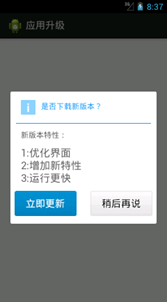
由于服务器中最新版本号比当前版本号大,因此打开应用时提示升级,此时点击稍后再说按钮会取消对话框进入主界面,点击立即更新按钮则会下载新apk,如图所示。
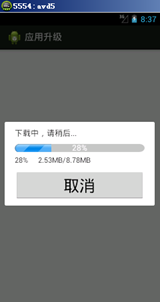
三、案例总结
1、进行网络连接不能在主线程中完成,必须开一个子线程。
2、进行网络连接必须要添加相应权限。

