
一、Handler消息机制
在使用手机下载软件时,通常都能在界面上看到一个下载的进度条,这个进度条用来表示当前下载的进度。但是Android4.0以后不能在UI线程访问网络,而子线程也不能更新UI界面。为了根据下载进度实时更新UI界面,就需要用到Handler消息机制来实现线程间的通信。
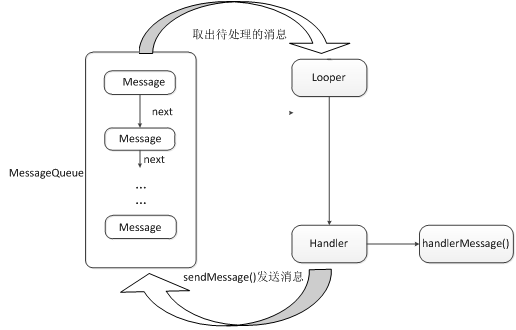
Handler机制主要包括四个关键对象,分别是:Message、Handler、MessageQueue、Looper。
1、Handler消息机制
Message
Message是在线程之间传递的消息,它可以在内部携带少量的信息,用于在不同线程之间交换数据。
Handler
Handler主要用于发送消息和处理消息。一般使用Handelr对象的sendMessage()方法发送消息,消息经过一系列处理后,最终会传递到Handler的handlerMessage()方法中。
MessageQueue
MessageQueue是消息队列的意思,它主要用来存放通过Handler发送的消息。通过Handler发送的消息会存在MessageQueue中等待处理。
Looper
Looper是每个线程中的MessageQueue的管家。调用Looper的loop()方法后,就会进入到一个无线循环中。然后一发现MessageQueue中存在一条消息,就会将它取出,并传递到Handler的HandlerMessage()方法中。
Handler消息处理首先需要在UI线程创建一个Handler对象,然后在子线程中调用Hanlder的sendMessage()方法,接着这个消息会存放在UI线程的MessageQueue中,通过Looper对象取出MessageQueue中的消息,最后分发回Hanlder的handleMessage()方法中。
案例—图片浏览器
布局文件:
<LinearLayout xmlns:android="http://schemas.android.com/apk/res/android"
xmlns:tools="http://schemas.android.com/tools"
android:layout_width="match_parent"
android:layout_height="match_parent"
android:orientation="vertical"
tools:context=".MainActivity" >
<ImageView
android:id="@+id/iv"
android:layout_width="fill_parent"
android:layout_height="fill_parent"
android:layout_weight="1000" />
<EditText
android:id="@+id/et_path"
android:layout_width="fill_parent"
android:layout_height="wrap_content"
android:hint="请输入图片路径"
android:text="http://g.hiphotos.baidu.com/image/w%3D310/sign=8671be31b8a1cd1105b674218913c8b0/ac4bd11373f082022402cb3e49fbfbedab641b1a.jpg"
android:singleLine="true" />
<Button
android:layout_width="fill_parent"
android:layout_height="wrap_content"
android:onClick="click"
android:text="浏览" />
</LinearLayout>
界面实现:
public class MainActivity extends Activity {
protected static final int CHANGE_UI = 1;
protected static final int ERROR = 2;
private EditText et_path;
private ImageView iv;
//1. 主线程创建消息处理器
private Handler handler = new Handler(){
public void handleMessage(android.os.Message msg) {
if(msg.what == CHANGE_UI){
Bitmap bitmap = (Bitmap) msg.obj;
iv.setImageBitmap(bitmap);
}else if(msg.what == ERROR){
Toast.makeText(MainActivity.this, "显示图片错误", 0).show();
}
};
};
protected void onCreate(Bundle savedInstanceState) {
super.onCreate(savedInstanceState);
setContentView(R.layout.activity_main);
et_path = (EditText) findViewById(R.id.et_path);
iv = (ImageView) findViewById(R.id.iv);
}
public void click(View view) {
final String path = et_path.getText().toString().trim();
if (TextUtils.isEmpty(path)) {
Toast.makeText(this, "图片路径不能为空", 0).show();
} else {
new Thread() {
public void run() {
// 连接服务器 get 请求 获取图片
getImageByClient(path);//使用HttpClient访问网络
};
}.start();
}
}
//使用HttpClient访问网络
protected void getImageByClient(String path) {
HttpClient client = new DefaultHttpClient();//获取HttpClient对象
HttpGet httpGet = new HttpGet(path); //用get方式请求网络
try {
HttpResponse httpResponse = client.execute(httpGet);
//获取返回的HttpResponse对象
if(httpResponse.getStatusLine().getStatusCode() == 200){
//检验服务器返回的状态码是否为200
HttpEntity entity = httpResponse.getEntity();//拿到HttpEntity对象
InputStream content = entity.getContent(); //拿到输入流
//拿到bitmap对象
Bitmap bitmap = BitmapFactory.decodeStream(content);
//TODO 通知主线程更改Ui界面
Message message = new Message();
message.what = CHANGE_UI;
message.obj = bitmap;
handler.sendMessage(message);
}else{
//状态码不为200 访问服务器不成功
Message message = new Message();
message.what = ERROR;
handler.sendMessage(message);
}
} catch (Exception e) {
e.printStackTrace();
Message message = new Message();
message.what = ERROR;
handler.sendMessage(message);
}
}
}

