
一、使用HttpClient访问网络
1.发送GET请求
(1)创建HttpClient对象。
(2)创建HttpGet对象。
(3)如果需要发送请求参数,可以直接将要发送的参数连接到URL地址中,也可以调用HttpGet的setParams()方法来添加请求参数。
(4)调用HttpClient对象的execute()方法发送请求。执行该方法将返回一个HttpResponse对象。
(5)调用HttpResponse的getEntity()方法,可获得包含服务器的响应内容的HttpEntity对象,通过该对象可以获取服务器的响应内容。
在Eclipse中创建Android项目,实现使用HttpClient向服务器发送GET请求,并获取服务器的响应结果。
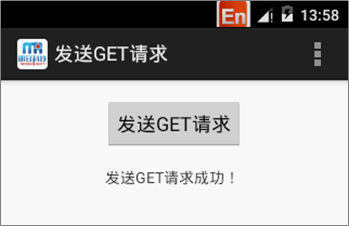
布局文件:
<LinearLayout xmlns:android="http://schemas.android.com/apk/res/android"
xmlns:tools="http://schemas.android.com/tools"
android:layout_width="match_parent"
android:layout_height="match_parent"
android:orientation="vertical"
android:gravity="center_horizontal"
android:paddingBottom="@dimen/activity_vertical_margin"
android:paddingLeft="@dimen/activity_horizontal_margin"
android:paddingRight="@dimen/activity_horizontal_margin"
android:paddingTop="@dimen/activity_vertical_margin"
tools:context="com.mingrisoft.MainActivity" >
<Button
android:id="@+id/button"
android:layout_width="wrap_content"
android:layout_height="wrap_content"
android:text="@string/button" />
<TextView
android:id="@+id/result"
android:layout_width="wrap_content"
android:layout_height="wrap_content"/>
</LinearLayout>
MainActivity.java
public class MainActivity extends Activity {
private Button button; // 声明一个发表按钮对象
private Handler handler; // 声明一个Handler对象
private String result = ""; // 声明一个代表显示结果的字符串
private TextView resultTV; // 声明一个显示结果的文本框对象
@Override
protected void onCreate(Bundle savedInstanceState) {
super.onCreate(savedInstanceState);
setContentView(R.layout.activity_main);
resultTV = (TextView) findViewById(R.id.result); // 获取显示结果的TextView组件
button = (Button) findViewById(R.id.button); // 获取“发表”按钮组件
// 为按钮添加单击事件监听器
button.setOnClickListener(new OnClickListener() {
@Override
public void onClick(View v) {
// 创建一个新线程,用于发送并获取GET请求
new Thread(new Runnable() {
public void run() {
send();
Message m = handler.obtainMessage(); // 获取一个Message
handler.sendMessage(m); // 发送消息
}
}).start();
}
});
handler = new Handler() {
@Override
public void handleMessage(Message msg) {
if (result != null) {
resultTV.setText(result); // 显示获得的结果
}
super.handleMessage(msg);
}
};
}
public void send() {
//要提交的目标地址
String target = "http://192.168.1.66:8080/blog/deal_httpclient.jsp?param=get";
HttpClient httpclient = new DefaultHttpClient(); //创建HttpClient对象
HttpGet httpRequest = new HttpGet(target); //创建HttpGet连接对象
HttpResponse httpResponse;
try {
httpResponse = httpclient.execute(httpRequest); //执行HttpClient请求
if (httpResponse.getStatusLine().getStatusCode() == HttpStatus.SC_OK){
result=EntityUtils.toString(httpResponse.getEntity());//获取返回的字符串
}else{
result="请求失败!";
}
} catch (ClientProtocolException e) {
e.printStackTrace(); //输出异常信息
} catch (IOException e) {
e.printStackTrace();
}
}
@Override
public boolean onCreateOptionsMenu(Menu menu) {
// Inflate the menu; this adds items to the action bar if it is present.
getMenuInflater().inflate(R.menu.main, menu);
return true;
}
@Override
public boolean onOptionsItemSelected(MenuItem item) {
// Handle action bar item clicks here. The action bar will
// automatically handle clicks on the Home/Up button, so long
// as you specify a parent activity in AndroidManifest.xml.
int id = item.getItemId();
if (id == R.id.action_settings) {
return true;
}
return super.onOptionsItemSelected(item);
}
}
2.发送POST请求
(1)创建HttpClient对象。
(2)创建HttpPost对象。
(3)如果需要发送请求参数,可以调用HttpPost的setParams()方法来添加请求参数,也可以调用setEntity()方法来设置请求参数。
(4)调用HttpClient对象的execute()方法发送请求。执行该方法将返回一个HttpResponse对象。
(5)调用HttpResponse的getEntity()方法,可获得包含了服务器的响应内容的HttpEntity对象,通过该对象可以获取服务器的响应内容。
在Eclipse中创建Android项目,实现应用HttpClient向服务器发送POST请求,并获取服务器的响应结果。
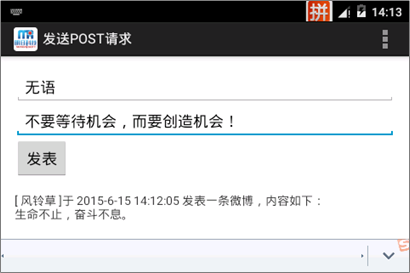
布局文件:
<LinearLayout xmlns:android="http://schemas.android.com/apk/res/android"
xmlns:tools="http://schemas.android.com/tools"
android:layout_width="match_parent"
android:layout_height="match_parent"
android:orientation="vertical"
android:paddingBottom="@dimen/activity_vertical_margin"
android:paddingLeft="@dimen/activity_horizontal_margin"
android:paddingRight="@dimen/activity_horizontal_margin"
android:paddingTop="@dimen/activity_vertical_margin"
tools:context="com.mingrisoft.MainActivity" >
<EditText
android:id="@+id/nickname"
android:hint="@string/nickname"
android:layout_width="match_parent"
android:layout_height="wrap_content" >
</EditText>
<EditText
android:id="@+id/content"
android:layout_height="wrap_content"
android:layout_width="match_parent"
android:inputType="textMultiLine"/>
<Button
android:id="@+id/button"
android:layout_width="wrap_content"
android:layout_height="wrap_content"
android:text="@string/button" />
<ScrollView
android:id="@+id/scrollView1"
android:layout_width="match_parent"
android:layout_height="wrap_content"
android:layout_weight="1" >
<LinearLayout
android:id="@+id/linearLayout1"
android:layout_width="match_parent"
android:layout_height="match_parent" >
<TextView
android:id="@+id/result"
android:layout_width="match_parent"
android:layout_height="wrap_content"
android:layout_weight="1" />
</LinearLayout>
</ScrollView>
</LinearLayout>
public class MainActivity extends Activity {
private EditText nickname; //声明一个输入昵称的编辑框对象
private EditText content; //声明一个输入文本内容的编辑框对象
private Button button; //声明一个发表按钮对象
private Handler handler; //声明一个Handler对象
private String result = ""; //声明一个代表显示内容的字符串
private TextView resultTV; //声明一个显示结果的文本框对象
@Override
protected void onCreate(Bundle savedInstanceState) {
super.onCreate(savedInstanceState);
setContentView(R.layout.activity_main);
content = (EditText) findViewById(R.id.content); //获取输入文本内容的EditText组件
resultTV = (TextView) findViewById(R.id.result); //获取显示结果的TextView组件
nickname=(EditText)findViewById(R.id.nickname); //获取输入昵称的EditText组件
button = (Button) findViewById(R.id.button); //获取“发表”按钮组件
//为按钮添加单击事件监听器
button.setOnClickListener(new OnClickListener() {
@Override
public void onClick(View v) {
if ("".equals(content.getText().toString())) {
Toast.makeText(MainActivity.this, "请输入要发表的内容!",Toast.LENGTH_SHORT).show();
return;
}
// 创建一个新线程,用于发送并读取微博信息
new Thread(new Runnable() {
public void run() {
send();
Message m = handler.obtainMessage(); // 获取一个Message
handler.sendMessage(m); // 发送消息
}
}).start(); // 开启线程
}
});
handler = new Handler() {
@Override
public void handleMessage(Message msg) {
if (result != null) {
resultTV.setText(result); // 显示获得的结果
content.setText(""); // 清空内容编辑框
nickname.setText(""); // 清空昵称编辑框
}
super.handleMessage(msg);
}
};
}
public void send() {
//要提交的目标地址
String target = "http://192.168.1.66:8080/blog/deal_httpclient.jsp";
HttpClient httpclient = new DefaultHttpClient(); //创建HttpClient对象
HttpPost httpRequest = new HttpPost(target); //创建HttpPost对象
//将要传递的参数保存到List集合中
List<NameValuePair> params = new ArrayList<NameValuePair>();
params.add(new BasicNameValuePair("param", "post"));//标记参数
params.add(new BasicNameValuePair("nickname", nickname.getText().toString()));
//内容
params.add(new BasicNameValuePair("content", content.getText().toString()));
try {
//设置编码方式
httpRequest.setEntity(new UrlEncodedFormEntity(params, "utf-8"));
//执行HttpClient请求
HttpResponse httpResponse = httpclient.execute(httpRequest);
//如果请求成功
if (httpResponse.getStatusLine().getStatusCode() == HttpStatus.SC_OK){
result+=EntityUtils.toString(httpResponse.getEntity());//获取返回的字符串
}else{
result = "请求失败!";
}
} catch (UnsupportedEncodingException e1) {
e1.printStackTrace(); //输出异常信息
} catch (ClientProtocolException e) {
e.printStackTrace(); //输出异常信息
} catch (IOException e) {
e.printStackTrace(); //输出异常信息
}
}
@Override
public boolean onCreateOptionsMenu(Menu menu) {
// Inflate the menu; this adds items to the action bar if it is present.
getMenuInflater().inflate(R.menu.main, menu);
return true;
}
@Override
public boolean onOptionsItemSelected(MenuItem item) {
// Handle action bar item clicks here. The action bar will
// automatically handle clicks on the Home/Up button, so long
// as you specify a parent activity in AndroidManifest.xml.
int id = item.getItemId();
if (id == R.id.action_settings) {
return true;
}
return super.onOptionsItemSelected(item);
}
}

