
案例-通话记录
一、案例描述
1、考核知识点
广播接收者简介
广播接收者的创建与注册
2、练习目标
广播的静态注册和使用
使用广播处理处理事件
3、需求分析
手机最重要的功能就是通话功能,同样储存通话记录也是必不可少的。该案例使用广播接收者自己实现通话记录的功能。包括呼出电话、已接来电、未接来电以及通话产生的时间。
4、设计思路(实现原理)
1) 注册监听电话状态的广播;
2) 在广播的onReceive()方法中使用SQLite记录通话记录;
3) 将通话记录展示在ListView上。
二、案例实现
(1)创建第一个界面
创建一个名为“通话记录”的程序并创建第一个界面MainActivity,该Activity用于展示已拨、已接和未接来电。程序主界面如图所示。
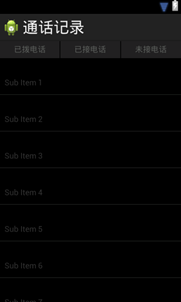
MainActivity界面对应的布局文件(activity_main.xml)如下所示:
<RelativeLayoutxmlns:android="http://schemas.android.com/apk/res/android"
xmlns:tools="http://schemas.android.com/tools"
android:layout_width="match_parent"
android:layout_height="match_parent"
android:background="#000000"
tools:context=".MainActivity" >
<LinearLayout
android:id="@+id/ll_title"
android:layout_width="match_parent"
android:layout_height="wrap_content"
android:background="#212021"
android:orientation="horizontal"
android:weightSum="3" >
<RelativeLayout
android:id="@+id/rl_dialedCalls"
android:layout_width="wrap_content"
android:layout_height="match_parent"
android:layout_weight="1" >
<TextView
android:id="@+id/tv_dialedCalls"
android:layout_width="wrap_content"
android:layout_height="wrap_content"
android:layout_centerInParent="true"
android:text="已拨电话"
android:textColor="#5a5d5a" />
</RelativeLayout>
<View
android:layout_width="1dp"
android:layout_height="30dp"
android:layout_gravity="center_vertical"
android:background="#000000" />
<RelativeLayout
android:id="@+id/rl_receivedCall"
android:layout_width="wrap_content"
android:layout_height="match_parent"
android:layout_weight="1" >
<TextView
android:id="@+id/tv_receivedCall"
android:layout_width="wrap_content"
android:layout_height="wrap_content"
android:layout_centerInParent="true"
android:text="已接电话"
android:textColor="#5a5d5a" />
</RelativeLayout>
<View
android:layout_width="1dp"
android:layout_height="30dp"
android:layout_gravity="center_vertical"
android:background="#000000" />
<RelativeLayout
android:id="@+id/rl_missedCall"
android:layout_width="wrap_content"
android:layout_height="match_parent"
android:layout_weight="1" >
<TextView
android:id="@+id/tv_missedCall"
android:layout_width="wrap_content"
android:layout_height="wrap_content"
android:layout_centerInParent="true"
android:gravity="center_horizontal"
android:text="未接电话"
android:textColor="#5a5d5a" />
</RelativeLayout>
</LinearLayout>
<ListView
android:id="@+id/listview"
android:layout_width="match_parent"
android:layout_height="match_parent"
android:layout_below="@+id/ll_title"
android:divider="#313431"
android:dividerHeight="1px" />
</RelativeLayout>
(2)创建数据库
创建数据库SQLiteHelper.java,用于储存通话记录,具体代码如下:
1 public class SQLiteHelperextends SQLiteOpenHelper {
2 public SQLiteHelper(Context context) {
3 super(context, "CallRecords.db", null, 1);
4 }
5 @Override
6 public void onCreate(SQLiteDatabase db) {
7 db.execSQL("create table phone (id integer primary keyautoincrement,phone
8 varchar(20),classify varchar(20),datevarchar(20))");
9 }
10 @Override
11 public void onUpgrade(SQLiteDatabase db, int oldVersion, intnewVersion) {
12 }
13 }
(3)创建数据库操作类PhoneDao
数据库完成之后,创建数据库操作类,本案例只需要查询所有数据以及插入数据两种方法,具体代码如下:
1 public class PhoneDao {
2 private SQLiteHelper helper;
3 public PhoneDao(Context context) {
4 helper = new SQLiteHelper(context);
5 }
6 public void insert(Phone psw) {
7 SQLiteDatabase db = helper.getWritableDatabase();
8 ContentValues values = new ContentValues();
9 values.put("phone", psw.getPhone());
10 values.put("classify", psw.getClassify());
11 values.put("date", psw.getDate());
12 db.insert("phone", null, values);
13 db.close();
14 }
15 public List<Phone> queryAll() {
16 SQLiteDatabase db = helper.getReadableDatabase();
17 Cursor c = db.query("phone",
18 new String[] { "phone","classify", "date" }, null, null, null,
19 null, null);
20 List<Phone> list = new ArrayList<Phone>();
21 while (c.moveToNext()) {
22 String phone =c.getString(c.getColumnIndex("phone"));
23 String classify =c.getString(c.getColumnIndex("classify"));
24 String date =c.getString(c.getColumnIndex("date"));
25 Phone number = new Phone(phone, classify, date);
26 list.add(number);
27 }
28 c.close();
29 db.close();
30 return list;
31 }
32 }
(4)创建业务bean
根据数据结构创建业务bean,其中包含phone、date、classify三种属性。Phone.java代码如下:
1 public class Phone {
2 private int id;
3 private String phone;
4 private String classify;
5 private String date;
6 public String getDate() {
7 return date;
8 }
9 public void setDate(String date) {
10 this.date = date;
11 }
12 public String getClassify() {
13 return classify;
14 }
15 public void setClassify(String classify) {
16 this.classify = classify;
17 }
18 public int getId() {
19 return id;
20 }
21 public void setId(int id) {
22 this.id = id;
23 }
24 public String getPhone() {
25 return phone;
26 }
27 public void setPhone(String phone) {
28 this.phone = phone;
29 }
30 public Phone(String phone, String classify, String date) {
31 super();
32 this.phone = phone;
33 this.classify = classify;
34 this.date = date;
35 }
36 public Phone(String phone, String date) {
37 super();
38 this.phone = phone;
39 this.date = date;
40 }
41 public Phone() {
42 }
43 }
(5)创建广播接收者
创建用于监听电话状态的广播接收者CallReceiver.java,具体代码如下:
1 public class CallReceiverextends BroadcastReceiver {
2 private static int lastState = TelephonyManager.CALL_STATE_IDLE;
3 private static boolean flag = false;
4 /** 区分呼入呼出标记 */
5 private static boolean isOuting = false;
6 /** 当前操作电话号码 */
7 private static String currentNumber = null;
8 private String listenerNumber;
9 private PhoneDao dao;
10 @Override
11 public void onReceive(final Context context, Intent intent) {
12 dao = new PhoneDao(context);
13 if(intent.getAction().equals(Intent.ACTION_NEW_OUTGOING_CALL)) {
14 // 呼出
15 isOuting = true;
16 String phonenumber = getResultData();// 被呼叫的电话号码
17 // 更新电话号码
18 if (null != phonenumber &&!"".equals(phonenumber)) {
19 currentNumber = phonenumber;
20 }
21 } else {
22 if (!flag) {
23 TelephonyManager manager = (TelephonyManager) context
24 .getSystemService(Context.TELEPHONY_SERVICE);
25 manager.listen(new PhoneStateListener() {
26 @SuppressLint({ "NewApi","ShowToast" })
27 @Override
28 public void onCallStateChanged(int state,
29 String incomingNumber) {
30 super.onCallStateChanged(state,incomingNumber);
31 flag = true;
32 if (state == TelephonyManager.CALL_STATE_RINGING){
33 // 来电状态
34 isOuting = false;
35 listenerNumber = incomingNumber;
36 Toast.makeText(context, "来电提醒: "+ listenerNumber,
37 0).show();
38
39 } else if (state ==TelephonyManager.CALL_STATE_OFFHOOK) {
40 if(isOuting) {
41 setData(context,currentNumber,"dialed","呼出电话: ");
42 } else {
43
44 setData(context,listenerNumber,"received","已接来
45 电: ");
46 }
47 }
48 if (lastState == TelephonyManager.CALL_STATE_RINGING
49 && state ==TelephonyManager.CALL_STATE_IDLE) {
50 setData(context,incomingNumber,"missed","未接来电:
51 ");
52 }
53 lastState = state;
54 }
55 private void setData(final Context context,
56 String incomingNumber,Stringclassicy,String hint) {
57 Toast.makeText(context, hint +incomingNumber,
58 0).show();
59 SimpleDateFormat formatter = newSimpleDateFormat(
60 "yyyy年MM月dd日 HH:mm:ss ");
61 Date curDate = newDate(System.currentTimeMillis());// 获
62 取当前时间
63 String date = formatter.format(curDate);
64 dao.insert(new Phone(incomingNumber,classicy, date));
65 }
66 }, PhoneStateListener.LISTEN_CALL_STATE);
67 }
68 }
69 }
70 }
(6)主界面逻辑
在MainActivity的onResume()方法中进行数据库的查询以及数据的展示,界面中有三个按钮,点击按钮时展示按钮所对应的数据,具体代码如下:
1 @SuppressLint({"NewApi", "ResourceAsColor" })
2 public class MainActivityextends Activity implements OnClickListener {
3 private ListView listView;
4 private PhoneDao dao;
5 private MyAdapter adapter;
6 private Phone phoneNumber;
7 private List<Phone> dialed, received, missed, dataList;
8 private TextView tv_receivedCall, tv_missedCall, tv_dialedCalls;
9 private RelativeLayout rl_receivedCall, rl_missedCall,rl_dialedCalls;
10 @Override
11 protected void onCreate(Bundle savedInstanceState) {
12 super.onCreate(savedInstanceState);
13 setContentView(R.layout.activity_main);
14 rl_receivedCall = (RelativeLayout)findViewById(R.id.rl_receivedCall);
15 rl_missedCall = (RelativeLayout)findViewById(R.id.rl_missedCall);
16 rl_dialedCalls = (RelativeLayout)findViewById(R.id.rl_dialedCalls);
17 tv_receivedCall = (TextView)findViewById(R.id.tv_receivedCall);
18 tv_missedCall = (TextView) findViewById(R.id.tv_missedCall);
19 tv_dialedCalls = (TextView)findViewById(R.id.tv_dialedCalls);
20 rl_receivedCall.setOnClickListener(this);
21 rl_missedCall.setOnClickListener(this);
22 rl_dialedCalls.setOnClickListener(this);
23 listView = (ListView) findViewById(R.id.listview);
24 dao = new PhoneDao(this);
25 }
26 @Override
27 protected void onResume() {
28 super.onResume();
29 dataList = dao.queryAll();
30 dialed = new ArrayList<Phone>();
31 received = new ArrayList<Phone>();
32 missed = new ArrayList<Phone>();
33 if (dataList != null) {
34 for (Phone p : dataList) {
35 String classify= p.getClassify();
36 if ("received".equals(classify)) {
37 received.add(new Phone(p.getPhone(),p.getDate()));
38 } else if ("dialed".equals(classify)) {
39 dialed.add(new Phone(p.getPhone(), p.getDate()));
40 } else if ("missed".equals(classify)) {
41 missed.add(new Phone(p.getPhone(), p.getDate()));
42 }
43 }
44 }
45 adapter = new MyAdapter(dialed);
46 listView.setAdapter(adapter);
47 setTextColor(R.color.gray, R.color.gray, R.color.white);
48 }
49 private class MyAdapter extends BaseAdapter {
50 private List<Phone> list;
51 public MyAdapter(List<Phone> list) {
52 this.list = list;
53 }
54 @Override
55 public int getCount() {
56 return list.size();
57 }
58
59 @Override
60 public Object getItem(int position) {
61 return list.get(position);
62 }
63 @Override
64 public long getItemId(int position) {
65 return position;
66 }
67 @Override
68 public View getView(int position, View convertView, ViewGroupparent) {
69 phoneNumber = list.get(position);
70 View item = convertView != null ? convertView : View.inflate(
71 MainActivity.this, R.layout.listview_item, null);
72 TextView tv_number = (TextView)item.findViewById(R.id.tv_number);
73 TextView tv_date = (TextView)item.findViewById(R.id.tv_date);
74 tv_number.setText("电话号码: " +phoneNumber.getPhone());
75 tv_date.setText(phoneNumber.getDate());
76 return item;
77 }
78 }
79 @Override
80 public void onClick(View v) {
81 switch (v.getId()) {
82 case R.id.rl_dialedCalls:
83 adapter = new MyAdapter(dialed);
84 listView.setAdapter(adapter);
85 setTextColor(R.color.gray, R.color.gray, R.color.white);
86 break;
87 case R.id.rl_receivedCall:
88 adapter = new MyAdapter(received);
89 listView.setAdapter(adapter);
90 setTextColor(R.color.white, R.color.gray, R.color.gray);
91 break;
92 case R.id.rl_missedCall:
93 adapter = new MyAdapter(missed);
94 listView.setAdapter(adapter);
95 setTextColor(R.color.gray, R.color.white, R.color.gray);
96 break;
97 }
98 }
99 private void setTextColor(int one, int two, int three) {
100 tv_receivedCall.setTextColor(getResources().getColor(one));
101 tv_missedCall.setTextColor(getResources().getColor(two));
102 tv_dialedCalls.setTextColor(getResources().getColor(three));
103 }
104 }
(7)注册广播接收者
广播接收者必须要进行注册,该案例为在清单文件中进行静态的注册,具体如下:
<receiver
android:name="cn.itcast.phoneState.CallReceiver"
android:enabled="true" >
<intent-filter android:priority="1000" >
<action android:name="android.intent.action.PHONE_STATE"/>
<actionandroid:name="android.intent.action.NEW_OUTGOING_CALL" />
</intent-filter>
</receiver>
(8)、运行程序
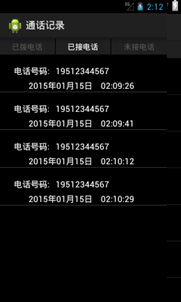
运行“通话记录”程序,界面如图所示。
三、案例总结
1、需要注意的是,使用广播接收者必须要在清单文件中进行注册。

