
电池电量
一、案例描述
1、考核知识点
广播接收者简介
广播接收者的创建与注册
2、练习目标
广播的动态注册和销毁
3、需求分析
广播分为两种注册方式:静态注册和动态注册,上一个案例讲解了静态注册,该案例将对广播进行动态注册与销毁。该案例主要讲解了监听设备的电量和网络状态并展示在界面上。
4、设计思路(实现原理)
1) 在代码中进行监听电池电量和网络状态广播的注册和注销;
2) 将获取到的状态显示在界面上。
二、案例实现
(1)电池电量程序
创建“电池电量”程序,首先创建MainActivity用于显示信息,该程序的界面如图所示。
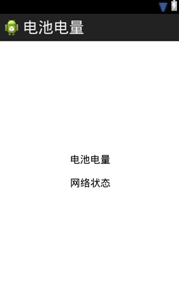
程序主界面对应的布局文件(activity_main)如下所示:
<RelativeLayoutxmlns:android="http://schemas.android.com/apk/res/android"
xmlns:tools="http://schemas.android.com/tools"
android:layout_width="match_parent"
android:layout_height="match_parent"
tools:context=".MainActivity" >
<LinearLayout
android:layout_width="wrap_content"
android:layout_height="wrap_content"
android:layout_centerInParent="true"
android:orientation="vertical" >
<TextView
android:id="@+id/tv_cell"
android:layout_width="wrap_content"
android:layout_height="wrap_content"
android:text="电池电量"
android:textColor="#000000"
android:layout_margin="10dp"
android:textSize="18dp" />
<TextView
android:id="@+id/tv_netWork"
android:layout_width="wrap_content"
android:layout_height="wrap_content"
android:text="网络状态"
android:textColor="#000000"
android:layout_margin="10dp"
android:textSize="18dp" />
</LinearLayout>
</RelativeLayout>
MainActivity的代码如下所示:
1 public class MainActivity extendsActivity {
2 private TextView tv_cell, tv_netWork;
3 private BatteryReceiver batteryReceiver;
4 private ConnectivityReceiver connectivity;
5 @Override
6 protected void onCreate(Bundle savedInstanceState) {
7 super.onCreate(savedInstanceState);
8 setContentView(R.layout.activity_main);
9 tv_cell = (TextView) findViewById(R.id.tv_cell);
10 tv_netWork = (TextView) findViewById(R.id.tv_netWork);
11 // 注册广播接受者java代码
12 IntentFilter intentFilter = new IntentFilter(
13 Intent.ACTION_BATTERY_CHANGED);
14 batteryReceiver = new BatteryReceiver();
15 // 注册receiver
16 registerReceiver(batteryReceiver, intentFilter);
17 IntentFilter mFilter = new IntentFilter();
18 mFilter.addAction(ConnectivityManager.CONNECTIVITY_ACTION);
19 connectivity = newConnectivityReceiver();
20 registerReceiver(connectivity, mFilter);
21 }
22 /**
23 * 广播接受者
24 */
25 private class BatteryReceiver extends BroadcastReceiver {
26 @Override
27 public void onReceive(Context context, Intent intent) {
28 // TODO Auto-generated method stub
29 // 判断它是否是为电量变化的Broadcast Action
30 if (Intent.ACTION_BATTERY_CHANGED.equals(intent.getAction())){
31 // 获取当前电量
32 int level = intent.getIntExtra("level", 0);
33 // 电量的总刻度
34 int scale = intent.getIntExtra("scale",100);
35 // 把它转成百分比
36 tv_cell.setText("电池电量为" + ((level * 100) / scale) + "%");
37 }
38 }
39 }
40 private class ConnectivityReceiver extends BroadcastReceiver {
41 @Override
42 public void onReceive(Context context, Intent intent) {
43 State wifiState = null;
44 State mobileState = null;
45 ConnectivityManager cm = (ConnectivityManager) context
46 .getSystemService(Context.CONNECTIVITY_SERVICE);
47 wifiState = cm.getNetworkInfo(ConnectivityManager.TYPE_WIFI)
48 .getState();
49 mobileState = cm.getNetworkInfo(ConnectivityManager.TYPE_MOBILE)
50 .getState();
51 if (wifiState != null && mobileState != null
52 && State.CONNECTED != wifiState
53 && State.CONNECTED == mobileState) {
54
55 Toast.makeText(context, "手机网络连接成功", 0).show();
56 tv_netWork.setText("手机网络连接成功");
57 // 手机网络连接成功
58 } else if (wifiState != null && mobileState != null
59 && State.CONNECTED != wifiState
60 && State.CONNECTED != mobileState) {
61 // 手机没有任何的网络
62 Toast.makeText(context, "手机没有网络", 0).show();
63 tv_netWork.setText("手机没有网络");
64 } else if (wifiState != null && State.CONNECTED== wifiState) {
65 // 无线网络连接成功
66 Toast.makeText(context, "无限网络连接成功", 0).show();
67 tv_netWork.setText("无限网络连接成功");
68 }
69 }
70 }
71 @Override
72 protected void onDestroy() {
73 super.onDestroy();
74 unregisterReceiver(batteryReceiver);
75 unregisterReceiver(connectivity);
76 }
77 }
(2)运行程序
运行“电池电量”程序,结果如图7-7所示。

如图所示,运行程序之后,当前设备的电量和网络状态都显示在了界面上。
三、案例总结
1、广播可以进行静态注册和动态注册。
2、广播在代码中动态注册需要有unregisterReceiver()操作。

